This guide is optimized for sales-led products where conversions are driven by demos, sales calls, or other manual qualification steps tracked in HubSpot.Use this guide if you:
  • Use HubSpot as your source of truth for deals
  • Want to send Cello signup events (e.g. demo-call-attended) without writing any backend code
  • Trigger events based on HubSpot deal stage changes (e.g. “Demo Done”, “Qualified”, “Purchase Consideration”)

Overview

This guide walks you through building a no-code Zapier workflow that:
  1. Watches HubSpot for deals moving into a specific stage (e.g. “Demo Done”)
  2. Filters deals to only those with a captured ucc referral code
  3. Authenticates with the Cello API to obtain an access token
  4. Sends a signup event to Cello using the POST /events endpoint
By the end, every qualified deal in HubSpot will automatically generate a Cello conversion event — letting you reward referrers as soon as their referee attends a demo or hits any milestone in your sales pipeline.

Prerequisites

Before you start, make sure you have:
  • A HubSpot account with deals flowing through your sales pipeline
  • A Zapier account (Starter plan or above — Code by Zapier steps require a paid plan)
  • A Cello account with API credentials (accessKeyId and secretAccessKey) — generate these in the Cello Portal
  • A ucc property on your HubSpot deal or company object, populated when the referral lands. Follow the HubSpot Forms attribution guide to set this up.
  • Cello JS Referral Component integrated in your product so referrers can share referral links
If ucc is not being captured on your HubSpot deals, the Zap will skip every event. Complete the HubSpot Forms attribution setup first and verify with a test referral before continuing.

The completed Zap

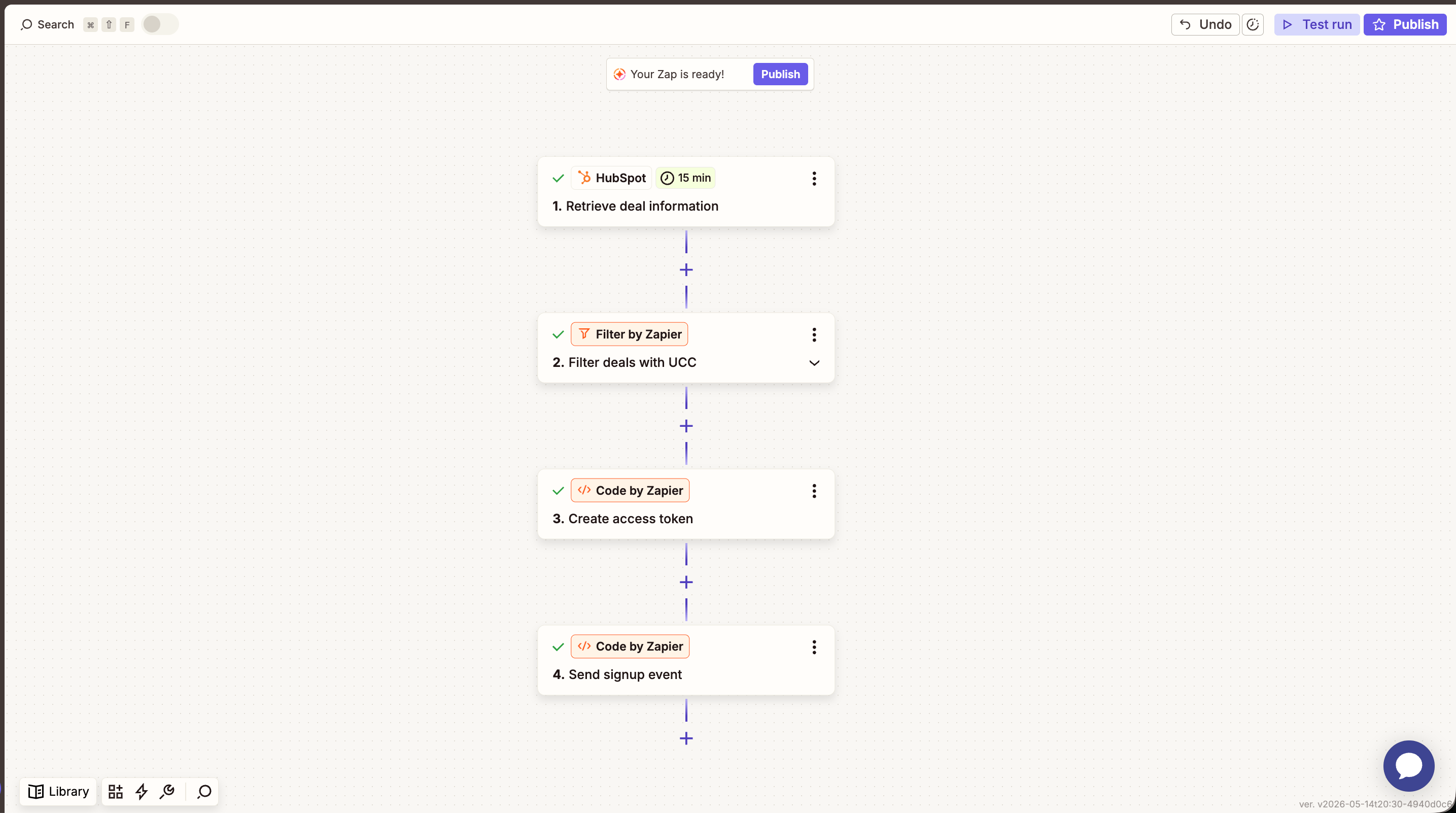
Your finished Zap will have four steps: HubSpot + Zapier flow with four steps: retrieve deal info, filter on ucc, create access token, send signup event
Step 1: Trigger on HubSpot deal stage change

The Zap fires whenever a deal enters the stage you choose (typically the one that represents a qualified conversion — “Demo Done”, “Purchase Consideration”, or similar).
  1. In Zapier, create a new Zap and choose HubSpot as the trigger app.
  2. Pick the event “Deal in stage” (or “Deal Property Changed” depending on your HubSpot plan).
  3. Select your Deal Pipeline and the Deal Stage that should trigger the event (e.g. Demo Done/Purchase Consideration).
  4. Under Additional properties to retrieve, add the ucc property so it’s available in later steps.
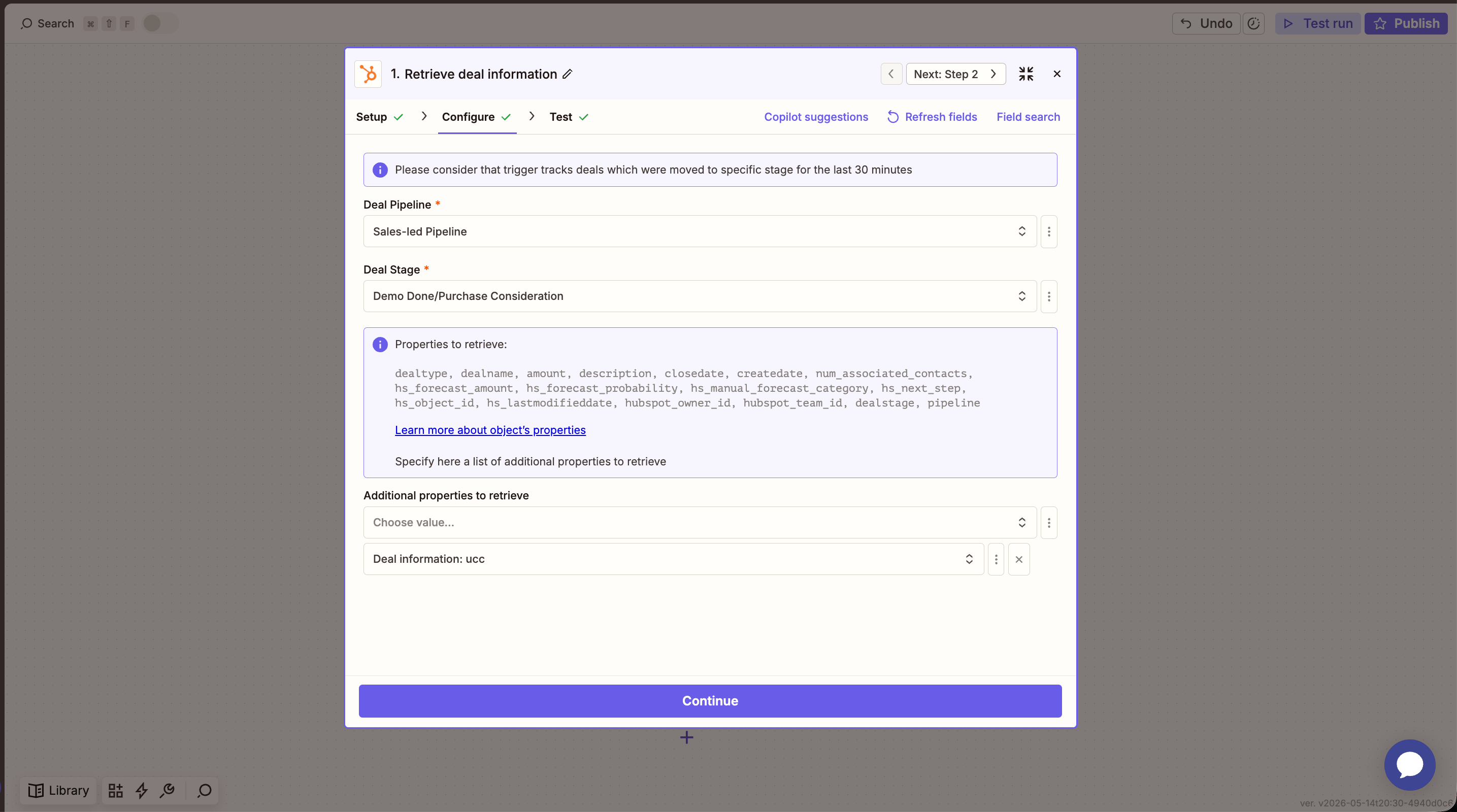
HubSpot trigger configured with pipeline, deal stage, and ucc as an additional property
The HubSpot trigger checks for matching deals every 15 minutes and only picks up deals moved into the stage in the last 30 minutes. Plan your stage transitions accordingly.
Test the trigger and confirm Zapier returns a sample deal with the expected fields: dealname, hs_object_id, ucc, plus any contact/company info you want to forward.

Step 2: Filter deals without a ucc

You only want to send events for deals that came from a referral. Add a Filter by Zapier step:
  1. Choose Filter by Zapier.
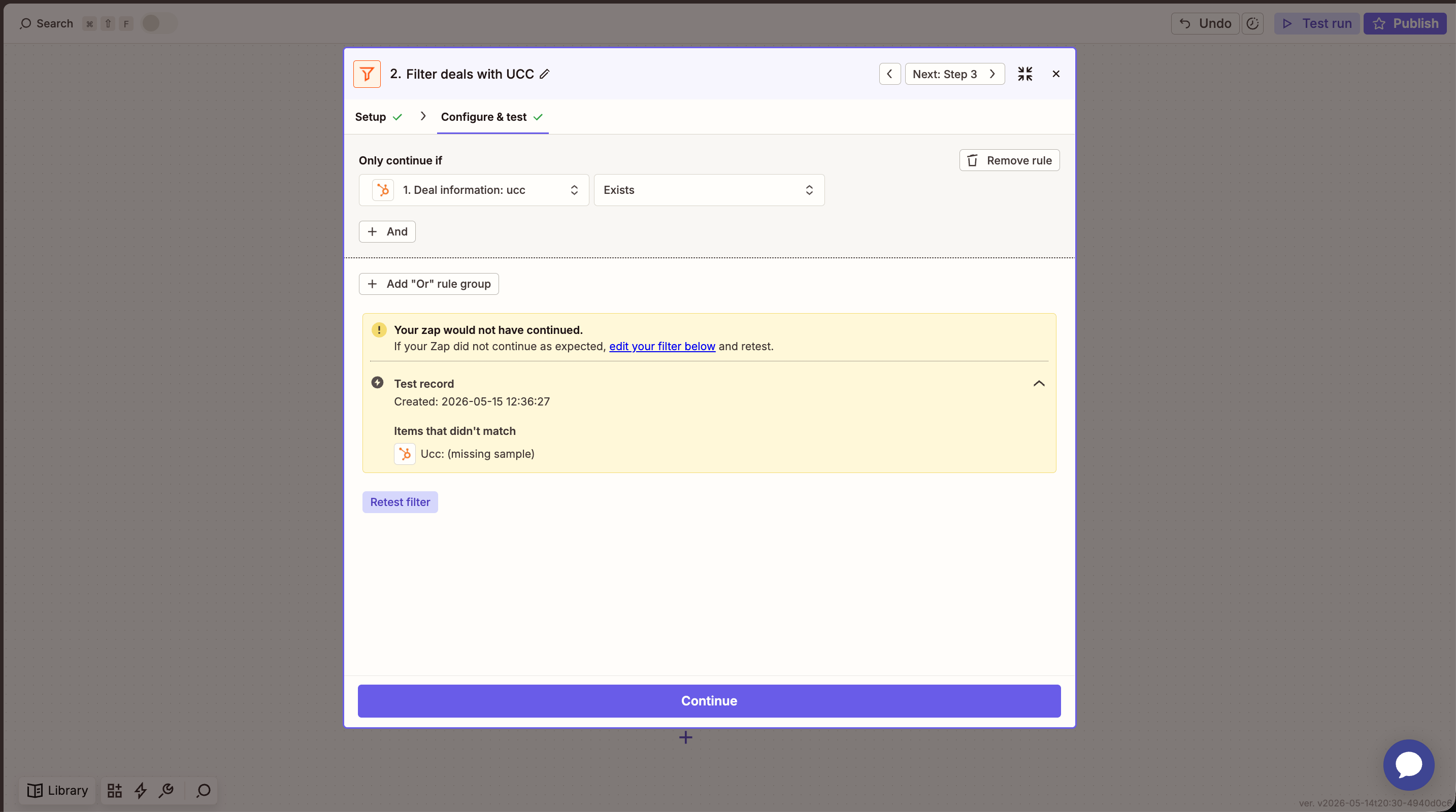
  2. Set the rule to: 1. Deal information: ucc Exists.
Zapier filter step: only continue if deal property ucc exists Deals without a ucc will stop here and no Cello event will be sent.

Step 3: Create a Cello access token

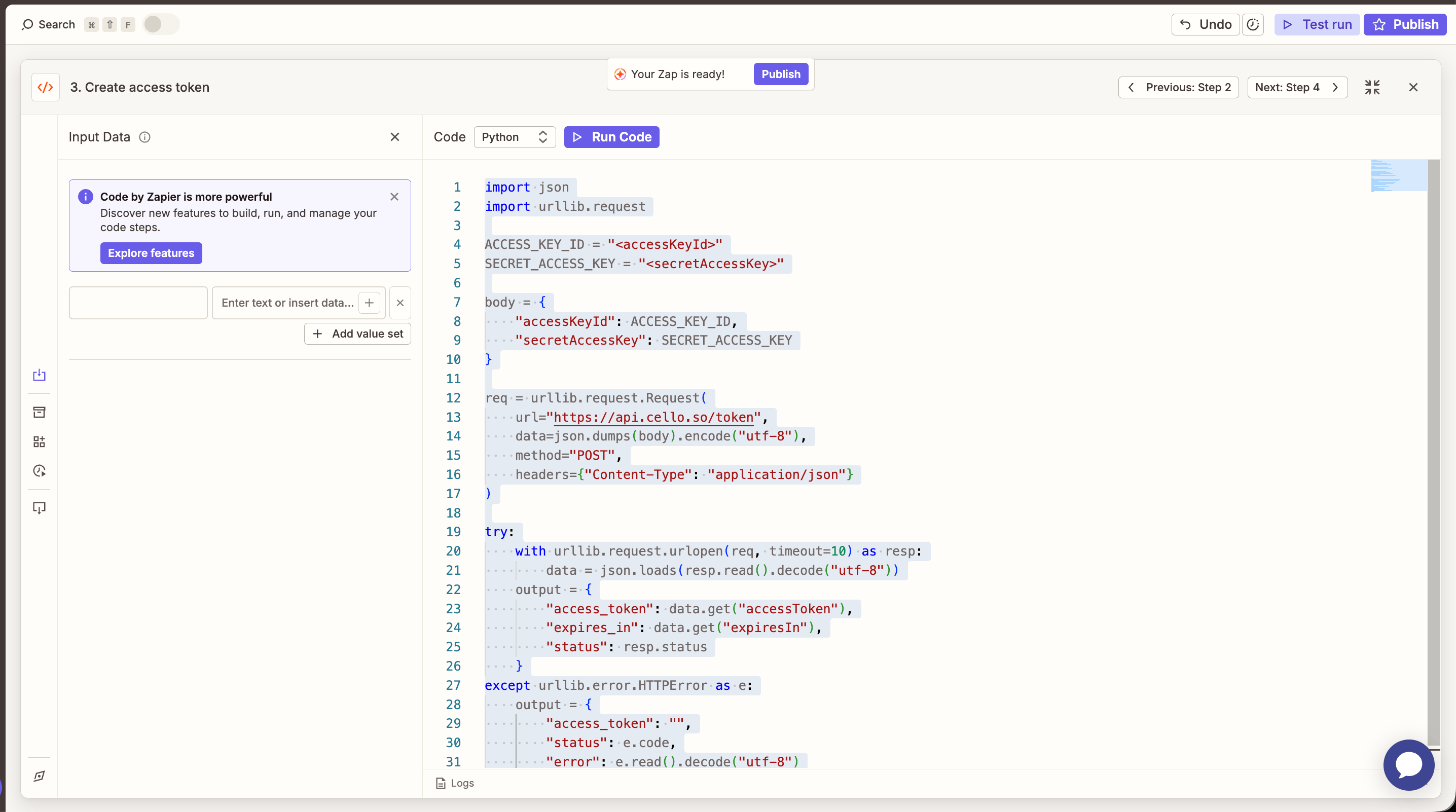
Cello uses short-lived access tokens for API auth. Add a Code by Zapier step using Python:
  1. Choose Code by ZapierRun Python.
  2. Leave Input Data empty (credentials are hardcoded in this step).
  3. Paste the snippet below and replace <accessKeyId> and <secretAccessKey> with your Cello API credentials.
import json
import urllib.request

ACCESS_KEY_ID = "<accessKeyId>"
SECRET_ACCESS_KEY = "<secretAccessKey>"

body = {
    "accessKeyId": ACCESS_KEY_ID,
    "secretAccessKey": SECRET_ACCESS_KEY
}

req = urllib.request.Request(
    url="https://api.cello.so/token",
    data=json.dumps(body).encode("utf-8"),
    method="POST",
    headers={"Content-Type": "application/json"}
)

try:
    with urllib.request.urlopen(req, timeout=10) as resp:
        data = json.loads(resp.read().decode("utf-8"))
    output = {
        "access_token": data.get("accessToken"),
        "expires_in": data.get("expiresIn"),
        "status": resp.status
    }
except urllib.error.HTTPError as e:
    output = {
        "access_token": "",
        "status": e.code,
        "error": e.read().decode("utf-8")
    }
Code by Zapier step creating a Cello access token via POST /token Test the step — you should see an access_token value and status: 200 in the output.
For production, store your accessKeyId and secretAccessKey in Zapier’s Storage by Zapier or as Code by Zapier environment variables rather than hardcoding them. See Zapier’s guide on storing credentials for details.
Reference: Cello Authentication API.

Step 4: Send the signup event to Cello

Add a second Code by Zapier (Python) step that posts the event to POST /events.
  1. Choose Code by ZapierRun Python.
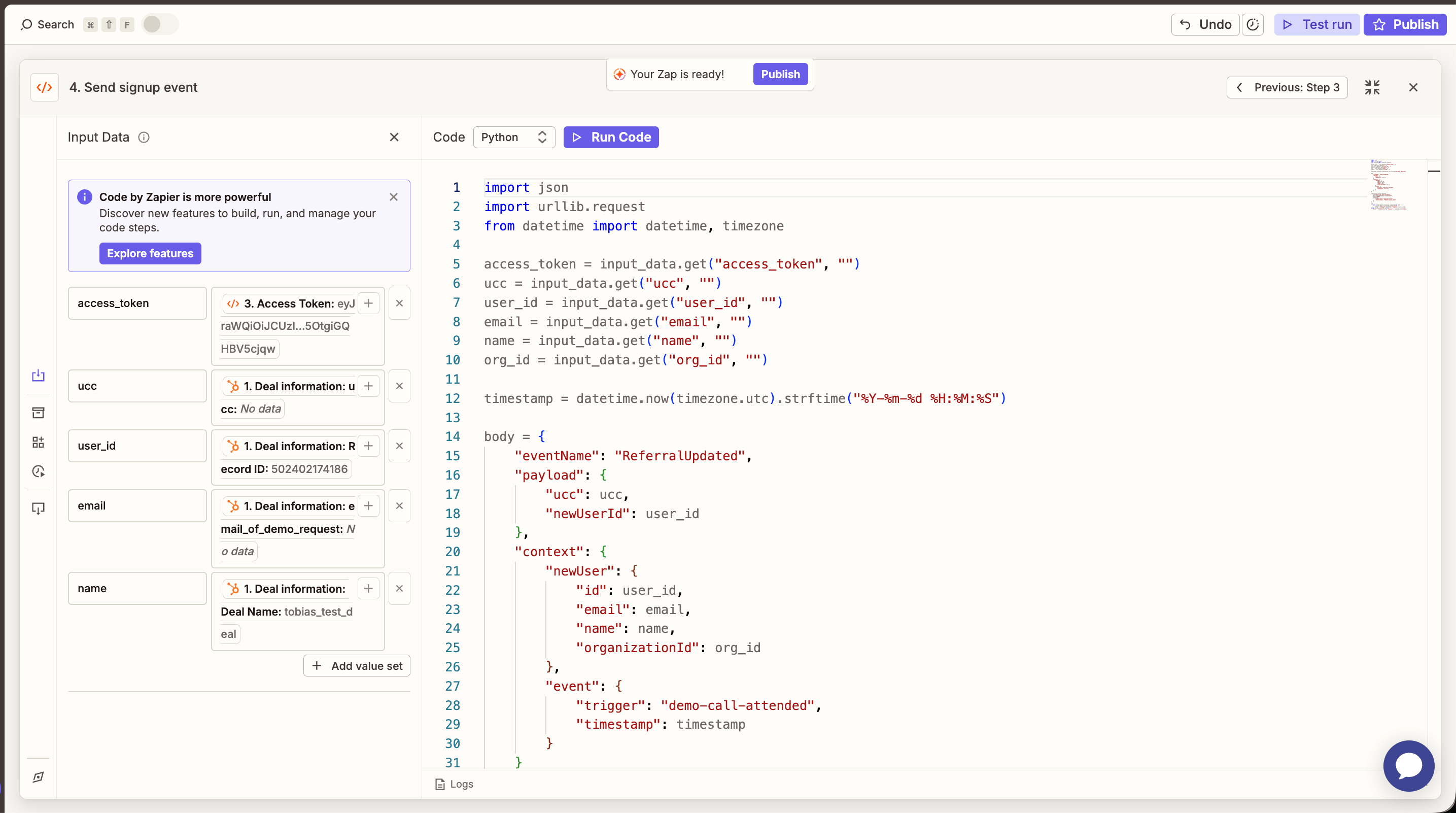
  2. Map the following Input Data fields from the previous steps:
    Input Data keyMap from
    access_tokenStep 3 → Access Token
    uccStep 1 → Deal information: ucc
    user_idStep 1 → Deal information: Record ID (or your own product user ID property)
    emailStep 1 → Deal information: email_of_demo_request (or contact email)
    nameStep 1 → Deal information: Deal Name (or contact name)
    org_idStep 1 → company / organization ID (optional)
  3. Paste the snippet below:
import json
import urllib.request
from datetime import datetime, timezone

access_token = input_data.get("access_token", "")
ucc = input_data.get("ucc", "")
user_id = input_data.get("user_id", "")
email = input_data.get("email", "")
name = input_data.get("name", "")
org_id = input_data.get("org_id", "")

timestamp = datetime.now(timezone.utc).strftime("%Y-%m-%d %H:%M:%S")

body = {
    "eventName": "ReferralUpdated",
    "payload": {
        "ucc": ucc,
        "newUserId": user_id
    },
    "context": {
        "newUser": {
            "id": user_id,
            "email": email,
            "name": name,
            "organizationId": org_id
        },
        "event": {
            "trigger": "demo-call-attended",
            "timestamp": timestamp
        }
    }
}

req = urllib.request.Request(
    url="https://api.cello.so/events",
    data=json.dumps(body).encode("utf-8"),
    method="POST",
    headers={
        "Content-Type": "application/json",
        "Authorization": f"Bearer {access_token}"
    }
)

try:
    with urllib.request.urlopen(req, timeout=10) as resp:
        response_body = resp.read().decode("utf-8")
        output = {"status": resp.status, "response": response_body}
except urllib.error.HTTPError as e:
    output = {"status": e.code, "response": e.read().decode("utf-8")}
Code by Zapier step sending a demo-call-attended event to Cello with mapped HubSpot fields
The event.trigger value (demo-call-attended in this example) determines how Cello classifies the event. Common values:
  • new-signup — user signed up but no demo yet
  • demo-call-attended — user attended a sales/demo call
  • qualified-lead — user has been qualified by sales
Match the trigger to the HubSpot deal stage you’re firing from.
Test the step and confirm you receive status: 200 from Cello.

Step 5: Verify and publish

  1. Publish your Zap.
  2. Move a test deal into the trigger stage in HubSpot.
  3. Wait up to 15 minutes for Zapier to pick up the change.
  4. Open the Event Feed in the Cello Portal and confirm the event was received with the correct ucc, newUserId, and trigger.
  5. Check Integration StatusSignups should now show as Connected.
You’re done! Every qualified deal in HubSpot will now generate a Cello signup event automatically. To also track purchase events, pair this with the Stripe or Chargebee webhook integrations — or extend this Zap with an additional Code step that posts a purchase event when the deal closes won.

Variations

  • Different trigger stages. Duplicate the Zap and change the HubSpot deal stage + event.trigger value to track multiple milestones (e.g. one Zap for demo-call-attended, another for qualified-lead).
  • Reward at the organization level. Set newUserId to the HubSpot company ID instead of the deal/contact ID, and populate newUser.organizationId accordingly. See Tracking Signups for the organization-level attribution model.
  • Use the Zapier HTTP action instead of Code steps. If you prefer not to write Python, both API calls can be done with Webhooks by Zapier → POST. The body and headers are the same as in the snippets above.