> ## Documentation Index
> Fetch the complete documentation index at: https://docs.cello.so/llms.txt
> Use this file to discover all available pages before exploring further.
# Introduction
> Native mobile SDKs for embedding referral functionality in iOS and Android applications
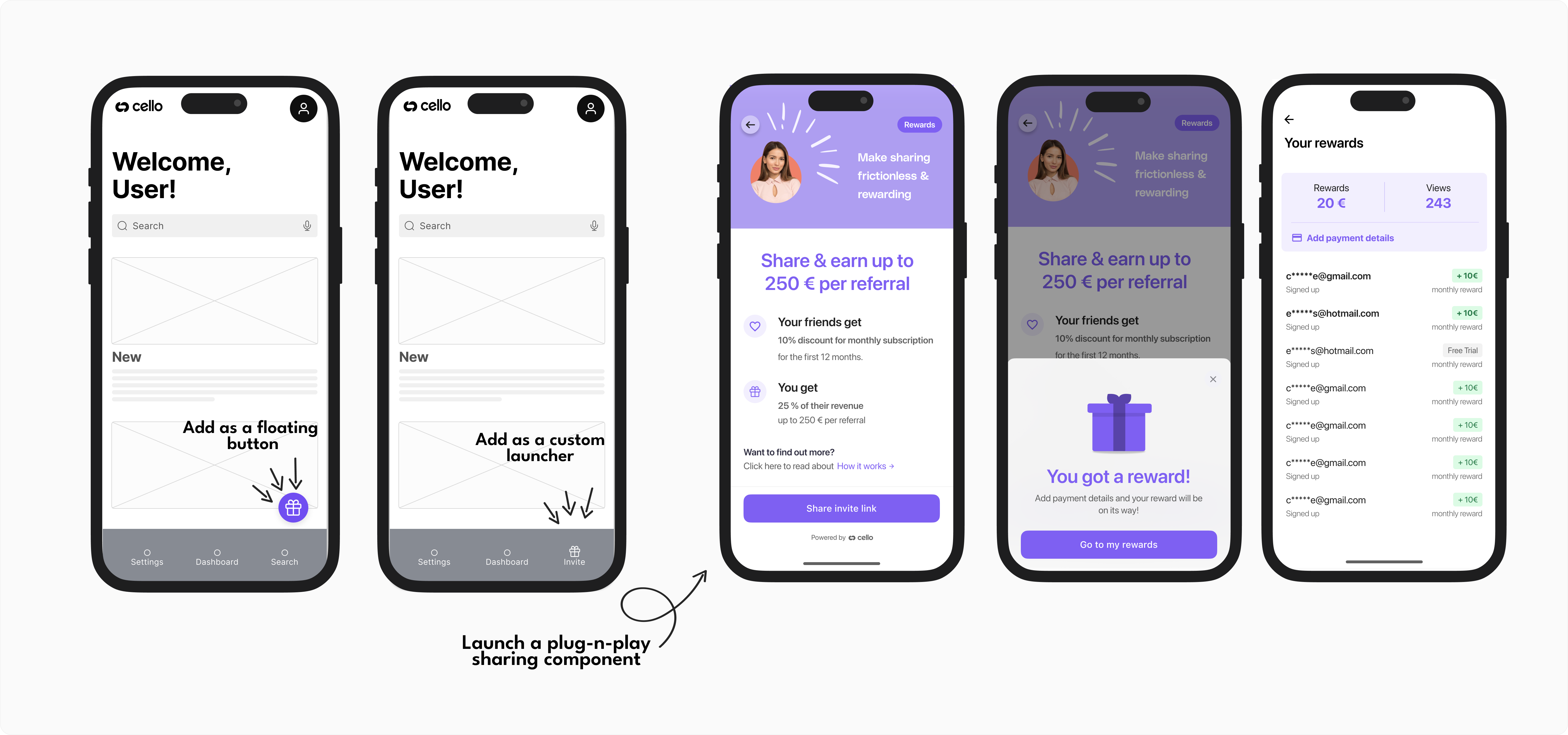 ## Available Mobile SDKs
Cello provides native mobile SDKs that embed a complete referral experience directly into your mobile applications, enabling users to share referral links, track rewards, and receive payouts - all without leaving your app.
Native Swift/Objective-C SDK for iOS apps
Native Kotlin/Java SDK for Android apps
Cross-platform SDK for React Native apps
Cross-platform SDK for Flutter apps
## What Do Mobile SDKs Do?
The mobile SDKs provide the same comprehensive referral functionality as our web component, optimized for mobile experiences:
### Referral Component Features
* **In-app sharing interface** with native mobile sharing options (Messages, email, social media)
* **Real-time tracking** of referral performance and earned rewards
* **Reward management** with payout setup and history
* **Multi-language support** with automatic device language detection
### Native Mobile Integrations
* **Platform-specific UI** that follows iOS and Android design guidelines
* **Native sharing** using platform share sheets and messaging apps
* **Deep linking support** for seamless user journeys
* **Performance optimized** for mobile device constraints
### Customizations
You can customize the mobile Referral Component in the following ways:
* **Launcher** – Use the default button or implement a custom launcher to open the Referral component.
* **Hero Image** – Set a custom image for the sharing screen.
* **Copy** – Customize the text displayed in the component.
* **Brand Color** – Apply your brand’s primary color to match your app’s style.
* **Notification images** - Choose which image is displayed in the new view and new reward notification.
* **Dark mode** - Support for light and dark theme, with configurable colors per theme in the [Cello Portal](https://portal.cello.so) to match your app’s interface.
## Complete Mobile Referral Setup
After integrating the mobile SDK, you'll need to set up mobile attribution and referral conversion tracking:
### 1. Set Up Mobile Attribution
Configure deep linking and referral code capture for mobile app installs:
Learn how to capture referral codes through app store installs using Branch.io or similar services
### 2. Track Referral Conversions
Implement signup and purchase event tracking to reward referrers:
Send signup events when users create accounts
Send purchase events for subscription or one-time payments
## Getting Started
Select the appropriate SDK for your mobile platform
Follow the installation guide for your chosen SDK
[Configure mobile attribution](/attribution/for-mobile) to capture referral codes from app installs
Implement referral events for [signups](/attribution/tracking-signups) and [purchases](/attribution/tracking-purchase) to complete the referral flow
Mobile SDKs work independently but can be used alongside [Cello JS](/sdk/client-side/cello-js-introduction) if you have both web and mobile versions of your product.
## Available Mobile SDKs
Cello provides native mobile SDKs that embed a complete referral experience directly into your mobile applications, enabling users to share referral links, track rewards, and receive payouts - all without leaving your app.
Native Swift/Objective-C SDK for iOS apps
Native Kotlin/Java SDK for Android apps
Cross-platform SDK for React Native apps
Cross-platform SDK for Flutter apps
## What Do Mobile SDKs Do?
The mobile SDKs provide the same comprehensive referral functionality as our web component, optimized for mobile experiences:
### Referral Component Features
* **In-app sharing interface** with native mobile sharing options (Messages, email, social media)
* **Real-time tracking** of referral performance and earned rewards
* **Reward management** with payout setup and history
* **Multi-language support** with automatic device language detection
### Native Mobile Integrations
* **Platform-specific UI** that follows iOS and Android design guidelines
* **Native sharing** using platform share sheets and messaging apps
* **Deep linking support** for seamless user journeys
* **Performance optimized** for mobile device constraints
### Customizations
You can customize the mobile Referral Component in the following ways:
* **Launcher** – Use the default button or implement a custom launcher to open the Referral component.
* **Hero Image** – Set a custom image for the sharing screen.
* **Copy** – Customize the text displayed in the component.
* **Brand Color** – Apply your brand’s primary color to match your app’s style.
* **Notification images** - Choose which image is displayed in the new view and new reward notification.
* **Dark mode** - Support for light and dark theme, with configurable colors per theme in the [Cello Portal](https://portal.cello.so) to match your app’s interface.
## Complete Mobile Referral Setup
After integrating the mobile SDK, you'll need to set up mobile attribution and referral conversion tracking:
### 1. Set Up Mobile Attribution
Configure deep linking and referral code capture for mobile app installs:
Learn how to capture referral codes through app store installs using Branch.io or similar services
### 2. Track Referral Conversions
Implement signup and purchase event tracking to reward referrers:
Send signup events when users create accounts
Send purchase events for subscription or one-time payments
## Getting Started
Select the appropriate SDK for your mobile platform
Follow the installation guide for your chosen SDK
[Configure mobile attribution](/attribution/for-mobile) to capture referral codes from app installs
Implement referral events for [signups](/attribution/tracking-signups) and [purchases](/attribution/tracking-purchase) to complete the referral flow
Mobile SDKs work independently but can be used alongside [Cello JS](/sdk/client-side/cello-js-introduction) if you have both web and mobile versions of your product.