> ## Documentation Index
> Fetch the complete documentation index at: https://docs.cello.so/llms.txt
> Use this file to discover all available pages before exploring further.
# User Authentication
The Cello Referral Component contains sensitive data such as the identity of the referee, amounts of payouts and details regarding your user's referral flow e.g. notifications. We use JWT (JSON Web token) to authenticate the user and authorize access to the data in the Referral Component.
The expected flow is as follows:
1. User logs into your system.
2. Your **backend** provides your frontend code with a **Cello JWT token**.
3. Your frontend code initializes the Referral Component with the **token**.
## Generating the token
Keep your credentials safe. **Never** generate a token or store your secret on the client side!
To generate a valid Cello JWT token, you'll need:
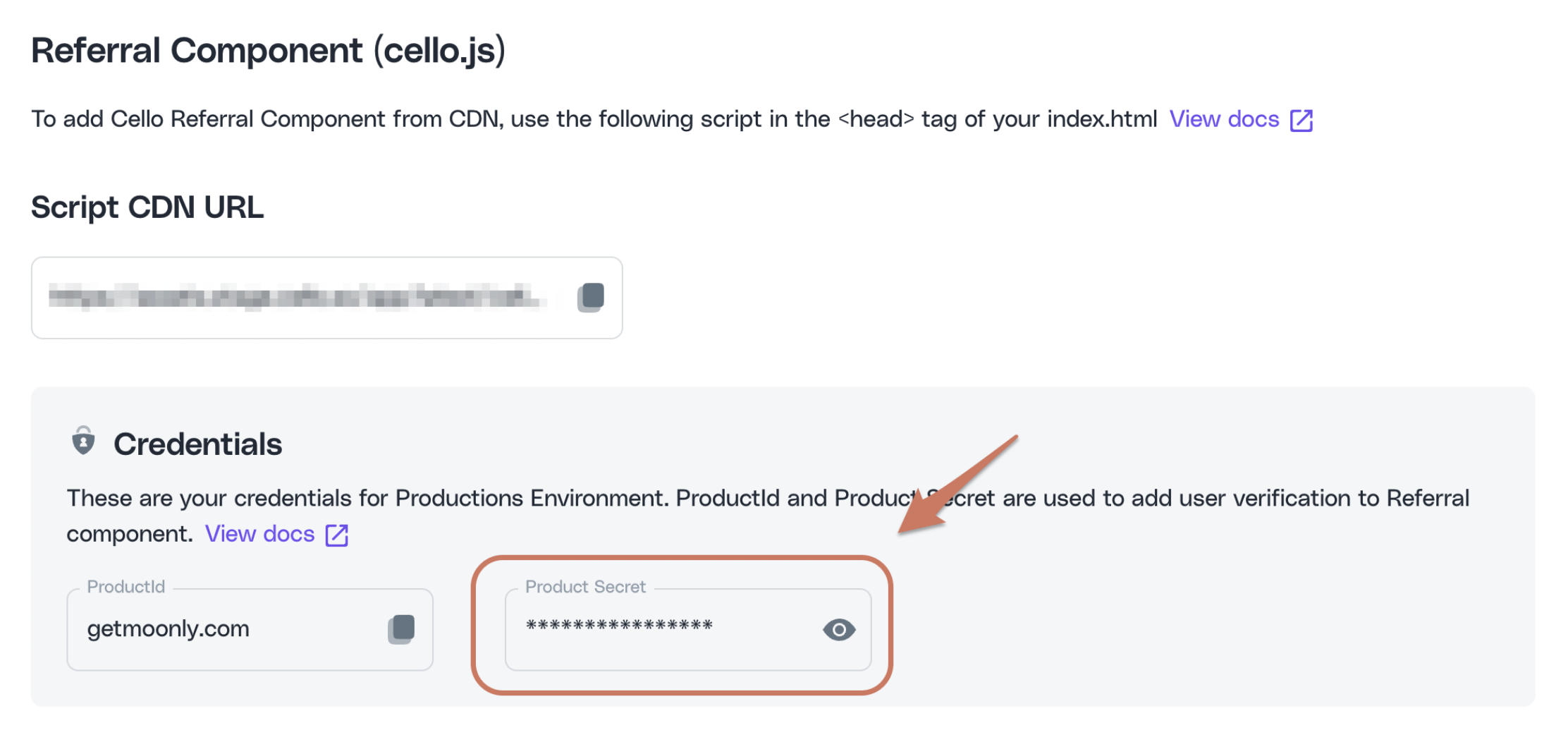
1. Your Cello credentials: **productId** and **product secret**
2. A **productUserId** that uniquely identifies the logged-in user
3. A token signing library for your tech stack of choice. A good variety can be found in the [JWT community](https://jwt.io/libraries)
For more resources on **server-side token** generation see [JWT community](https://jwt.io/introduction).
### Credentials
You will require both **productId** and **product secret** to generate tokens for your users. You can find these in your [Cello Portal](https://portal.cello.so/integrations/accesskeys):
 ### User identity
Cello requires a **productUserId** - a unique user identifier to be passed when initializing the Referral Component.
This can be a user id that you already use to identify users in your product. It can also be any other new unique identifier you generate - the main requirement is that it is unique per user accross your application.
It is important that this ID is **unique per user**, rather than organisation.
### JWT signing library
Regardless of the signing library you choose, make sure you use the `HS512` signing algorithm:
```json theme={null}
{
"alg": "HS512",
"typ": "JWT"
}
```
### Token generation
Token payload attributes:
Identifier of the product your users will refer
Your logged-in user's unique identifier within your system
A token issuing Unix timestamp. Example: `1661876739`
Original signup date of the user. This helps to improve [accuracy](/guides/attribution/auto-attribution) for auto-attributions.
List of organizations the user is assigned to. This is required to enable automatic attribution when referrals are based on organizations. [More information](/guides/attribution/auto-attribution).
Note that some libraries do not require you to pass `iat` in the payload and default to the current time if you don't.
### Example
Example of token generation in a NodeJS backend with JavaScript:
```javascript theme={null}
import { sign } from 'jsonwebtoken';
const tokenPayload = {
productId: 'REPLACE_WITH_PRODUCT_ID',
productUserId: 'REPLACE_WITH_CURRENT_USER_ID',
signupDate: '2022-10-05T14:14:34Z',
orgIds: ['ORG_1, ORG_2']
};
const secret = 'REPLACE_WITH_PRODUCT_SECRET';
const token = sign(tokenPayload, secret, {
algorithm: 'HS512',
});
```
Creating a JWT token should **always** be done in your backend code and **not in the browser**!
Below is an example content of the generated JWT token.
```json theme={null}
{
"productId": "acme.com",
"productUserId": "123456",
"iat": 1662712365
}
```
## Using the token
Finally, provide the server side-generated token in the `token` property when initializing the Referral Component.
```javascript theme={null}
window.cello = window.cello || { cmd: [] };
window.cello.cmd.push(async (cello) => {
await cello.boot({
productId: "REPLACE_WITH_PRODUCT_ID",
token: "REPLACE_WITH_TOKEN",
...otherOptions,
});
});
```
### User identity
Cello requires a **productUserId** - a unique user identifier to be passed when initializing the Referral Component.
This can be a user id that you already use to identify users in your product. It can also be any other new unique identifier you generate - the main requirement is that it is unique per user accross your application.
It is important that this ID is **unique per user**, rather than organisation.
### JWT signing library
Regardless of the signing library you choose, make sure you use the `HS512` signing algorithm:
```json theme={null}
{
"alg": "HS512",
"typ": "JWT"
}
```
### Token generation
Token payload attributes:
Identifier of the product your users will refer
Your logged-in user's unique identifier within your system
A token issuing Unix timestamp. Example: `1661876739`
Original signup date of the user. This helps to improve [accuracy](/guides/attribution/auto-attribution) for auto-attributions.
List of organizations the user is assigned to. This is required to enable automatic attribution when referrals are based on organizations. [More information](/guides/attribution/auto-attribution).
Note that some libraries do not require you to pass `iat` in the payload and default to the current time if you don't.
### Example
Example of token generation in a NodeJS backend with JavaScript:
```javascript theme={null}
import { sign } from 'jsonwebtoken';
const tokenPayload = {
productId: 'REPLACE_WITH_PRODUCT_ID',
productUserId: 'REPLACE_WITH_CURRENT_USER_ID',
signupDate: '2022-10-05T14:14:34Z',
orgIds: ['ORG_1, ORG_2']
};
const secret = 'REPLACE_WITH_PRODUCT_SECRET';
const token = sign(tokenPayload, secret, {
algorithm: 'HS512',
});
```
Creating a JWT token should **always** be done in your backend code and **not in the browser**!
Below is an example content of the generated JWT token.
```json theme={null}
{
"productId": "acme.com",
"productUserId": "123456",
"iat": 1662712365
}
```
## Using the token
Finally, provide the server side-generated token in the `token` property when initializing the Referral Component.
```javascript theme={null}
window.cello = window.cello || { cmd: [] };
window.cello.cmd.push(async (cello) => {
await cello.boot({
productId: "REPLACE_WITH_PRODUCT_ID",
token: "REPLACE_WITH_TOKEN",
...otherOptions,
});
});
```