> ## Documentation Index
> Fetch the complete documentation index at: https://docs.cello.so/llms.txt
> Use this file to discover all available pages before exploring further.
# Introduction
> Add a referral program to your application with Cello's embeddable referral component
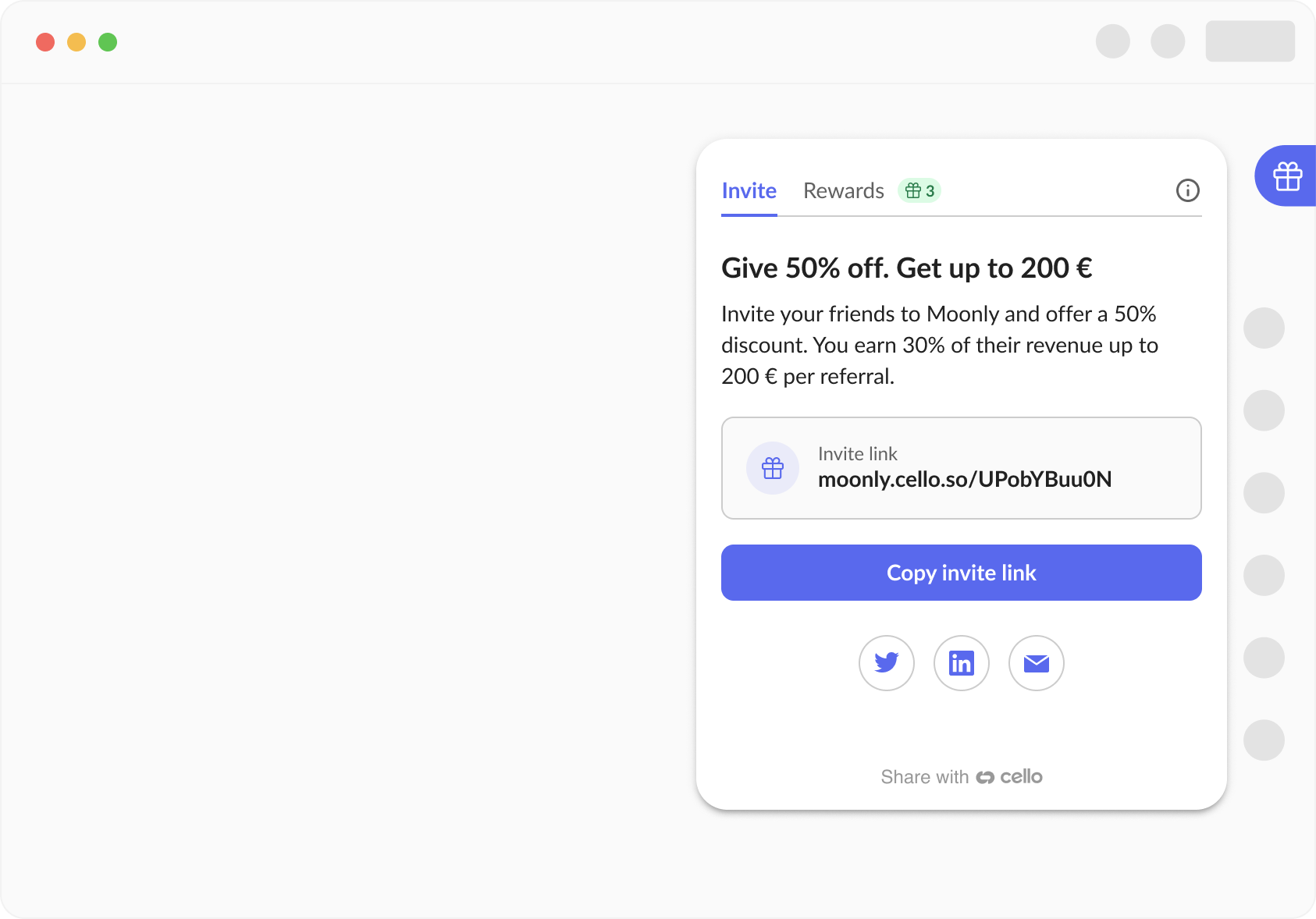
The Cello Referral Component is an all-in-one referral experience that integrates directly into your web and mobile applications with just a few lines of code, enabling users to share referral links, track progress, and receive rewards.
 ## What is the Referral Component?
The Referral Component provides a complete referral experience within your product through:
* **First-time onboarding** that explains how your referral program works
* **Multiple sharing options** including link copy, social media, email, and QR codes
* **Progress tracking** showing clicks, signups, and earned rewards in real-time
* **Automated reward payouts** via PayPal, Venmo, and other payment methods
* **In-app and Email notifications** to keep users engaged with referral activity
Learn more about the [complete user experience](/guides/user-experience/overview).
## Key Features
* **Easy Integration** - Add as a floating button to launch the Referral Component or integrate into your existing menu with [custom launcher](/referral-component/custom-launcher)
* **Customizable Offer** - [Configure reward amounts, text, and program details](/guides/campaigns/setting-up-campaigns)
* **In-app Notifications** - [Alerts and announcements](/guides/user-experience/referral-notifications-and-emails) to keep users engaged with updates, promotions, and milestones
* **Email Notifications** - [Automated emails for signups, rewards, and milestones](/guides/user-experience/referral-notifications-and-emails)
* **Multi-language Support** - Available in 10+ languages with automatic detection
* **Cross-platform** - Native SDKs [for Web](/sdk/client-side/cello-js), [iOS, Android, and React Native](/sdk/mobile/introduction)
* **Dark mode** - Support for light and dark theme to match your app’s interface
## Installation Options
JavaScript library for React, Vue, Angular, and vanilla JS applications
Native Swift/Objective-C SDK with CocoaPods and SPM support
Native Kotlin/Java SDK with Gradle integration
Cross-platform mobile SDK for React Native apps
## How to Use
### Basic Implementation
1. **Load the SDK** - Add Cello script or SDK to your application
2. **Generate JWT Token** - Create server-side authentication token
3. **Initialize Component** - Boot with your product ID and user details
### Quick Example (Web)
```javascript theme={null}
// Load and initialize Cello
window.cello.cmd.push(async function (cello) {
await cello.boot({
productId: "YOUR_PRODUCT_ID",
token: "JWT_TOKEN",
productUserDetails: {
email: "user@example.com",
firstName: "John"
}
});
});
```
## Next Steps
Get started with the [Quickstart guide](/referral-component/quickstart) to integrate the Referral Component in under 15 minutes.
## What is the Referral Component?
The Referral Component provides a complete referral experience within your product through:
* **First-time onboarding** that explains how your referral program works
* **Multiple sharing options** including link copy, social media, email, and QR codes
* **Progress tracking** showing clicks, signups, and earned rewards in real-time
* **Automated reward payouts** via PayPal, Venmo, and other payment methods
* **In-app and Email notifications** to keep users engaged with referral activity
Learn more about the [complete user experience](/guides/user-experience/overview).
## Key Features
* **Easy Integration** - Add as a floating button to launch the Referral Component or integrate into your existing menu with [custom launcher](/referral-component/custom-launcher)
* **Customizable Offer** - [Configure reward amounts, text, and program details](/guides/campaigns/setting-up-campaigns)
* **In-app Notifications** - [Alerts and announcements](/guides/user-experience/referral-notifications-and-emails) to keep users engaged with updates, promotions, and milestones
* **Email Notifications** - [Automated emails for signups, rewards, and milestones](/guides/user-experience/referral-notifications-and-emails)
* **Multi-language Support** - Available in 10+ languages with automatic detection
* **Cross-platform** - Native SDKs [for Web](/sdk/client-side/cello-js), [iOS, Android, and React Native](/sdk/mobile/introduction)
* **Dark mode** - Support for light and dark theme to match your app’s interface
## Installation Options
JavaScript library for React, Vue, Angular, and vanilla JS applications
Native Swift/Objective-C SDK with CocoaPods and SPM support
Native Kotlin/Java SDK with Gradle integration
Cross-platform mobile SDK for React Native apps
## How to Use
### Basic Implementation
1. **Load the SDK** - Add Cello script or SDK to your application
2. **Generate JWT Token** - Create server-side authentication token
3. **Initialize Component** - Boot with your product ID and user details
### Quick Example (Web)
```javascript theme={null}
// Load and initialize Cello
window.cello.cmd.push(async function (cello) {
await cello.boot({
productId: "YOUR_PRODUCT_ID",
token: "JWT_TOKEN",
productUserDetails: {
email: "user@example.com",
firstName: "John"
}
});
});
```
## Next Steps
Get started with the [Quickstart guide](/referral-component/quickstart) to integrate the Referral Component in under 15 minutes.