> ## Documentation Index
> Fetch the complete documentation index at: https://docs.cello.so/llms.txt
> Use this file to discover all available pages before exploring further.
# Personalizing Referrals
> Add personalized messages to your landing pages to increase conversion rates
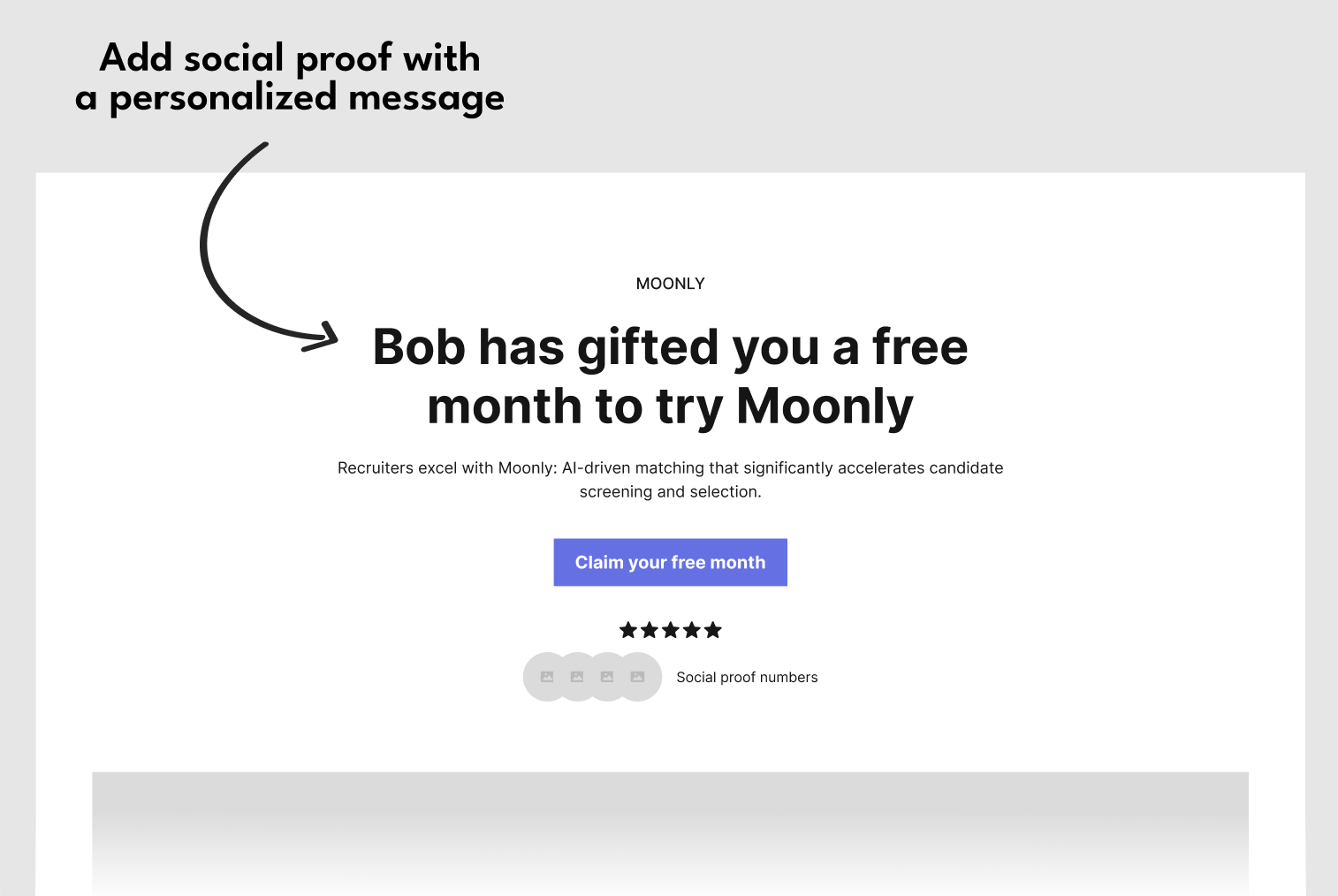 In this guide we will go through:
* The benefits of personalization
* How to add personalization to your landing pages:
* [Inline](#add-personalization-to-the-headline-or-other-page-element) Recommended
* [Using the new user banner](#add-personalization-with-new-user-banner) No code
## Why personalization?
Personalization and social proof, such as including the referrer's name in the landing page headline, are crucial for converting referees into signed-up users due to several key reasons:
1. **Enhanced Trust and Credibility:** Seeing a familiar name like "Bob has gifted you a free month to try Moonly" immediately establishes a sense of trust. The referee recognizes the referrer, which lends credibility to the offer.
2. **Increased Relevance and Engagement:** Personalization makes the offer feel more tailored and relevant to the referee. A message that appears to be handpicked for them can create a stronger emotional connection and engagement with the content, increasing the likelihood of a positive response.
3. **Leveraging Existing Relationships:** Utilizing the referrer's name capitalizes on the existing relationship between the referrer and the referee. This relational dynamic can be a powerful motivator, as referees often value and trust the opinions and choices of their friends or contacts.
4. **Creating a Sense of Community and Belonging:** Personalized messages can give referees the feeling of being part of an exclusive group or community, especially when the message implies a gift or a special offer from someone they know. This sense of belonging can be a strong incentive to join and participate.
5. **Reducing Perceived Risk:** For new users, trying a new service involves some level of perceived risk or uncertainty. A personalized referral reduces this perceived risk, as it comes with an implicit endorsement from someone the referee trusts.
6. **Emotional Appeal:** Personalized messages can evoke an emotional response. Knowing that a friend or acquaintance has thoughtfully extended an offer can create feelings of appreciation and reciprocity, further encouraging the referee to sign up.
To show the referrer name to the new user, you need to make sure that their user details are passed in the [referral component](/referral-component/quickstart).
## Add personalization to the Headline or other page element
Recommended
In this guide we will go through:
* The benefits of personalization
* How to add personalization to your landing pages:
* [Inline](#add-personalization-to-the-headline-or-other-page-element) Recommended
* [Using the new user banner](#add-personalization-with-new-user-banner) No code
## Why personalization?
Personalization and social proof, such as including the referrer's name in the landing page headline, are crucial for converting referees into signed-up users due to several key reasons:
1. **Enhanced Trust and Credibility:** Seeing a familiar name like "Bob has gifted you a free month to try Moonly" immediately establishes a sense of trust. The referee recognizes the referrer, which lends credibility to the offer.
2. **Increased Relevance and Engagement:** Personalization makes the offer feel more tailored and relevant to the referee. A message that appears to be handpicked for them can create a stronger emotional connection and engagement with the content, increasing the likelihood of a positive response.
3. **Leveraging Existing Relationships:** Utilizing the referrer's name capitalizes on the existing relationship between the referrer and the referee. This relational dynamic can be a powerful motivator, as referees often value and trust the opinions and choices of their friends or contacts.
4. **Creating a Sense of Community and Belonging:** Personalized messages can give referees the feeling of being part of an exclusive group or community, especially when the message implies a gift or a special offer from someone they know. This sense of belonging can be a strong incentive to join and participate.
5. **Reducing Perceived Risk:** For new users, trying a new service involves some level of perceived risk or uncertainty. A personalized referral reduces this perceived risk, as it comes with an implicit endorsement from someone the referee trusts.
6. **Emotional Appeal:** Personalized messages can evoke an emotional response. Knowing that a friend or acquaintance has thoughtfully extended an offer can create feelings of appreciation and reciprocity, further encouraging the referee to sign up.
To show the referrer name to the new user, you need to make sure that their user details are passed in the [referral component](/referral-component/quickstart).
## Add personalization to the Headline or other page element
Recommended
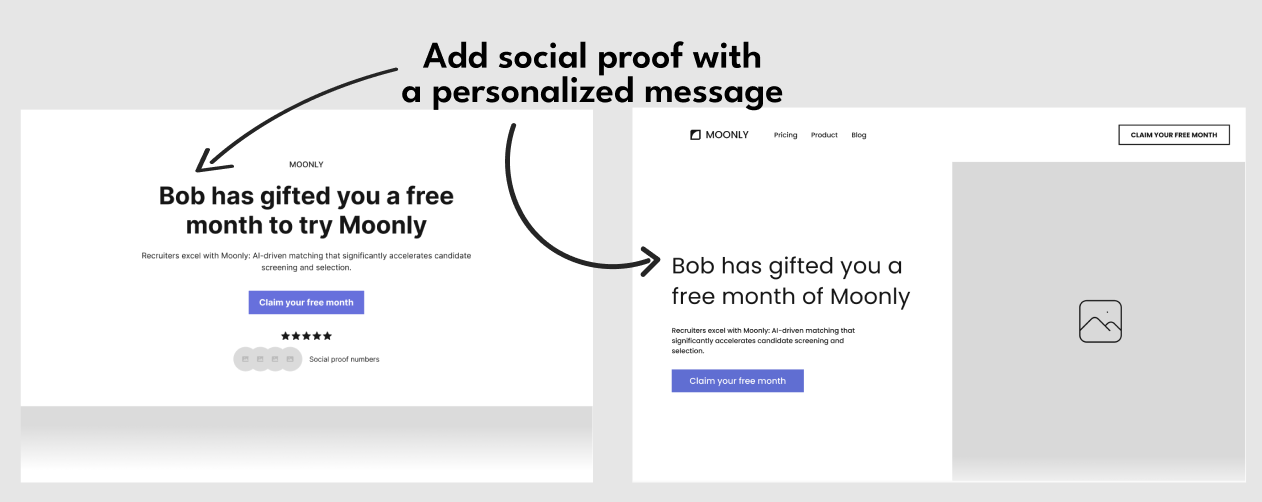 To add the referrer's name to an element on the page that the new user lands on when following an invite link, you need to follow these steps:
### Turn personalization on for your product
Go to [New User Experience setup in Cello Portal -> Personalization tab](https://portal.cello.so/setup/new-user-experience) and add personalization.
To add the referrer's name to an element on the page that the new user lands on when following an invite link, you need to follow these steps:
### Turn personalization on for your product
Go to [New User Experience setup in Cello Portal -> Personalization tab](https://portal.cello.so/setup/new-user-experience) and add personalization.
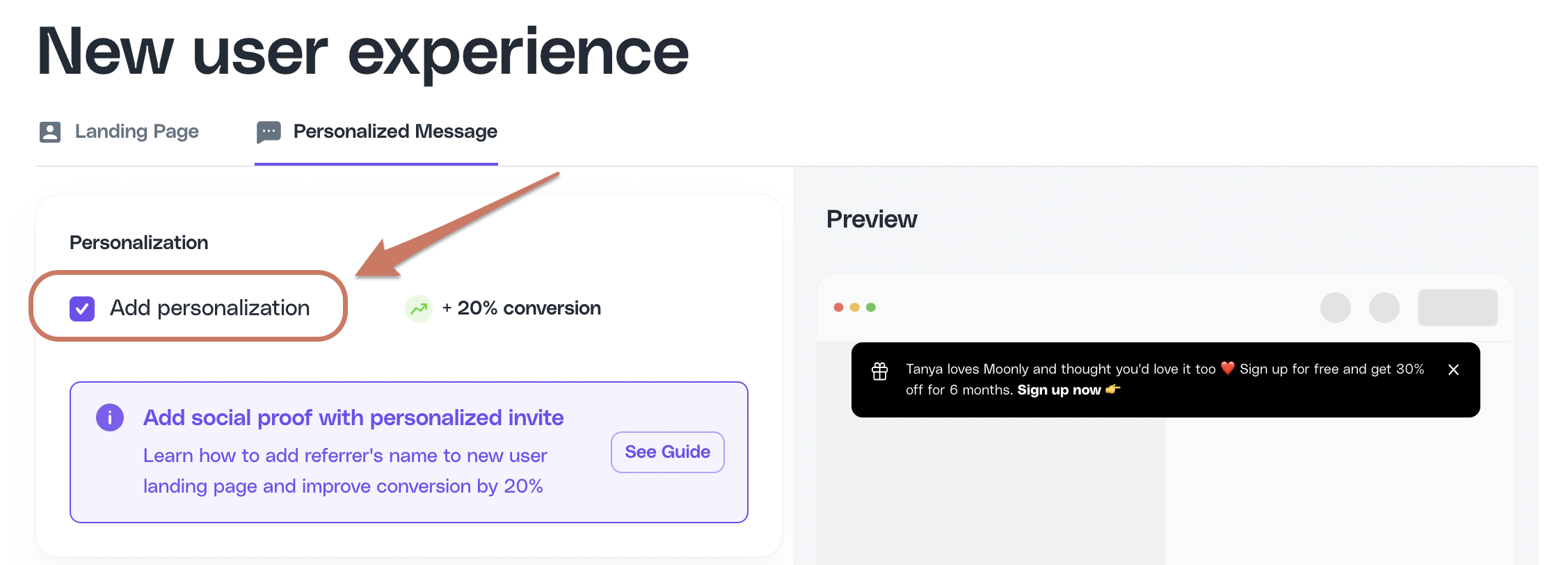 When personalization is turned on, an extra parameter will be added to the URL of your landing page, e.g. `celloN=VGFuamE`
```html theme={null}
https://getmoonly.com/?productId=getmoonly.com&ucc=pNRB1aYqArN&celloN=VGFuamE
```
### Use the attribution script methods to get referrer information
[Attribution script](/sdk/client-side/attribution-js-usage#getreferrername) provides a JS method `getReferrerName()` to fetch the name of the referrer.
```javascript theme={null}
const referrerName = await window.CelloAttribution("getReferrerName");
console.log('Referrer name:', referrerName);
```
You can also get the referrer name from the `celloN` URL parameter. Value of parameter `celloN` is an base64 encoded name of the referrer. In this example, `VGFuamE` is decoded to `Tanya` . You can try it yourself [here](https://www.base64decode.org/). By accessing this parameter from the URL and decoding in, you can add it to any element on any landing pages which are relevant.
#### Complete Integration Example
Use attribution script methods to get referral data:
```javascript theme={null}
async function initializeReferralLandingPage() {
try {
// Wait for attribution script to load
await new Promise(resolve => setTimeout(resolve, 1000));
// Get all attribution data using script methods (recommended)
const ucc = await window.CelloAttribution("getUcc");
const referrerName = await window.CelloAttribution("getReferrerName");
const campaignConfig = await window.CelloAttribution("getCampaignConfig");
// Use the data for personalization
personalizePageContent(referrerName, campaignConfig, ucc);
} catch (error) {
console.error('Failed to initialize referral landing page:', error);
// Proceed without personalization
personalizePageContent(null, null, null);
}
}
function personalizePageContent(referrerName, campaignConfig, ucc) {
// Update headline with referrer name
const headline = document.getElementById('headline');
if (headline && referrerName) {
headline.innerHTML = `${referrerName} has invited you to try our platform!`;
}
// Show discount information
const discountBanner = document.getElementById('discount-banner');
if (discountBanner && campaignConfig) {
const discountPercent = campaignConfig.newUserDiscountPercentage * 100;
const discountMonths = campaignConfig.newUserDiscountMonth;
discountBanner.innerHTML =
`🎉 Special offer: ${discountPercent}% off for your first ${discountMonths} months!`;
discountBanner.style.display = 'block';
}
// Update call-to-action button
const ctaButton = document.getElementById('cta-button');
if (ctaButton) {
if (referrerName && campaignConfig) {
const discountPercent = campaignConfig.newUserDiscountPercentage * 100;
ctaButton.textContent = `Claim ${discountPercent}% Discount`;
} else if (referrerName) {
ctaButton.textContent = `Accept ${referrerName}'s Invitation`;
}
}
// Store UCC for form submission if available
if (ucc) {
// This will be handled automatically by attribution script
// but you can also manually add to forms:
const forms = document.querySelectorAll('form');
forms.forEach(form => {
if (!form.querySelector('input[name="ucc"]')) {
const uccInput = document.createElement('input');
uccInput.type = 'hidden';
uccInput.name = 'ucc';
uccInput.value = ucc;
form.appendChild(uccInput);
}
});
}
}
// Initialize when DOM is ready
document.addEventListener('DOMContentLoaded', initializeReferralLandingPage);
```
## Add personalization with the New user banner
No code
When personalization is turned on, an extra parameter will be added to the URL of your landing page, e.g. `celloN=VGFuamE`
```html theme={null}
https://getmoonly.com/?productId=getmoonly.com&ucc=pNRB1aYqArN&celloN=VGFuamE
```
### Use the attribution script methods to get referrer information
[Attribution script](/sdk/client-side/attribution-js-usage#getreferrername) provides a JS method `getReferrerName()` to fetch the name of the referrer.
```javascript theme={null}
const referrerName = await window.CelloAttribution("getReferrerName");
console.log('Referrer name:', referrerName);
```
You can also get the referrer name from the `celloN` URL parameter. Value of parameter `celloN` is an base64 encoded name of the referrer. In this example, `VGFuamE` is decoded to `Tanya` . You can try it yourself [here](https://www.base64decode.org/). By accessing this parameter from the URL and decoding in, you can add it to any element on any landing pages which are relevant.
#### Complete Integration Example
Use attribution script methods to get referral data:
```javascript theme={null}
async function initializeReferralLandingPage() {
try {
// Wait for attribution script to load
await new Promise(resolve => setTimeout(resolve, 1000));
// Get all attribution data using script methods (recommended)
const ucc = await window.CelloAttribution("getUcc");
const referrerName = await window.CelloAttribution("getReferrerName");
const campaignConfig = await window.CelloAttribution("getCampaignConfig");
// Use the data for personalization
personalizePageContent(referrerName, campaignConfig, ucc);
} catch (error) {
console.error('Failed to initialize referral landing page:', error);
// Proceed without personalization
personalizePageContent(null, null, null);
}
}
function personalizePageContent(referrerName, campaignConfig, ucc) {
// Update headline with referrer name
const headline = document.getElementById('headline');
if (headline && referrerName) {
headline.innerHTML = `${referrerName} has invited you to try our platform!`;
}
// Show discount information
const discountBanner = document.getElementById('discount-banner');
if (discountBanner && campaignConfig) {
const discountPercent = campaignConfig.newUserDiscountPercentage * 100;
const discountMonths = campaignConfig.newUserDiscountMonth;
discountBanner.innerHTML =
`🎉 Special offer: ${discountPercent}% off for your first ${discountMonths} months!`;
discountBanner.style.display = 'block';
}
// Update call-to-action button
const ctaButton = document.getElementById('cta-button');
if (ctaButton) {
if (referrerName && campaignConfig) {
const discountPercent = campaignConfig.newUserDiscountPercentage * 100;
ctaButton.textContent = `Claim ${discountPercent}% Discount`;
} else if (referrerName) {
ctaButton.textContent = `Accept ${referrerName}'s Invitation`;
}
}
// Store UCC for form submission if available
if (ucc) {
// This will be handled automatically by attribution script
// but you can also manually add to forms:
const forms = document.querySelectorAll('form');
forms.forEach(form => {
if (!form.querySelector('input[name="ucc"]')) {
const uccInput = document.createElement('input');
uccInput.type = 'hidden';
uccInput.name = 'ucc';
uccInput.value = ucc;
form.appendChild(uccInput);
}
});
}
}
// Initialize when DOM is ready
document.addEventListener('DOMContentLoaded', initializeReferralLandingPage);
```
## Add personalization with the New user banner
No code
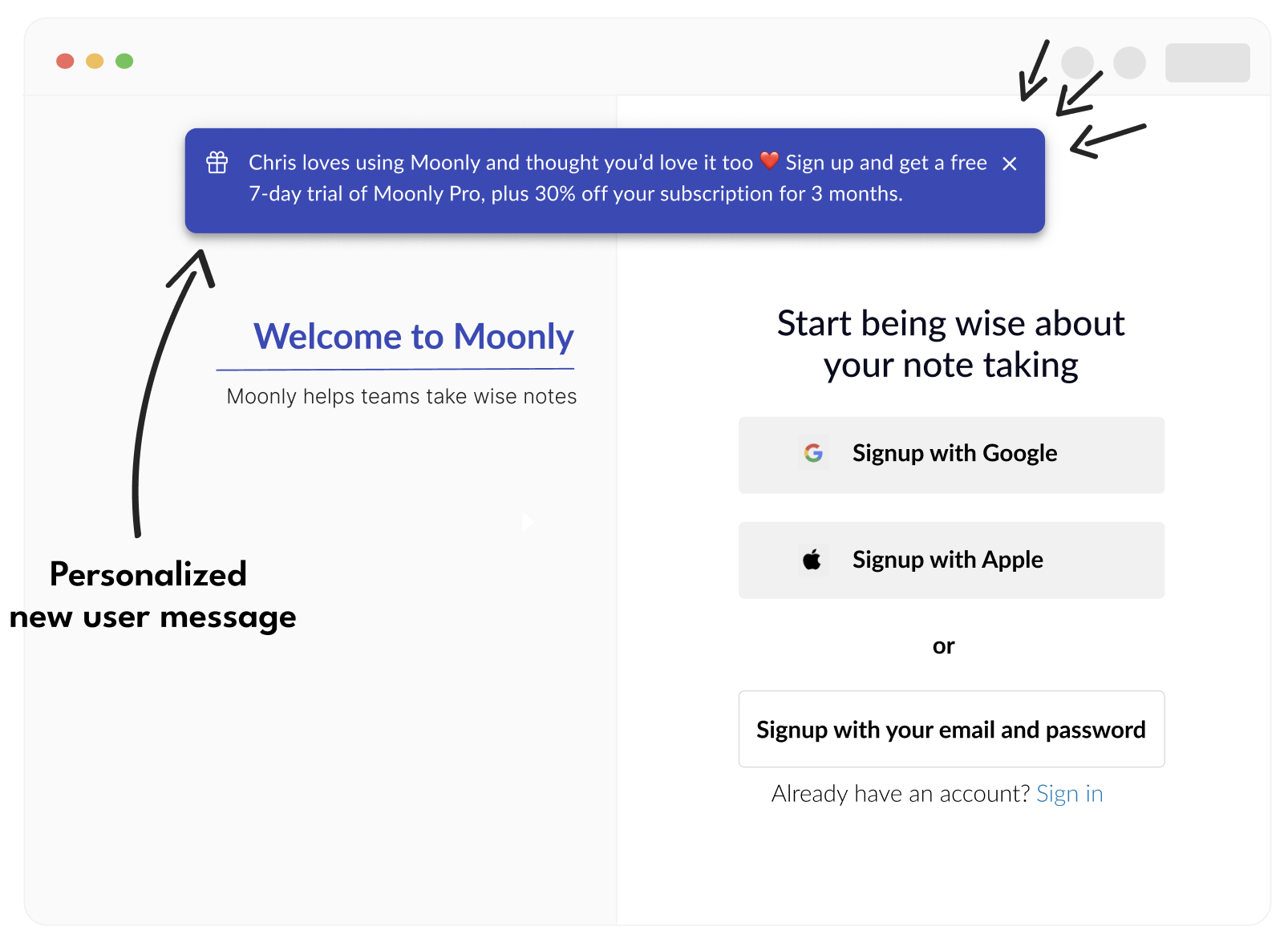 The banner is easily added in a few steps:
* Add [Cello attribution script](/sdk/client-side/embedded-script-tag) to your landing page.
* Go to [New User Experience setup in Cello Portal -> Personalization tab](https://portal.cello.so/setup/new-user-experience) and turn the banner on.
The banner is easily added in a few steps:
* Add [Cello attribution script](/sdk/client-side/embedded-script-tag) to your landing page.
* Go to [New User Experience setup in Cello Portal -> Personalization tab](https://portal.cello.so/setup/new-user-experience) and turn the banner on.
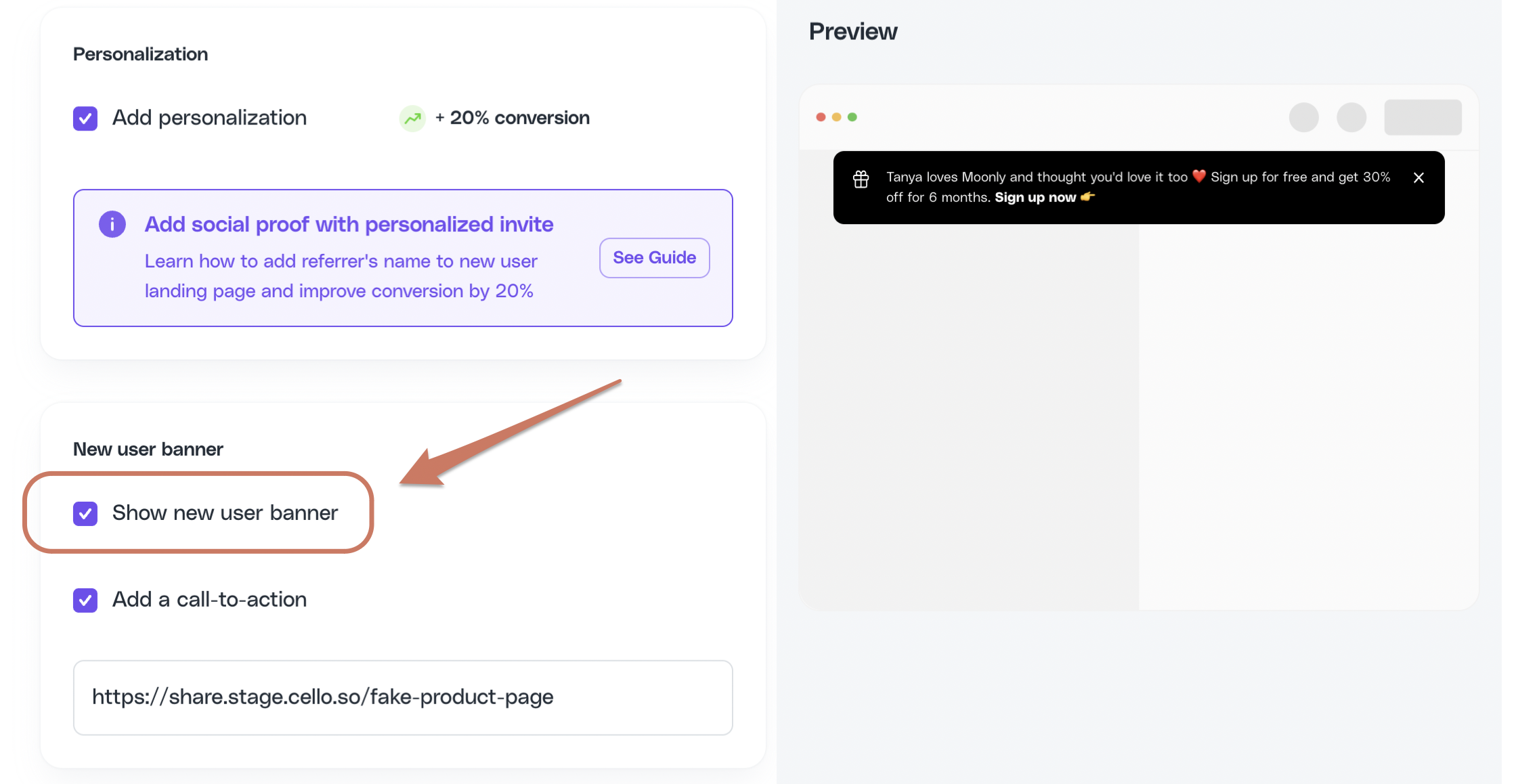 Visitors who follow the Cello invite link will have a banner displayed with an offer and the name of their referrer.
The Portal toggles the banner on/off and exposes any visual styling options. The banner **copy** (message text, CTA wording) is managed by Cello and is not editable self-serve - contact your CSM or [support@cello.so](mailto:support@cello.so) to request copy changes. The same applies to widget onboarding text, offer descriptions, announcements, and email body copy. See [Texts and copy](/guides/user-experience/configuring-referral-component#customize-text-and-copy).
### Testing the Banner Implementation
To verify the banner works correctly:
```javascript theme={null}
// Test banner functionality
async function testPersonalizationBanner() {
// Check if attribution script loaded
if (typeof window.CelloAttribution !== 'function') {
console.error('Attribution script not loaded - banner won\'t work');
return;
}
// Test with sample referral data
const testUrl = `${window.location.origin}${window.location.pathname}?productId=test&ucc=testUcc123&celloN=VGVzdFVzZXI=`;
console.log('Test this URL for banner:', testUrl);
// Check current page data
const ucc = await window.CelloAttribution("getUcc");
const referrerName = await window.CelloAttribution("getReferrerName");
const campaignConfig = await window.CelloAttribution("getCampaignConfig");
console.log('Current page attribution data:', {
ucc,
referrerName,
campaignConfig,
bannerShouldShow: !!(ucc && (referrerName || campaignConfig))
});
}
// Run test after page load
setTimeout(testPersonalizationBanner, 2000);
```
Visitors who follow the Cello invite link will have a banner displayed with an offer and the name of their referrer.
The Portal toggles the banner on/off and exposes any visual styling options. The banner **copy** (message text, CTA wording) is managed by Cello and is not editable self-serve - contact your CSM or [support@cello.so](mailto:support@cello.so) to request copy changes. The same applies to widget onboarding text, offer descriptions, announcements, and email body copy. See [Texts and copy](/guides/user-experience/configuring-referral-component#customize-text-and-copy).
### Testing the Banner Implementation
To verify the banner works correctly:
```javascript theme={null}
// Test banner functionality
async function testPersonalizationBanner() {
// Check if attribution script loaded
if (typeof window.CelloAttribution !== 'function') {
console.error('Attribution script not loaded - banner won\'t work');
return;
}
// Test with sample referral data
const testUrl = `${window.location.origin}${window.location.pathname}?productId=test&ucc=testUcc123&celloN=VGVzdFVzZXI=`;
console.log('Test this URL for banner:', testUrl);
// Check current page data
const ucc = await window.CelloAttribution("getUcc");
const referrerName = await window.CelloAttribution("getReferrerName");
const campaignConfig = await window.CelloAttribution("getCampaignConfig");
console.log('Current page attribution data:', {
ucc,
referrerName,
campaignConfig,
bannerShouldShow: !!(ucc && (referrerName || campaignConfig))
});
}
// Run test after page load
setTimeout(testPersonalizationBanner, 2000);
```