> ## Documentation Index
> Fetch the complete documentation index at: https://docs.cello.so/llms.txt
> Use this file to discover all available pages before exploring further.
# Integration Status
> Get a real-time health overview of your Cello integration across the Referral Component, Attribution Library, Signups, and Purchases. See whether each piece is connected, when the last event was received, and what to do when something goes wrong. The signup and purchase source must be confirmed with Cello - do not self-select a source if you are unsure.
The Integration Status page gives you a single health view of your Cello integration. It tracks four core components - the Referral component, the Attribution library, Signups tracking, and Purchases tracking - and tells you at a glance whether each one is sending events as expected.
Use Integration Status to confirm a new integration is wired up correctly, monitor an existing integration in production, and quickly spot when an upstream change has broken a webhook or script.
You can access it at [Integrations → Integration Status](https://portal.cello.so/integrations/integration-status) in the Cello Portal. It's available in both **sandbox** and **production**.
## How it relates to Event Feed
Integration Status and the [Event Feed](/guides/support/portal/event-feed) work hand-in-hand:
* **Integration Status** - high-level health per component. Use it to answer "is everything working?"
* **Event Feed** - individual event log with per-field validation. Use it to answer "why did this specific event fail?"
When a component on Integration Status shows a warning or error, the Event Feed is where you drill in to see the exact payload and field-level issue.
## Page header
The page header gives you an at-a-glance summary of your integration before you scroll into the individual component cards.
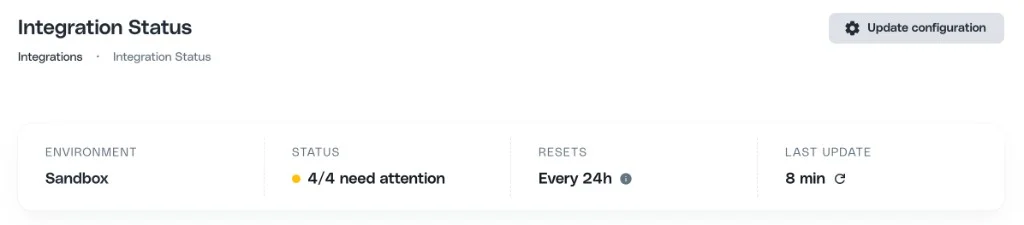 | Field | What it shows |
| ------------------------ | ---------------------------------------------------------------------------------------------------------------------------------------------------------------------------------------------------------- |
| **Environment** | Which environment you're viewing - **Sandbox** or **Production**. |
| **Status** | Aggregate health across all four components (e.g. `4/4 connected`, `2/4 need attention`). |
| **Health window** | The time range Cello checks for successful events. If none arrive within this window, the integration is flagged as needing attention. The window is **1 hour** in production and **24 hours** in sandbox. |
| **Last update** | Time since the page last refreshed its data. Use the refresh icon to re-check all components on demand - otherwise, statuses refresh automatically within \~10 minutes of an event arriving. |
| **Update configuration** | Opens the modal where you can change the signup and purchase sources. See [Changing the configured source](#changing-the-configured-source-confirm-with-cello-first). |
## Status definitions
Every component reports one of three statuses, calculated against the **health window** shown in the page header (1 hour in production, 24 hours in sandbox):
| Status | Meaning |
| --------------------------- | --------------------------------------------------------------------------------------------------------------------------------------------------------------------------------------------------------------------------------------------------------------------------------------------------------------------------- |
| **Connected** | At least one successful event received within the health window. Even if some events had errors, a single success is enough to count as Connected. |
| **Connected with warnings** | The component **is** receiving events, but something needs attention. Either events arrived recently (within the last 30 days) but **none in the current health window**, or events arrived in the window but couldn't be attributed (no referral code) or failed validation. |
| **Not connected** | The component is **not** receiving events. This covers three distinct situations: (1) **no source is configured**, (2) a source is selected but its **credentials are missing** (Cello API key or webhook signing secret), or (3) the source and credentials are set up correctly but **no events have been received yet**. |
Statuses can move in any direction - a component can go from Connected to Warnings if recent events have errors, or to Not connected if you change the source.
**Connected with warnings is not the same as Not connected.** Connected with warnings means events are arriving and the integration is fundamentally wired up - the fix is usually about the referral code (`ucc`) or field validation, **not** about setting up or changing a source. Always match troubleshooting to the **already-configured source** shown on the card.
## Status and warning reference
This is the authoritative mapping of what each Signups and Purchases tracking state means and what to do about it. Whatever the state, **troubleshoot the source that is already configured** - do not switch sources or set up a webhook for a different source. If you think a different source fits your setup, [confirm it with Cello first](#changing-the-configured-source-confirm-with-cello-first).
### Signups tracking
| Scenario | Status | What to do |
| -------------------------------------------------------------------- | ----------------------- | ----------------------------------------------------------------------------------------------------------------------------------------------------------------------------------------------------------------------------------------------------------------------------------------------------------------------------------------- |
| No source configured | Not connected | Set the source (sandbox: Update configuration modal; production: Cello Support). Confirm the right source with Cello. |
| Source selected but credentials missing | Not connected | Add the prerequisite for that source: Cello API -> generate an API key; Stripe/Chargebee -> install the webhook and signing secret. |
| Configured correctly, but no signups received yet | Not connected | Confirm the **configured** source is actually sending. Cello API -> your backend calls `POST /events` with `trigger: "new-signup"`; Stripe/Chargebee -> the webhook is forwarding `customer.created` / `customer.updated` (or Chargebee equivalents); Auto Attribution -> a referred signup has actually happened. Do not switch sources. |
| Auto Attribution: signups seen before, but none in the health window | Connected with warnings | Usually low recent activity, not a break. Confirm referred signups are still occurring. (This recent-activity warning applies to Auto Attribution.) |
| Events arriving, but none attributed | Connected with warnings | Events lack a referral code (`ucc`), so they can't be attributed. Open the [Event Feed](/guides/support/portal/event-feed) and check recent events for a missing or malformed `ucc`. Applies to event-sending sources (Cello API, Stripe, Chargebee), not Auto Attribution. |
| Attributed events arriving, but all fail validation | Connected with warnings | Open the [Event Feed](/guides/support/portal/event-feed) to see which required fields are failing for your source. |
| Everything healthy | Connected | Nothing - signups are being attributed. |
### Purchases tracking
Purchases have no Auto Attribution path and no recent-activity warning - a configured purchase source that has never received events shows **Not connected** until the first event arrives.
| Scenario | Status | What to do |
| --------------------------------------------------- | ----------------------- | --------------------------------------------------------------------------------------------------------------------------------------------------------------------------------------------------------------- |
| No source configured | Not connected | Set the source (sandbox: Update configuration modal; production: Cello Support). Confirm the right source with Cello. |
| Source selected but credentials missing | Not connected | Add the prerequisite for that source: Cello API -> generate an API key; Stripe/Chargebee -> install the webhook and signing secret. |
| Configured correctly, but no purchases received yet | Not connected | Confirm the **configured** source is actually sending. Cello API -> your backend sends `invoice-paid` via `POST /events`; Stripe/Chargebee -> the webhook is forwarding purchase events. Do not switch sources. |
| Events arriving, but none attributed | Connected with warnings | Events lack a referral code (`ucc`). Open the [Event Feed](/guides/support/portal/event-feed) and check recent events for a missing or malformed `ucc`. |
| Attributed events arriving, but all fail validation | Connected with warnings | Open the [Event Feed](/guides/support/portal/event-feed) to see which required fields are failing for your source. |
| Everything healthy | Connected | Nothing - purchases are being attributed. |
## The four components
### 1. Referral component
Tracks `booted` events from `cello.js` - the script that renders the Referral Component widget in your app.
| Field | What it shows |
| ------------------------ | ---------------------------------------------------------------------------------------------------------------------------------------------------------------------------------------------------------- |
| **Environment** | Which environment you're viewing - **Sandbox** or **Production**. |
| **Status** | Aggregate health across all four components (e.g. `4/4 connected`, `2/4 need attention`). |
| **Health window** | The time range Cello checks for successful events. If none arrive within this window, the integration is flagged as needing attention. The window is **1 hour** in production and **24 hours** in sandbox. |
| **Last update** | Time since the page last refreshed its data. Use the refresh icon to re-check all components on demand - otherwise, statuses refresh automatically within \~10 minutes of an event arriving. |
| **Update configuration** | Opens the modal where you can change the signup and purchase sources. See [Changing the configured source](#changing-the-configured-source-confirm-with-cello-first). |
## Status definitions
Every component reports one of three statuses, calculated against the **health window** shown in the page header (1 hour in production, 24 hours in sandbox):
| Status | Meaning |
| --------------------------- | --------------------------------------------------------------------------------------------------------------------------------------------------------------------------------------------------------------------------------------------------------------------------------------------------------------------------- |
| **Connected** | At least one successful event received within the health window. Even if some events had errors, a single success is enough to count as Connected. |
| **Connected with warnings** | The component **is** receiving events, but something needs attention. Either events arrived recently (within the last 30 days) but **none in the current health window**, or events arrived in the window but couldn't be attributed (no referral code) or failed validation. |
| **Not connected** | The component is **not** receiving events. This covers three distinct situations: (1) **no source is configured**, (2) a source is selected but its **credentials are missing** (Cello API key or webhook signing secret), or (3) the source and credentials are set up correctly but **no events have been received yet**. |
Statuses can move in any direction - a component can go from Connected to Warnings if recent events have errors, or to Not connected if you change the source.
**Connected with warnings is not the same as Not connected.** Connected with warnings means events are arriving and the integration is fundamentally wired up - the fix is usually about the referral code (`ucc`) or field validation, **not** about setting up or changing a source. Always match troubleshooting to the **already-configured source** shown on the card.
## Status and warning reference
This is the authoritative mapping of what each Signups and Purchases tracking state means and what to do about it. Whatever the state, **troubleshoot the source that is already configured** - do not switch sources or set up a webhook for a different source. If you think a different source fits your setup, [confirm it with Cello first](#changing-the-configured-source-confirm-with-cello-first).
### Signups tracking
| Scenario | Status | What to do |
| -------------------------------------------------------------------- | ----------------------- | ----------------------------------------------------------------------------------------------------------------------------------------------------------------------------------------------------------------------------------------------------------------------------------------------------------------------------------------- |
| No source configured | Not connected | Set the source (sandbox: Update configuration modal; production: Cello Support). Confirm the right source with Cello. |
| Source selected but credentials missing | Not connected | Add the prerequisite for that source: Cello API -> generate an API key; Stripe/Chargebee -> install the webhook and signing secret. |
| Configured correctly, but no signups received yet | Not connected | Confirm the **configured** source is actually sending. Cello API -> your backend calls `POST /events` with `trigger: "new-signup"`; Stripe/Chargebee -> the webhook is forwarding `customer.created` / `customer.updated` (or Chargebee equivalents); Auto Attribution -> a referred signup has actually happened. Do not switch sources. |
| Auto Attribution: signups seen before, but none in the health window | Connected with warnings | Usually low recent activity, not a break. Confirm referred signups are still occurring. (This recent-activity warning applies to Auto Attribution.) |
| Events arriving, but none attributed | Connected with warnings | Events lack a referral code (`ucc`), so they can't be attributed. Open the [Event Feed](/guides/support/portal/event-feed) and check recent events for a missing or malformed `ucc`. Applies to event-sending sources (Cello API, Stripe, Chargebee), not Auto Attribution. |
| Attributed events arriving, but all fail validation | Connected with warnings | Open the [Event Feed](/guides/support/portal/event-feed) to see which required fields are failing for your source. |
| Everything healthy | Connected | Nothing - signups are being attributed. |
### Purchases tracking
Purchases have no Auto Attribution path and no recent-activity warning - a configured purchase source that has never received events shows **Not connected** until the first event arrives.
| Scenario | Status | What to do |
| --------------------------------------------------- | ----------------------- | --------------------------------------------------------------------------------------------------------------------------------------------------------------------------------------------------------------- |
| No source configured | Not connected | Set the source (sandbox: Update configuration modal; production: Cello Support). Confirm the right source with Cello. |
| Source selected but credentials missing | Not connected | Add the prerequisite for that source: Cello API -> generate an API key; Stripe/Chargebee -> install the webhook and signing secret. |
| Configured correctly, but no purchases received yet | Not connected | Confirm the **configured** source is actually sending. Cello API -> your backend sends `invoice-paid` via `POST /events`; Stripe/Chargebee -> the webhook is forwarding purchase events. Do not switch sources. |
| Events arriving, but none attributed | Connected with warnings | Events lack a referral code (`ucc`). Open the [Event Feed](/guides/support/portal/event-feed) and check recent events for a missing or malformed `ucc`. |
| Attributed events arriving, but all fail validation | Connected with warnings | Open the [Event Feed](/guides/support/portal/event-feed) to see which required fields are failing for your source. |
| Everything healthy | Connected | Nothing - purchases are being attributed. |
## The four components
### 1. Referral component
Tracks `booted` events from `cello.js` - the script that renders the Referral Component widget in your app.
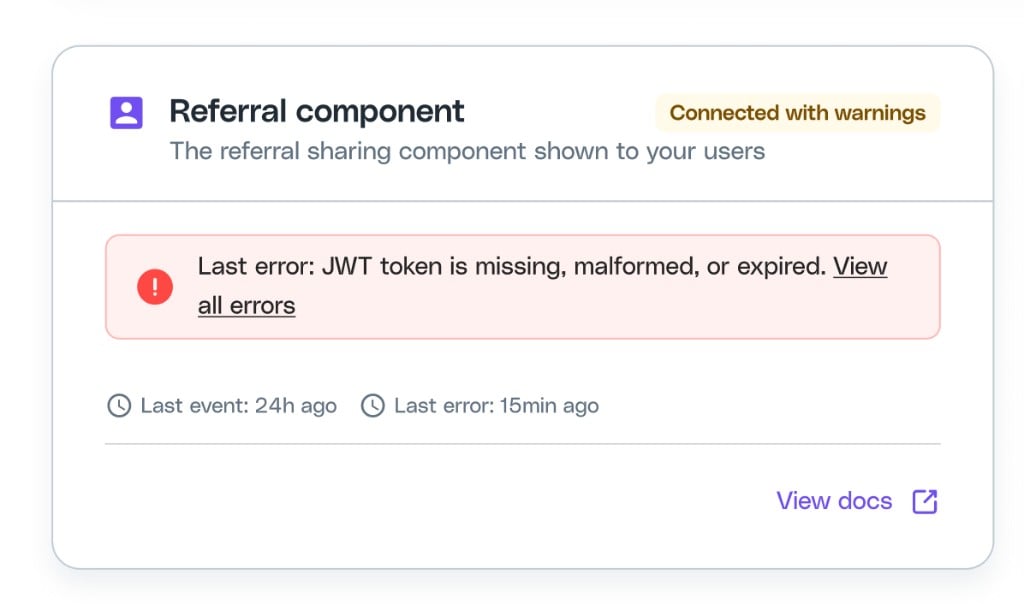 The card shows when the **last event** and **last error** were received. When errors are present, the alert summarizes the most recent error and a **View all errors** link opens the last 10 widget events so you can see what went wrong.
| Status | What it means | What to check |
| ---------------------------------------- | --------------------------------------------------------------------------------------------------------------- | ------------------------------------------------------------------------------------------------------------------------------------- |
| Connected | The Referral Component booted successfully within the health window. | Nothing - everything is working as expected. |
| Connected with warnings | No successful boots in the health window, but no errors either. | Confirm the Referral Component is still being loaded for users. Check whether traffic to pages embedding the widget has dropped. |
| Connected with warnings (errors present) | Recent boots produced errors. The card shows the **last error** message and links to the last 10 widget events. | See [Widget errors reference](#widget-errors-reference) below to interpret the message. |
| Not connected | No boots in 30 days. | Verify `cello.js` is loaded and `cello("boot", ...)` is called. See [Embed the Referral Component](/referral-component/introduction). |
#### Widget errors reference
The error messages shown in the portal are deliberately written to be human-readable, and they're worded differently from what you'll see in the browser **Console** or in the **Network** tab. Use this table to map between the portal wording and the underlying error.
| Error type | Console (browser) | API (network tab) | Portal |
| ------------------- | ----------------------------------------------------------------------- | ------------------------------- | ------------------------------------------------------------------------------- |
| **JWT token issue** | `401 (Unauthorized) [Cello]: User is not authorized to load the widget` | `Error 1100: Invalid JWT token` | **JWT token is missing, malformed, or expired** (code: `Invalid token payload`) |
| **Internal error** | `Internal server error` | `Internal server error` | **An internal error occurred - contact support** |
##### Token issue (`InvalidJwt`)
The portal collapses several underlying token failures into a single message: **"JWT token is missing, malformed, or expired"**. The actual underlying cause is one of:
* `token verification failed` - `decodeWidgetToken` could not verify the signature.
* `token schema not validated` - the token payload is invalid (e.g. wrong shape).
* `token missing iat field` - the token has no `iat` claim and `allowMissingTokenIat = false`.
* `token creation time in future` - the `iat` is in the future.
* `No referrer found for productUserId` - the token references a `productUserId` that doesn't exist.
* `No auth token found` - no token was sent with the boot request.
If the portal shows this error, regenerate the widget token on your backend and confirm it's signed with the right secret, contains a valid `productUserId`, and has a current `iat` timestamp. See [User Authentication](/sdk/client-side/user-authentication) for details.
### 2. Attribution library
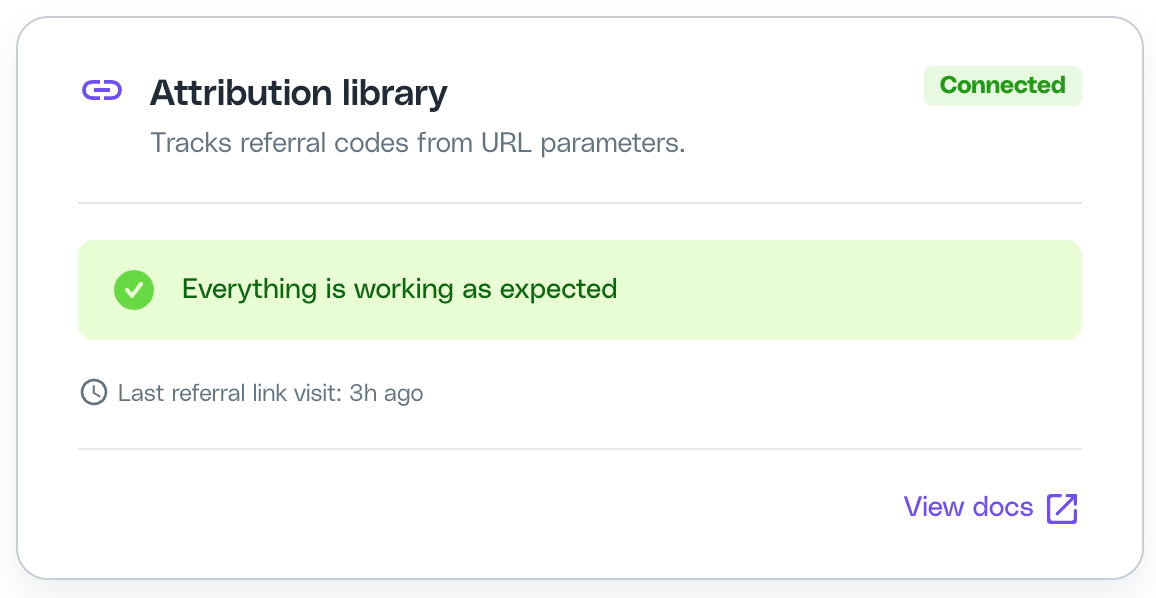
Tracks referral link visits picked up by `cello-attribution.js` - the script you embed on your landing pages to capture referral codes.
The card shows when the **last event** and **last error** were received. When errors are present, the alert summarizes the most recent error and a **View all errors** link opens the last 10 widget events so you can see what went wrong.
| Status | What it means | What to check |
| ---------------------------------------- | --------------------------------------------------------------------------------------------------------------- | ------------------------------------------------------------------------------------------------------------------------------------- |
| Connected | The Referral Component booted successfully within the health window. | Nothing - everything is working as expected. |
| Connected with warnings | No successful boots in the health window, but no errors either. | Confirm the Referral Component is still being loaded for users. Check whether traffic to pages embedding the widget has dropped. |
| Connected with warnings (errors present) | Recent boots produced errors. The card shows the **last error** message and links to the last 10 widget events. | See [Widget errors reference](#widget-errors-reference) below to interpret the message. |
| Not connected | No boots in 30 days. | Verify `cello.js` is loaded and `cello("boot", ...)` is called. See [Embed the Referral Component](/referral-component/introduction). |
#### Widget errors reference
The error messages shown in the portal are deliberately written to be human-readable, and they're worded differently from what you'll see in the browser **Console** or in the **Network** tab. Use this table to map between the portal wording and the underlying error.
| Error type | Console (browser) | API (network tab) | Portal |
| ------------------- | ----------------------------------------------------------------------- | ------------------------------- | ------------------------------------------------------------------------------- |
| **JWT token issue** | `401 (Unauthorized) [Cello]: User is not authorized to load the widget` | `Error 1100: Invalid JWT token` | **JWT token is missing, malformed, or expired** (code: `Invalid token payload`) |
| **Internal error** | `Internal server error` | `Internal server error` | **An internal error occurred - contact support** |
##### Token issue (`InvalidJwt`)
The portal collapses several underlying token failures into a single message: **"JWT token is missing, malformed, or expired"**. The actual underlying cause is one of:
* `token verification failed` - `decodeWidgetToken` could not verify the signature.
* `token schema not validated` - the token payload is invalid (e.g. wrong shape).
* `token missing iat field` - the token has no `iat` claim and `allowMissingTokenIat = false`.
* `token creation time in future` - the `iat` is in the future.
* `No referrer found for productUserId` - the token references a `productUserId` that doesn't exist.
* `No auth token found` - no token was sent with the boot request.
If the portal shows this error, regenerate the widget token on your backend and confirm it's signed with the right secret, contains a valid `productUserId`, and has a current `iat` timestamp. See [User Authentication](/sdk/client-side/user-authentication) for details.
### 2. Attribution library
Tracks referral link visits picked up by `cello-attribution.js` - the script you embed on your landing pages to capture referral codes.
 | Status | What it means | What to check |
| ---------------------------------- | -------------------------------------------------------------- | ------------------------------------------------------------------------------------------------------------------------------------------------------ |
| Connected | A referral link was visited within the health window. | Nothing - attribution is being captured. |
| Connected with warnings | No referral link visits in the last few hours. | Likely just low traffic. Check sharing activity in the portal. |
| Not connected (no signup URL) | No signup URL is set in your Cello configuration. | Set the signup URL in **User Experience → Settings**. |
| Not connected (URL set, no events) | The signup URL is configured but no visits have been recorded. | Confirm `cello-attribution.js` is embedded on the landing pages reachable from your referral links. See [Web attribution setup](/attribution/for-web). |
### 3. Signups tracking
Tracks signup events from your configured source. The expected event type depends on which source you use:
| Source | Events tracked |
| ---------------- | ----------------------------------------------------------------------------------------------------------------- |
| Cello API | `new-signup` |
| Stripe | `customer.created`, `customer.updated` |
| Chargebee | `Customer Created`, `Customer Changed` |
| Auto Attribution | Signup detected by [Auto Attribution](/guides/attribution/auto-attribution) (only used if no other source is set) |
**Confirm the signup source with Cello before setting it - do not pick one from this table alone.** The key rule for Stripe/Chargebee vs Cello API: Stripe/Chargebee can only be the signup source if your payment-provider customer is created **at signup**. IF the customer is created **at first purchase**, use the Cello API to send `new-signup` at the real signup moment, or follow the [purchase-first, signup-later](/guides/support/faqs) pattern instead. See [Changing the configured source](#changing-the-configured-source-confirm-with-cello-first) for all the factors.
| Status | What it means | What to check |
| ---------------------------------- | -------------------------------------------------------------- | ------------------------------------------------------------------------------------------------------------------------------------------------------ |
| Connected | A referral link was visited within the health window. | Nothing - attribution is being captured. |
| Connected with warnings | No referral link visits in the last few hours. | Likely just low traffic. Check sharing activity in the portal. |
| Not connected (no signup URL) | No signup URL is set in your Cello configuration. | Set the signup URL in **User Experience → Settings**. |
| Not connected (URL set, no events) | The signup URL is configured but no visits have been recorded. | Confirm `cello-attribution.js` is embedded on the landing pages reachable from your referral links. See [Web attribution setup](/attribution/for-web). |
### 3. Signups tracking
Tracks signup events from your configured source. The expected event type depends on which source you use:
| Source | Events tracked |
| ---------------- | ----------------------------------------------------------------------------------------------------------------- |
| Cello API | `new-signup` |
| Stripe | `customer.created`, `customer.updated` |
| Chargebee | `Customer Created`, `Customer Changed` |
| Auto Attribution | Signup detected by [Auto Attribution](/guides/attribution/auto-attribution) (only used if no other source is set) |
**Confirm the signup source with Cello before setting it - do not pick one from this table alone.** The key rule for Stripe/Chargebee vs Cello API: Stripe/Chargebee can only be the signup source if your payment-provider customer is created **at signup**. IF the customer is created **at first purchase**, use the Cello API to send `new-signup` at the real signup moment, or follow the [purchase-first, signup-later](/guides/support/faqs) pattern instead. See [Changing the configured source](#changing-the-configured-source-confirm-with-cello-first) for all the factors.
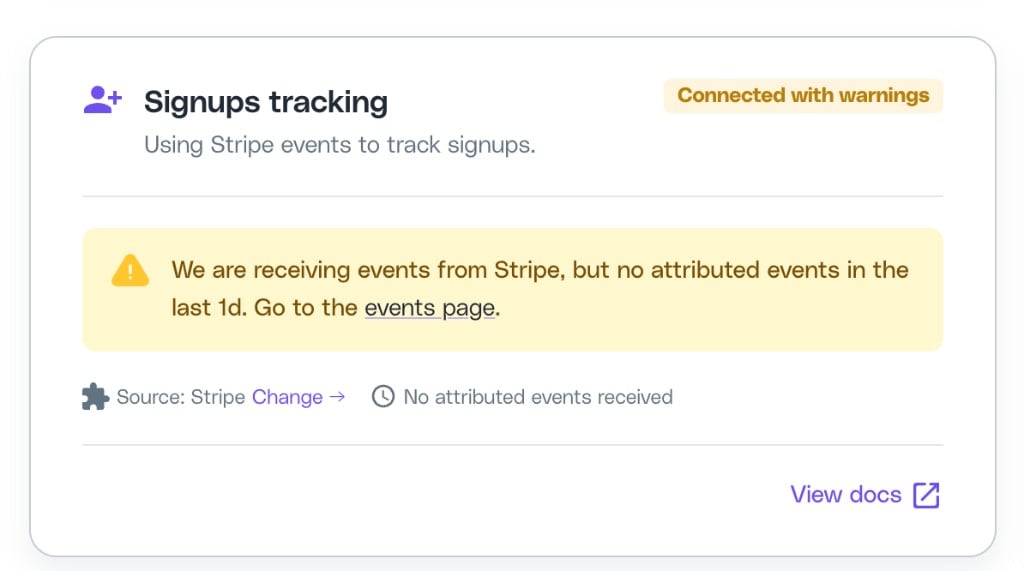 The card shows the configured source, when the **last attributed signup event** was received (i.e. the last event that included a referral code), and a **Change** link to update the source. When the card needs attention, the alert links directly to the [Event Feed](/guides/support/portal/event-feed) so you can drill into the offending events.
#### Common alerts
These are specific cases of the [statuses above](#status-and-warning-reference). The per-source **Not connected** rows are the "source configured, but no events received yet" case - the fix is to confirm that source is actually sending, never to switch to a different source.
| Status / Source | Alert | What to do |
| ------------------------------------------------------------- | ----------------------------------------------------------------------------------------------------------------------- | ------------------------------------------------------------------------------------------------------------------------------------------------------------------------------------------------------------------------------------------------------------------------------------------------------------------------------------------------------------- |
| Not connected - Cello API | No `new-signup` events received from Cello API. | Confirm your backend is calling `POST /events` with `trigger: "new-signup"`. See [Track Signups](/attribution/tracking-signups). |
| Not connected - Stripe | No `customer.created` / `customer.updated` events from Stripe. | Confirm the [Stripe webhook](/integrations/webhooks/stripe-webhook) is installed and pointed at the right Cello endpoint. |
| Not connected - Chargebee | No `Customer Created` / `Customer Changed` events from Chargebee. | Confirm the [Chargebee webhook](/integrations/webhooks/chargebee-webhook) is configured. |
| Not connected - Auto Attribution | No signups detected. | Verify [Auto Attribution](/guides/attribution/auto-attribution) is enabled and a signup has actually occurred. |
| Not configured | Event source is not set. | Set the source from the [Update configuration modal](#changing-the-configured-source-confirm-with-cello-first) (sandbox), or contact Cello Support (production). |
| Missing API key | Cello API key has not been generated. | Generate an API key in **Integrations → API Keys**. |
| Missing webhook | The webhook for the selected source has not been installed. | Follow the webhook setup guide for your provider. |
| Connected with warnings - Auto Attribution, no recent signups | Signups were detected before, but none in the last \[health window]. | Usually low recent activity rather than a break. Confirm referred signups are still occurring. This recent-activity warning applies to Auto Attribution only. |
| Connected with warnings - events received, none attributed | "We are receiving events from \[source], but no attributed events in the last \[health window]. Go to the events page." | Events are arriving but none include a referral code (`ucc`), so they can't be attributed. Open the [Event Feed](/guides/support/portal/event-feed) (linked directly from the alert) and inspect the recent events to see which `ucc` values are missing or malformed. Applies to event-sending sources (Cello API, Stripe, Chargebee), not Auto Attribution. |
| Connected with warnings - attributed events have errors | All attributed events received in the health window failed validation. | Open the [Event Feed](/guides/support/portal/event-feed) and inspect the recent attributed events to see which required fields are failing. |
### 4. Purchases tracking
Tracks purchase events from your configured source:
| Source | Events tracked |
| --------- | --------------------------------------------------------- |
| Cello API | `invoice-paid` |
| Stripe | Purchase events (e.g. `invoice.paid`, `charge.succeeded`) |
| Chargebee | Purchase events |
The card shows the configured source, when the **last attributed signup event** was received (i.e. the last event that included a referral code), and a **Change** link to update the source. When the card needs attention, the alert links directly to the [Event Feed](/guides/support/portal/event-feed) so you can drill into the offending events.
#### Common alerts
These are specific cases of the [statuses above](#status-and-warning-reference). The per-source **Not connected** rows are the "source configured, but no events received yet" case - the fix is to confirm that source is actually sending, never to switch to a different source.
| Status / Source | Alert | What to do |
| ------------------------------------------------------------- | ----------------------------------------------------------------------------------------------------------------------- | ------------------------------------------------------------------------------------------------------------------------------------------------------------------------------------------------------------------------------------------------------------------------------------------------------------------------------------------------------------- |
| Not connected - Cello API | No `new-signup` events received from Cello API. | Confirm your backend is calling `POST /events` with `trigger: "new-signup"`. See [Track Signups](/attribution/tracking-signups). |
| Not connected - Stripe | No `customer.created` / `customer.updated` events from Stripe. | Confirm the [Stripe webhook](/integrations/webhooks/stripe-webhook) is installed and pointed at the right Cello endpoint. |
| Not connected - Chargebee | No `Customer Created` / `Customer Changed` events from Chargebee. | Confirm the [Chargebee webhook](/integrations/webhooks/chargebee-webhook) is configured. |
| Not connected - Auto Attribution | No signups detected. | Verify [Auto Attribution](/guides/attribution/auto-attribution) is enabled and a signup has actually occurred. |
| Not configured | Event source is not set. | Set the source from the [Update configuration modal](#changing-the-configured-source-confirm-with-cello-first) (sandbox), or contact Cello Support (production). |
| Missing API key | Cello API key has not been generated. | Generate an API key in **Integrations → API Keys**. |
| Missing webhook | The webhook for the selected source has not been installed. | Follow the webhook setup guide for your provider. |
| Connected with warnings - Auto Attribution, no recent signups | Signups were detected before, but none in the last \[health window]. | Usually low recent activity rather than a break. Confirm referred signups are still occurring. This recent-activity warning applies to Auto Attribution only. |
| Connected with warnings - events received, none attributed | "We are receiving events from \[source], but no attributed events in the last \[health window]. Go to the events page." | Events are arriving but none include a referral code (`ucc`), so they can't be attributed. Open the [Event Feed](/guides/support/portal/event-feed) (linked directly from the alert) and inspect the recent events to see which `ucc` values are missing or malformed. Applies to event-sending sources (Cello API, Stripe, Chargebee), not Auto Attribution. |
| Connected with warnings - attributed events have errors | All attributed events received in the health window failed validation. | Open the [Event Feed](/guides/support/portal/event-feed) and inspect the recent attributed events to see which required fields are failing. |
### 4. Purchases tracking
Tracks purchase events from your configured source:
| Source | Events tracked |
| --------- | --------------------------------------------------------- |
| Cello API | `invoice-paid` |
| Stripe | Purchase events (e.g. `invoice.paid`, `charge.succeeded`) |
| Chargebee | Purchase events |
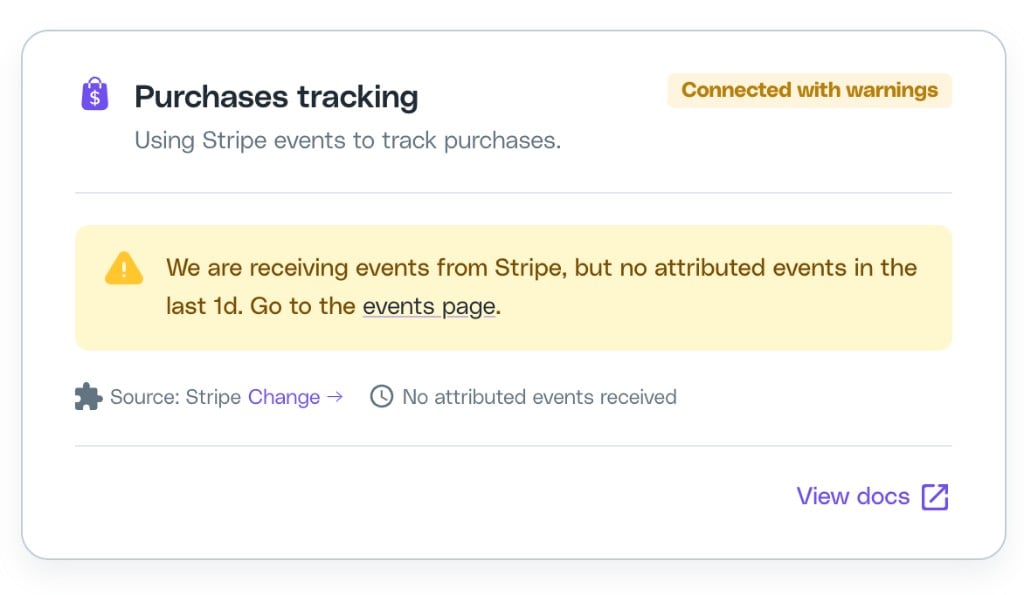 The card shows the configured source, when the **last attributed purchase event** was received (i.e. the last event that included a referral code), and a **Change** link to update the source. When the card needs attention, the alert links directly to the [Event Feed](/guides/support/portal/event-feed) so you can drill into the offending events.
#### Common alerts
These are specific cases of the [statuses above](#status-and-warning-reference). Purchases have no Auto Attribution path and no recent-activity warning. The per-source **Not connected** rows are the "source configured, but no events received yet" case - confirm that source is sending, never switch to a different source.
| Status / Source | Alert | What to do |
| ---------------------------------------------------------- | ----------------------------------------------------------------------------------------------------------------------- | ---------------------------------------------------------------------------------------------------------------------------------------------------------------------------------------------------------------------------------------------------------------------- |
| Not connected - Cello API | No `invoice-paid` events received from Cello API. | Confirm purchase events are being sent. See [Track Purchases](/attribution/tracking-purchase). |
| Not connected - Stripe | No purchase events from Stripe. | Confirm the [Stripe webhook](/integrations/webhooks/stripe-webhook) is forwarding purchase events. |
| Not connected - Chargebee | No purchase events from Chargebee. | Confirm the [Chargebee webhook](/integrations/webhooks/chargebee-webhook) is forwarding purchase events. |
| Not configured | Event source is not set. | Set the source from the [Update configuration modal](#changing-the-configured-source-confirm-with-cello-first) (sandbox), or contact Cello Support (production). |
| Connected with warnings - events received, none attributed | "We are receiving events from \[source], but no attributed events in the last \[health window]. Go to the events page." | Events are arriving but none include a referral code (`ucc`), so they can't be attributed. Open the [Event Feed](/guides/support/portal/event-feed) (linked directly from the alert) and inspect the recent events to see which `ucc` values are missing or malformed. |
| Connected with warnings - attributed events have errors | All attributed events received in the health window failed validation. | Open the [Event Feed](/guides/support/portal/event-feed) and inspect the recent attributed events to see which required fields are failing. |
## Changing the configured source (confirm with Cello first)
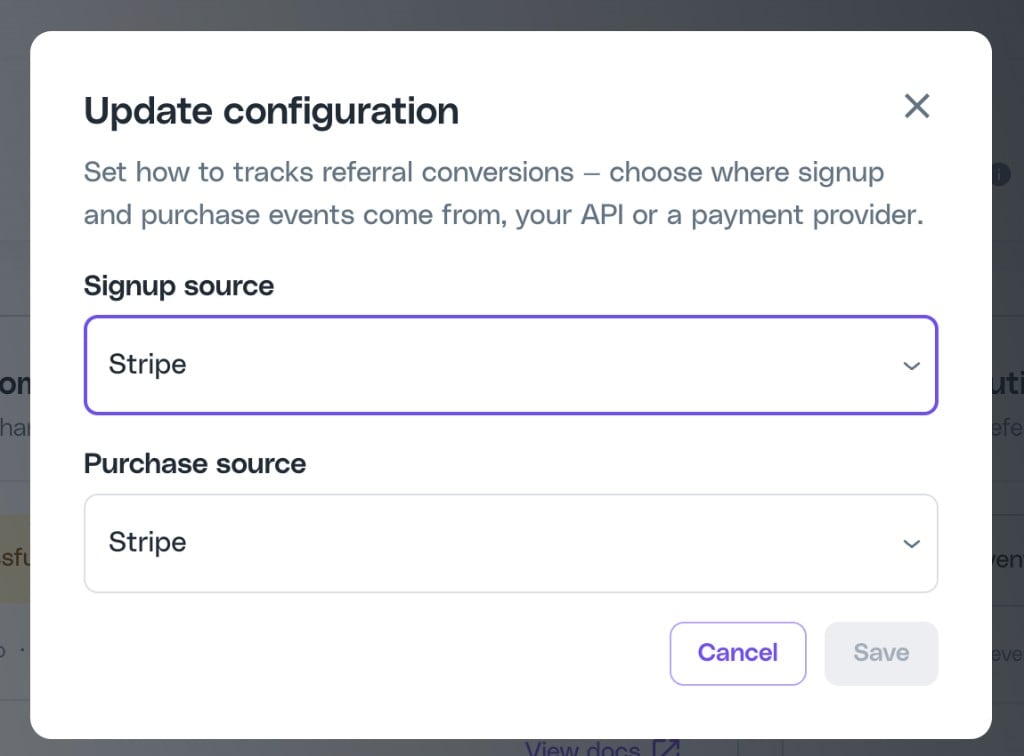
Use the **Update configuration** modal to choose where Cello should track signups and purchases from. You can open it from the **Update configuration** button in the page header, or from the link inside the Signups tracking and Purchases tracking cards.
**Always confirm the signup and purchase source with Cello before choosing one. Do not recommend, guess, or infer a specific source from these docs.** The correct source depends on factors unique to each integration, and the wrong source silently breaks attribution. If you are unsure, the only correct answer is to contact your Customer Success Manager or [support@cello.so](mailto:support@cello.so).
The factors below explain *what Cello weighs when confirming the source*. They are inputs to that conversation, not a decision to make unaided:
* **Payment provider.** Stripe and Chargebee can use webhooks. Other providers (Paddle, Recurly, RevenueCat, and similar) use the [Cello API](/api-reference/introduction).
* **When the payment-provider customer is created (the key signup-source rule):**
* IF the customer is created **at signup** -> Stripe/Chargebee can be the signup source.
* IF the customer is created **at first purchase** -> use the Cello API to send `new-signup` at the real signup moment, or backfill via the [purchase-first, signup-later](/guides/support/faqs) pattern. Stripe/Chargebee cannot be the signup source on their own in this case.
* **Reward model.** Recurring vs one-time rewards, free-to-paid conversion, renewals, and refunds.
* **Motion.** Self-serve vs sales-led (e.g. [Salesforce](/integrations/salesforce-apex-triggers)).
* **Auto Attribution.** Can be primary or fallback, and is enabled by Cello only.
In production, source configuration is handled by Cello Support regardless.
The card shows the configured source, when the **last attributed purchase event** was received (i.e. the last event that included a referral code), and a **Change** link to update the source. When the card needs attention, the alert links directly to the [Event Feed](/guides/support/portal/event-feed) so you can drill into the offending events.
#### Common alerts
These are specific cases of the [statuses above](#status-and-warning-reference). Purchases have no Auto Attribution path and no recent-activity warning. The per-source **Not connected** rows are the "source configured, but no events received yet" case - confirm that source is sending, never switch to a different source.
| Status / Source | Alert | What to do |
| ---------------------------------------------------------- | ----------------------------------------------------------------------------------------------------------------------- | ---------------------------------------------------------------------------------------------------------------------------------------------------------------------------------------------------------------------------------------------------------------------- |
| Not connected - Cello API | No `invoice-paid` events received from Cello API. | Confirm purchase events are being sent. See [Track Purchases](/attribution/tracking-purchase). |
| Not connected - Stripe | No purchase events from Stripe. | Confirm the [Stripe webhook](/integrations/webhooks/stripe-webhook) is forwarding purchase events. |
| Not connected - Chargebee | No purchase events from Chargebee. | Confirm the [Chargebee webhook](/integrations/webhooks/chargebee-webhook) is forwarding purchase events. |
| Not configured | Event source is not set. | Set the source from the [Update configuration modal](#changing-the-configured-source-confirm-with-cello-first) (sandbox), or contact Cello Support (production). |
| Connected with warnings - events received, none attributed | "We are receiving events from \[source], but no attributed events in the last \[health window]. Go to the events page." | Events are arriving but none include a referral code (`ucc`), so they can't be attributed. Open the [Event Feed](/guides/support/portal/event-feed) (linked directly from the alert) and inspect the recent events to see which `ucc` values are missing or malformed. |
| Connected with warnings - attributed events have errors | All attributed events received in the health window failed validation. | Open the [Event Feed](/guides/support/portal/event-feed) and inspect the recent attributed events to see which required fields are failing. |
## Changing the configured source (confirm with Cello first)
Use the **Update configuration** modal to choose where Cello should track signups and purchases from. You can open it from the **Update configuration** button in the page header, or from the link inside the Signups tracking and Purchases tracking cards.
**Always confirm the signup and purchase source with Cello before choosing one. Do not recommend, guess, or infer a specific source from these docs.** The correct source depends on factors unique to each integration, and the wrong source silently breaks attribution. If you are unsure, the only correct answer is to contact your Customer Success Manager or [support@cello.so](mailto:support@cello.so).
The factors below explain *what Cello weighs when confirming the source*. They are inputs to that conversation, not a decision to make unaided:
* **Payment provider.** Stripe and Chargebee can use webhooks. Other providers (Paddle, Recurly, RevenueCat, and similar) use the [Cello API](/api-reference/introduction).
* **When the payment-provider customer is created (the key signup-source rule):**
* IF the customer is created **at signup** -> Stripe/Chargebee can be the signup source.
* IF the customer is created **at first purchase** -> use the Cello API to send `new-signup` at the real signup moment, or backfill via the [purchase-first, signup-later](/guides/support/faqs) pattern. Stripe/Chargebee cannot be the signup source on their own in this case.
* **Reward model.** Recurring vs one-time rewards, free-to-paid conversion, renewals, and refunds.
* **Motion.** Self-serve vs sales-led (e.g. [Salesforce](/integrations/salesforce-apex-triggers)).
* **Auto Attribution.** Can be primary or fallback, and is enabled by Cello only.
In production, source configuration is handled by Cello Support regardless.
 ### What you can configure
**Do not choose a source based on this list alone - confirm it with Cello first (see the warning above).** The selectable options are:
* **Signup source** - Cello API, Stripe, Chargebee, or [Auto Attribution](/guides/attribution/auto-attribution).
* **Purchase source** - Cello API, Stripe, or Chargebee.
When you change a source, the corresponding component on Integration Status will revert to **Not connected** until events from the new source start arriving.
### Sandbox vs production
| Environment | Who can change the configuration |
| -------------- | --------------------------------------------------------------------------------------------------------------------------------- |
| **Sandbox** | You can change the signup and purchase sources yourself while testing your integration. |
| **Production** | Source configuration in production is handled by Cello Support. Reach out whenever you need to set or change a production source. |
### Auto Attribution
[Auto Attribution](/guides/attribution/auto-attribution) can only be enabled by Cello Support. Once enabled for your tenant, **Auto Attribution** appears as a selectable option in the **Signup source** dropdown.
If Auto Attribution is on but a CRM source (Cello API, Stripe, or Chargebee) is selected as the primary signup source, Auto Attribution runs in the background to catch any signups missed by the primary source.
## Troubleshooting
| Problem | Cause | Solution |
| ------------------------------------------------------------------ | --------------------------------------------------------------------------------------------- | --------------------------------------------------------------------------------------------------------------------------- |
| Component shows Not connected even though events are flowing | Status updates can take up to 10 minutes | Click the refresh icon next to **Last update** to re-check immediately. |
| Component shows Connected with warnings but you can't see why | The summary doesn't include payload-level detail | Open the [Event Feed](/guides/support/portal/event-feed) to inspect the latest events for that source. |
| Signup or Purchase tracking shows "source not set" | No source has been configured for this tenant | Set the source from the **Update configuration** modal in sandbox, or contact Cello Support to configure it for production. |
| Status flipped to Not connected after you updated your integration | Source was changed and no new events have arrived yet | Trigger a test event from the new source - the status will update within \~10 minutes. |
| Auto Attribution doesn't appear in the Signup source dropdown | [Auto Attribution](/guides/attribution/auto-attribution) has not been enabled for your tenant | Contact Cello Support to enable Auto Attribution. |
You can check integration health from your AI client using [`cello_get_integration_status`](/mcp/tools#cello_get_integration_status) via the [Cello MCP](/mcp/developers/use-cases).
### What you can configure
**Do not choose a source based on this list alone - confirm it with Cello first (see the warning above).** The selectable options are:
* **Signup source** - Cello API, Stripe, Chargebee, or [Auto Attribution](/guides/attribution/auto-attribution).
* **Purchase source** - Cello API, Stripe, or Chargebee.
When you change a source, the corresponding component on Integration Status will revert to **Not connected** until events from the new source start arriving.
### Sandbox vs production
| Environment | Who can change the configuration |
| -------------- | --------------------------------------------------------------------------------------------------------------------------------- |
| **Sandbox** | You can change the signup and purchase sources yourself while testing your integration. |
| **Production** | Source configuration in production is handled by Cello Support. Reach out whenever you need to set or change a production source. |
### Auto Attribution
[Auto Attribution](/guides/attribution/auto-attribution) can only be enabled by Cello Support. Once enabled for your tenant, **Auto Attribution** appears as a selectable option in the **Signup source** dropdown.
If Auto Attribution is on but a CRM source (Cello API, Stripe, or Chargebee) is selected as the primary signup source, Auto Attribution runs in the background to catch any signups missed by the primary source.
## Troubleshooting
| Problem | Cause | Solution |
| ------------------------------------------------------------------ | --------------------------------------------------------------------------------------------- | --------------------------------------------------------------------------------------------------------------------------- |
| Component shows Not connected even though events are flowing | Status updates can take up to 10 minutes | Click the refresh icon next to **Last update** to re-check immediately. |
| Component shows Connected with warnings but you can't see why | The summary doesn't include payload-level detail | Open the [Event Feed](/guides/support/portal/event-feed) to inspect the latest events for that source. |
| Signup or Purchase tracking shows "source not set" | No source has been configured for this tenant | Set the source from the **Update configuration** modal in sandbox, or contact Cello Support to configure it for production. |
| Status flipped to Not connected after you updated your integration | Source was changed and no new events have arrived yet | Trigger a test event from the new source - the status will update within \~10 minutes. |
| Auto Attribution doesn't appear in the Signup source dropdown | [Auto Attribution](/guides/attribution/auto-attribution) has not been enabled for your tenant | Contact Cello Support to enable Auto Attribution. |
You can check integration health from your AI client using [`cello_get_integration_status`](/mcp/tools#cello_get_integration_status) via the [Cello MCP](/mcp/developers/use-cases).