> ## Documentation Index
> Fetch the complete documentation index at: https://docs.cello.so/llms.txt
> Use this file to discover all available pages before exploring further.
# Event Feed
> Monitor and debug incoming signup and transaction events from Stripe, Chargebee, Cello API, and auto attribution. Inspect event payloads, understand field validation statuses (OK, Warning, Error), and troubleshoot missing or malformed fields.
The Event Feed gives you a real-time view of every signup and transaction event Cello receives - whether from a webhook, the Cello API, or auto attribution. Use it to verify your integration is working correctly and to quickly identify missing or malformed fields.
The Event Feed shows events from four sources: Auto Attribution, Stripe Webhook, Chargebee Webhook, and Cello API. Each event is validated and assigned a status of OK (all fields valid), Warning (non-critical issues like missing recommended fields), or Error (critical failures like missing required fields). You can filter by source, search by text, and expand any event to inspect its payload with per-field validation.
You can access the Event Feed at [Integrations → Events Feed](https://portal.cello.so/integrations/events-feed) in the Cello Portal.
For a higher-level view of which integration components are connected, see [Integration Status](/guides/support/portal/integration-status).
## List View
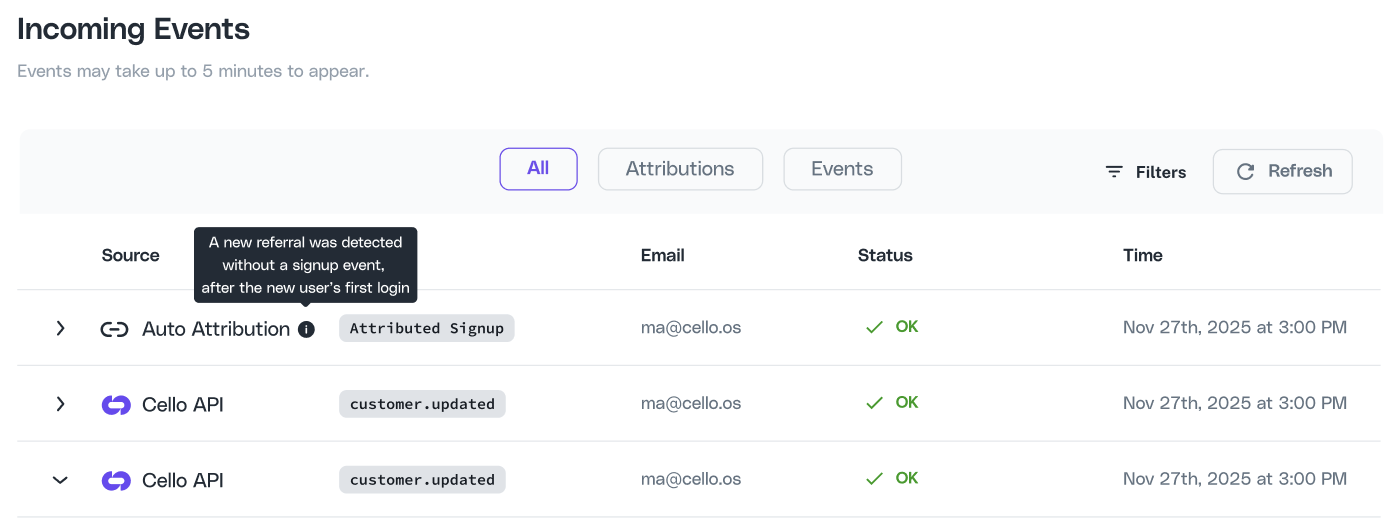
The Event Feed displays your most recent events in a table with the following columns:
| Column | Description |
| -------------- | ---------------------------------------------------------------------------------------------- |
| **Source** | Where the event originated - Auto Attribution, Stripe Webhook, Chargebee Webhook, or Cello API |
| **Event Type** | The type of event, e.g. `new-signup`, `invoice-paid`, `customer_created`, `Attributed Signup` |
| **Email** | The email address associated with the event |
| **Status** | Validation result - OK, Warning, or Error |
| **Time (UTC)** | When the event was received |
 ### Filtering Events
* **Search bar** - free-text search across all columns
* **Tabs** - switch between **All**, **Attributions**, and **Events**
* **Filters button** - apply additional filters to narrow down results
### Event Statuses
Each event is validated and assigned one of three statuses:
| Status | Meaning |
| ----------- | ---------------------------------------------------------------------------------------- |
| **OK** | The event passed all validations successfully |
| **Warning** | The event was received but has non-critical issues (e.g. a recommended field is missing) |
| **Error** | The event has critical validation failures that need to be resolved |
## Expanded Event View
Click the arrow on any row to expand it and inspect the event details.
### Filtering Events
* **Search bar** - free-text search across all columns
* **Tabs** - switch between **All**, **Attributions**, and **Events**
* **Filters button** - apply additional filters to narrow down results
### Event Statuses
Each event is validated and assigned one of three statuses:
| Status | Meaning |
| ----------- | ---------------------------------------------------------------------------------------- |
| **OK** | The event passed all validations successfully |
| **Warning** | The event was received but has non-critical issues (e.g. a recommended field is missing) |
| **Error** | The event has critical validation failures that need to be resolved |
## Expanded Event View
Click the arrow on any row to expand it and inspect the event details.
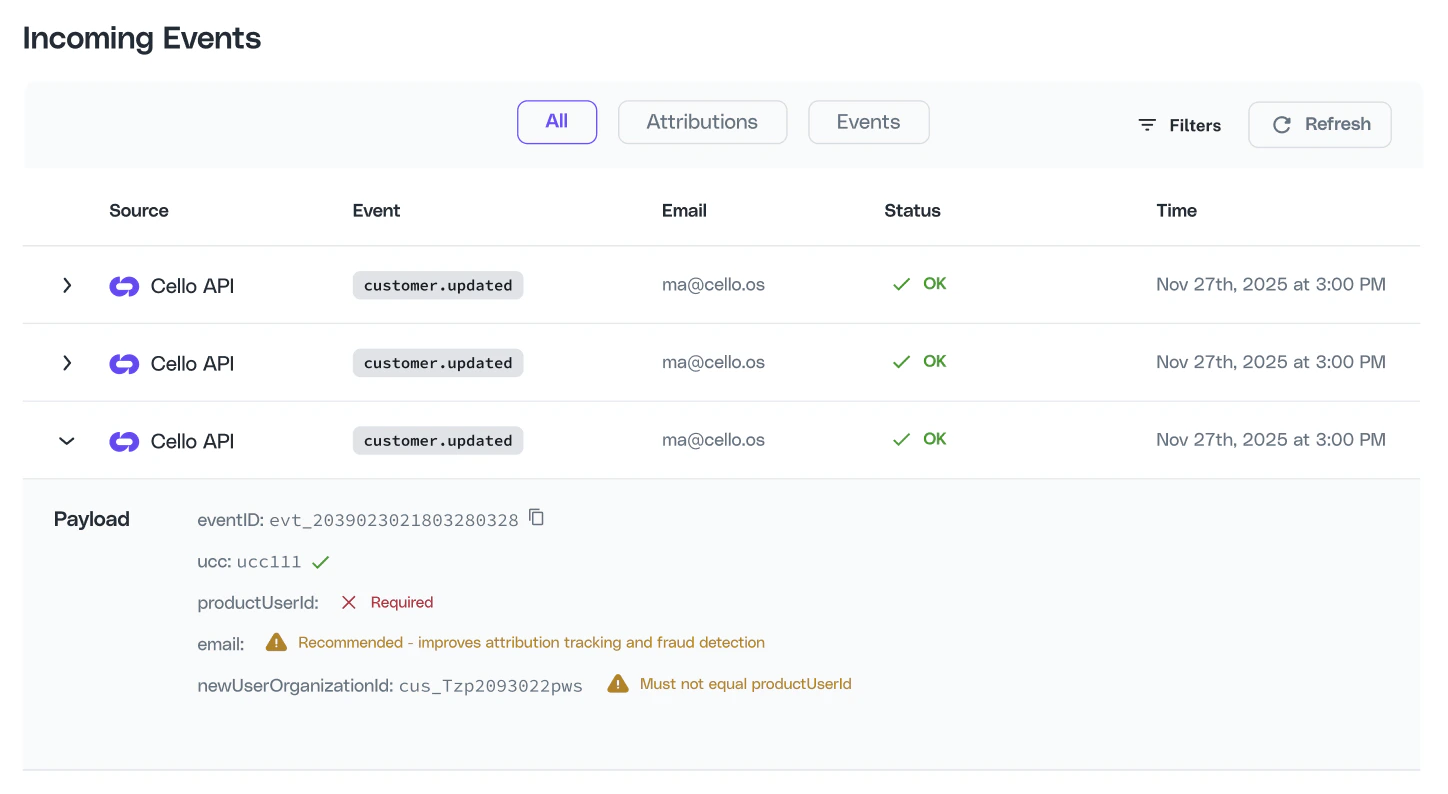 The expanded view shows the parsed event payload with per-field validation indicators. Each field is marked as valid, warning, or error so you can immediately see which fields need attention.
## Field Validation Reference
The Event Feed validates each field in the event payload and shows a status indicator next to it. The required and recommended fields differ depending on the event source.
### Field Validation for Stripe / Chargebee Webhooks
For Stripe and Chargebee webhook events, the `ucc` (referral code) and `newUserId` fields are always required. The `email` field is recommended and improves attribution tracking, but becomes required if your product uses [auto attribution](/guides/attribution/auto-attribution).
#### Required fields
| Field | Validation |
| ----------- | ------------------------------------------------------------------------------------------ |
| `ucc` | Must be a valid 11-character alphanumeric referral code. Shows **"Invalid"** if malformed. |
| `newUserId` | Must be present. Shows **"Required"** if missing. |
#### Recommended fields
| Field | Validation |
| ------- | ------------------------------------------------------------------------------------------------------------------------------------------------------------ |
| `email` | Recommended - improves attribution tracking and fraud detection. **Required** if your product uses [auto attribution](/guides/attribution/auto-attribution). |
#### Other validated fields
| Field | Validation |
| ---------------- | ------------------------------------------------------------------- |
| `customerId` | Validated when present |
| `organizationId` | See [Organization ID validation](#organization-id-validation) below |
### Field Validation for Cello API Events
For Cello API events, the `ucc` (referral code) is always required, and at least one of `newUserId` or `productUserId` must be present. For `invoice-paid` events, the `invoiceId`, `interval`, and `currency` fields are also required.
#### Always required
| Field | Validation |
| ------------------------------ | ----------------------------------------------------------------------- |
| `ucc` | Must be a valid referral code. Shows **"Invalid"** if malformed. |
| `newUserId` or `productUserId` | At least one must be present. Shows **"Required"** if both are missing. |
#### Additional fields for `invoice-paid` events
| Field | Validation |
| ----------- | ---------------------- |
| `invoiceId` | **Required** |
| `interval` | **Required** |
| `currency` | **Required** |
| `price` | Validated when present |
#### Timestamp
Must be a valid Unix timestamp. Shows **"Invalid"** if the format is incorrect.
## Organization ID Validation
How `organizationId` is validated depends on whether your product is configured for org-level attribution.
### Org-level attribution enabled
When org-level attribution is enabled, the `organizationId` field is required and must not equal `newUserId`. If `organizationId` is missing while `newUserId` is present, the event shows an Error. If `organizationId` is provided but `newUserId` is missing, the event shows a Warning.
| Scenario | Status | Message |
| ------------------------------------- | ------- | ---------------------------------------------------------------------------- |
| `orgId` present and valid | Valid | - |
| `orgId` equals `newUserId` | Error | "Must not equal newUserId" |
| `orgId` missing, `newUserId` present | Error | "Required" |
| Both `orgId` and `newUserId` missing | Error | Both show "Required" |
| `orgId` provided, `newUserId` missing | Warning | newUserId: "Recommended - improves attribution tracking and fraud detection" |
### Org-level attribution disabled
When org-level attribution is disabled, any provided `organizationId` is ignored and the field is not shown if omitted.
| Scenario | Status | Message |
| -------------------- | ------- | ------------------------------------------------------------ |
| `orgId` provided | Warning | "Ignored - product not configured for org-level attribution" |
| `orgId` not provided | - | Field not shown |
## Field Status Icons
| Icon | Meaning |
| ------------------------------ | -------------------------------------------------------------- |
| Green check | Field is valid |
| Red "Required" | A required field is missing |
| Red "Invalid" | Field is present but malformed (e.g. invalid referral code) |
| Red "Must not equal newUserId" | `orgId` is the same as `newUserId` |
| Yellow "Recommended..." | An optional field that improves tracking is missing |
| Yellow "Ignored..." | Field is provided but your product is not configured to use it |
## Troubleshooting
| Problem | Cause | Solution |
| -------------------------------------------------------------- | ----------------------------------------------------------------- | ------------------------------------------------------------------------------------------------------------------------------------------------------------------------- |
| Event shows "Error" with "Required" on `ucc` | The referral code is missing from the event payload | Ensure you pass the `ucc` parameter when sending the event. See [Track Signups](/attribution/tracking-signups) or your [webhook setup guide](/integrations/introduction). |
| Event shows "Error" with "Invalid" on `ucc` | The referral code is not a valid 11-character alphanumeric string | Verify you are passing the correct `ucc` value captured during attribution. |
| Event shows "Warning" on `email` | Email is recommended but not strictly required | Add the `email` field to improve attribution tracking and fraud detection. If you use auto attribution, `email` becomes required. |
| Event shows "Ignored" on `organizationId` | Your product is not configured for org-level attribution | You can safely ignore this warning, or remove the `organizationId` field from your payload. |
| Event shows "Error" with "Must not equal newUserId" on `orgId` | The `organizationId` and `newUserId` have the same value | These must be different - `organizationId` identifies the company, `newUserId` identifies the individual user. |
| I don't see my events | Events can take a few minutes to appear | Click the **Refresh** button to reload the feed. |
| I only see some of my events | Only events that include a referral code (`ucc`) are shown | Events without a `ucc` are not displayed in the Event Feed. |
You can inspect events from your AI client using [`cello_get_events`](/mcp/tools#cello_get_events) via the [Cello MCP](/mcp/developers/use-cases).
The expanded view shows the parsed event payload with per-field validation indicators. Each field is marked as valid, warning, or error so you can immediately see which fields need attention.
## Field Validation Reference
The Event Feed validates each field in the event payload and shows a status indicator next to it. The required and recommended fields differ depending on the event source.
### Field Validation for Stripe / Chargebee Webhooks
For Stripe and Chargebee webhook events, the `ucc` (referral code) and `newUserId` fields are always required. The `email` field is recommended and improves attribution tracking, but becomes required if your product uses [auto attribution](/guides/attribution/auto-attribution).
#### Required fields
| Field | Validation |
| ----------- | ------------------------------------------------------------------------------------------ |
| `ucc` | Must be a valid 11-character alphanumeric referral code. Shows **"Invalid"** if malformed. |
| `newUserId` | Must be present. Shows **"Required"** if missing. |
#### Recommended fields
| Field | Validation |
| ------- | ------------------------------------------------------------------------------------------------------------------------------------------------------------ |
| `email` | Recommended - improves attribution tracking and fraud detection. **Required** if your product uses [auto attribution](/guides/attribution/auto-attribution). |
#### Other validated fields
| Field | Validation |
| ---------------- | ------------------------------------------------------------------- |
| `customerId` | Validated when present |
| `organizationId` | See [Organization ID validation](#organization-id-validation) below |
### Field Validation for Cello API Events
For Cello API events, the `ucc` (referral code) is always required, and at least one of `newUserId` or `productUserId` must be present. For `invoice-paid` events, the `invoiceId`, `interval`, and `currency` fields are also required.
#### Always required
| Field | Validation |
| ------------------------------ | ----------------------------------------------------------------------- |
| `ucc` | Must be a valid referral code. Shows **"Invalid"** if malformed. |
| `newUserId` or `productUserId` | At least one must be present. Shows **"Required"** if both are missing. |
#### Additional fields for `invoice-paid` events
| Field | Validation |
| ----------- | ---------------------- |
| `invoiceId` | **Required** |
| `interval` | **Required** |
| `currency` | **Required** |
| `price` | Validated when present |
#### Timestamp
Must be a valid Unix timestamp. Shows **"Invalid"** if the format is incorrect.
## Organization ID Validation
How `organizationId` is validated depends on whether your product is configured for org-level attribution.
### Org-level attribution enabled
When org-level attribution is enabled, the `organizationId` field is required and must not equal `newUserId`. If `organizationId` is missing while `newUserId` is present, the event shows an Error. If `organizationId` is provided but `newUserId` is missing, the event shows a Warning.
| Scenario | Status | Message |
| ------------------------------------- | ------- | ---------------------------------------------------------------------------- |
| `orgId` present and valid | Valid | - |
| `orgId` equals `newUserId` | Error | "Must not equal newUserId" |
| `orgId` missing, `newUserId` present | Error | "Required" |
| Both `orgId` and `newUserId` missing | Error | Both show "Required" |
| `orgId` provided, `newUserId` missing | Warning | newUserId: "Recommended - improves attribution tracking and fraud detection" |
### Org-level attribution disabled
When org-level attribution is disabled, any provided `organizationId` is ignored and the field is not shown if omitted.
| Scenario | Status | Message |
| -------------------- | ------- | ------------------------------------------------------------ |
| `orgId` provided | Warning | "Ignored - product not configured for org-level attribution" |
| `orgId` not provided | - | Field not shown |
## Field Status Icons
| Icon | Meaning |
| ------------------------------ | -------------------------------------------------------------- |
| Green check | Field is valid |
| Red "Required" | A required field is missing |
| Red "Invalid" | Field is present but malformed (e.g. invalid referral code) |
| Red "Must not equal newUserId" | `orgId` is the same as `newUserId` |
| Yellow "Recommended..." | An optional field that improves tracking is missing |
| Yellow "Ignored..." | Field is provided but your product is not configured to use it |
## Troubleshooting
| Problem | Cause | Solution |
| -------------------------------------------------------------- | ----------------------------------------------------------------- | ------------------------------------------------------------------------------------------------------------------------------------------------------------------------- |
| Event shows "Error" with "Required" on `ucc` | The referral code is missing from the event payload | Ensure you pass the `ucc` parameter when sending the event. See [Track Signups](/attribution/tracking-signups) or your [webhook setup guide](/integrations/introduction). |
| Event shows "Error" with "Invalid" on `ucc` | The referral code is not a valid 11-character alphanumeric string | Verify you are passing the correct `ucc` value captured during attribution. |
| Event shows "Warning" on `email` | Email is recommended but not strictly required | Add the `email` field to improve attribution tracking and fraud detection. If you use auto attribution, `email` becomes required. |
| Event shows "Ignored" on `organizationId` | Your product is not configured for org-level attribution | You can safely ignore this warning, or remove the `organizationId` field from your payload. |
| Event shows "Error" with "Must not equal newUserId" on `orgId` | The `organizationId` and `newUserId` have the same value | These must be different - `organizationId` identifies the company, `newUserId` identifies the individual user. |
| I don't see my events | Events can take a few minutes to appear | Click the **Refresh** button to reload the feed. |
| I only see some of my events | Only events that include a referral code (`ucc`) are shown | Events without a `ucc` are not displayed in the Event Feed. |
You can inspect events from your AI client using [`cello_get_events`](/mcp/tools#cello_get_events) via the [Cello MCP](/mcp/developers/use-cases).