> ## Documentation Index
> Fetch the complete documentation index at: https://docs.cello.so/llms.txt
> Use this file to discover all available pages before exploring further.
# In-product Rewards
> An in-product reward is a non-monetary reward that can be used to incentivize users within the product itself
Early access
## What are in-product rewards?
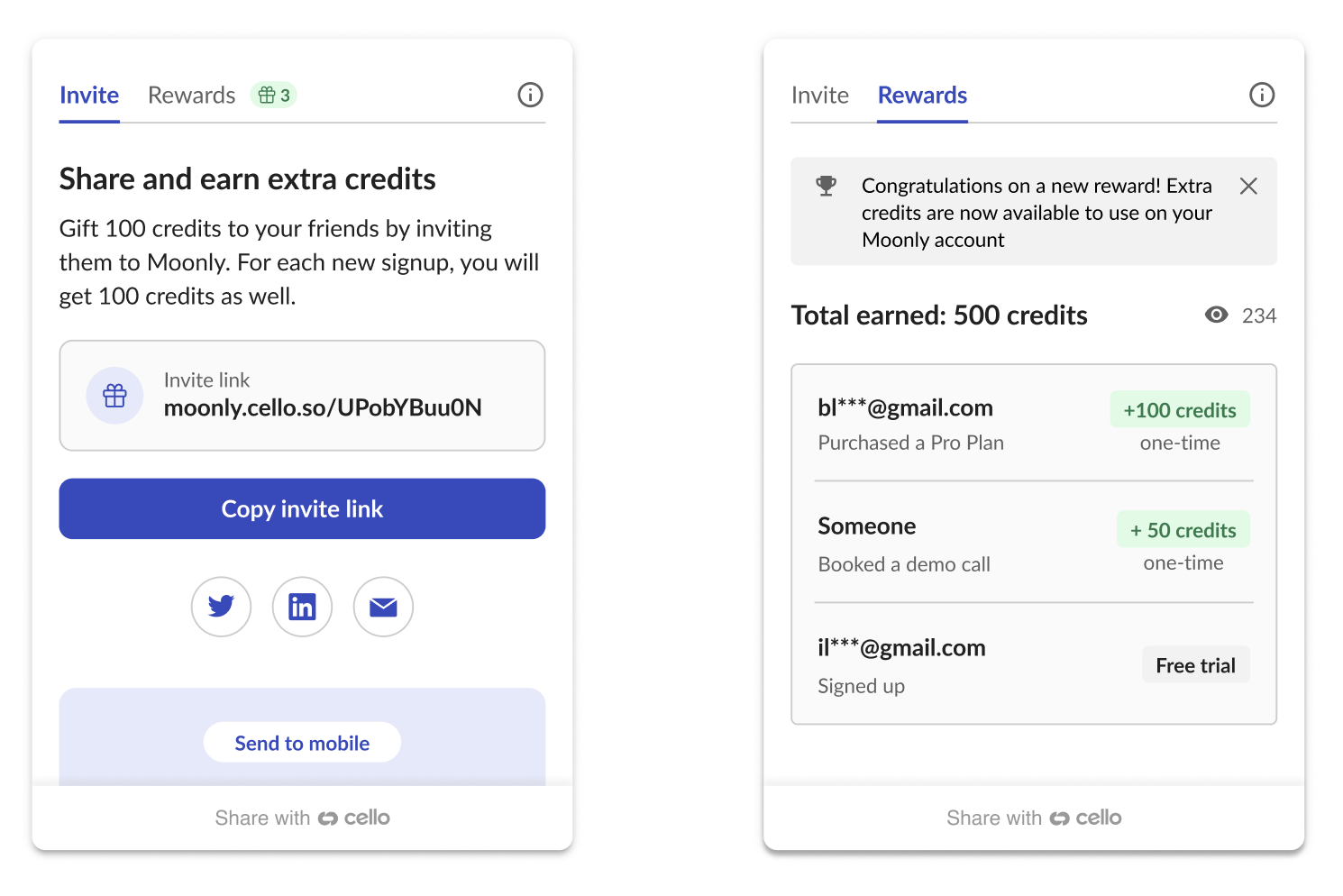
An in-product reward is a non-monetary reward that can be used to incentivize users within the product itself. Instead of rewarding a referrer with cash, you can reward successful referrals with free credits for your product. You then make credits redeemable for discounts or to unlock other functionality within your product.
## How does it work?
1. Referrers will see a campaign in the Cello Referral Component that shows them what they can earn per referral. (e.g., Earn up to 100 extra credits per referral)
2. If a referral code (`ucc`) was successfully used and attributed Cello will calculate a reward based on the agreed terms and inform the referrer about it.
3. Cello provides a **Rewards API** to obtain the latest rewards for all your referrers.
4. You process the rewards for your users.
 ## Rewards API
### Domain base URL's
Use the Domain base URL that corresponds with the environment.
| Endpoint URL | Environment |
| ------------------------------- | ------------- |
| `https://api.sandbox.cello.so/` | Dev and Stage |
| `https://api.cello.so/` | Prod |
### Authenticating the API
To use the code validation API, you need to authenticate the request using an `accessToken`which is passed in Authorization request header
To obtain them, you will need the `accessKeyId` and `secretAccessKey`, which you can find in your Cello Portal.
#### Obtain accessToken & refreshToken
```javascript theme={null}
curl -X POST https://api.cello.so/token \
-H "Content-Type: application/json" \
-d '{ "accessKeyId": "", "secretAccessKey": "" }'
{
"accessToken": "",
"expiresIn": 18000,
"refreshToken": ""
}
Status Code 201
```
#### Refresh accessToken
```json theme={null}
curl -X POST https://api.cello.so/token \
-H "Content-Type: application/json" \
-d '{ "refreshToken": "" }'
{
"accessToken": "",
"expiresIn": 18000
}
Status Code 201
```
### Receive the rewards (GET)
Once you have the `accessToken`, use the following request to get the latest rewards.
```json theme={null}
curl -X GET https://api.cello.so/rewards? \
-H "Content-Type: application/json" \
-H "Authorization: Bearer " \
[
{
"id": "629022865933390159",
"productUserId": "cb5ad15c-739d-43b4-8aae-aad591ac1601",
"rewardAmount": 1500,
"rewardUnit": "USD",
"rewardType": "IN_PRODUCT_REWARD",
"rewardStatus": "CREATED",
"rewardCreatedTs": "2023-04-25T02:09:21.920Z"
}
]
Status Code 200
```
### Filtering
You can filter by certain parameters to adopt the response based on your needs.
| Parameter | Type | Example |
| ------------- | ------ | -------------------------------------- |
| startDate | String | "2022-12-02" |
| endDate | String | "2023-02-02" |
| productUserId | String | "bd5ef72a-3b88-45fa-9377-9f8e354906b5" |
**Example request url with a filter:**
```json theme={null}
curl -X GET https://api.cello.so/rewards? \
startDate="2022-12-02"&endDate="2023-02-02" \
productUserId="bd5ef72a-3b88-45fa-9377-9f8e354906b5" \
-H "Content-Type: application/json" \
-H "Authorization: Bearer " \
```
### Update Rewards (PATCH)
To report back to Cello if you processed or assigned a reward to a user, you can use our PATCH endpoint. You can update multiple entries at a time. As a reference, use the IDs of the entries from the GET response.
```javascript theme={null}
curl -X PATCH https://api.cello.so/rewards? \
-H "Content-Type: application/json" \
-H "Authorization: Bearer " \
-d {
"ids":["629022865933390159", "929022865933390159"],
"change":{
"rewardStatus":"PROCESSED"
}
}
Status Code 200
```
### Possible reward status
| Status | Description |
| --------- | ----------------------------------------------------------------- |
| CREATED | Reward was created |
| CANCELED | Reward was canceled due to a reason reported by you as a customer |
| REJECTED | Reward was rejected, for example, due to a fraud reason |
| PROCESSED | Reward was already processed and applied by the customer |
## Rewards API
### Domain base URL's
Use the Domain base URL that corresponds with the environment.
| Endpoint URL | Environment |
| ------------------------------- | ------------- |
| `https://api.sandbox.cello.so/` | Dev and Stage |
| `https://api.cello.so/` | Prod |
### Authenticating the API
To use the code validation API, you need to authenticate the request using an `accessToken`which is passed in Authorization request header
To obtain them, you will need the `accessKeyId` and `secretAccessKey`, which you can find in your Cello Portal.
#### Obtain accessToken & refreshToken
```javascript theme={null}
curl -X POST https://api.cello.so/token \
-H "Content-Type: application/json" \
-d '{ "accessKeyId": "", "secretAccessKey": "" }'
{
"accessToken": "",
"expiresIn": 18000,
"refreshToken": ""
}
Status Code 201
```
#### Refresh accessToken
```json theme={null}
curl -X POST https://api.cello.so/token \
-H "Content-Type: application/json" \
-d '{ "refreshToken": "" }'
{
"accessToken": "",
"expiresIn": 18000
}
Status Code 201
```
### Receive the rewards (GET)
Once you have the `accessToken`, use the following request to get the latest rewards.
```json theme={null}
curl -X GET https://api.cello.so/rewards? \
-H "Content-Type: application/json" \
-H "Authorization: Bearer " \
[
{
"id": "629022865933390159",
"productUserId": "cb5ad15c-739d-43b4-8aae-aad591ac1601",
"rewardAmount": 1500,
"rewardUnit": "USD",
"rewardType": "IN_PRODUCT_REWARD",
"rewardStatus": "CREATED",
"rewardCreatedTs": "2023-04-25T02:09:21.920Z"
}
]
Status Code 200
```
### Filtering
You can filter by certain parameters to adopt the response based on your needs.
| Parameter | Type | Example |
| ------------- | ------ | -------------------------------------- |
| startDate | String | "2022-12-02" |
| endDate | String | "2023-02-02" |
| productUserId | String | "bd5ef72a-3b88-45fa-9377-9f8e354906b5" |
**Example request url with a filter:**
```json theme={null}
curl -X GET https://api.cello.so/rewards? \
startDate="2022-12-02"&endDate="2023-02-02" \
productUserId="bd5ef72a-3b88-45fa-9377-9f8e354906b5" \
-H "Content-Type: application/json" \
-H "Authorization: Bearer " \
```
### Update Rewards (PATCH)
To report back to Cello if you processed or assigned a reward to a user, you can use our PATCH endpoint. You can update multiple entries at a time. As a reference, use the IDs of the entries from the GET response.
```javascript theme={null}
curl -X PATCH https://api.cello.so/rewards? \
-H "Content-Type: application/json" \
-H "Authorization: Bearer " \
-d {
"ids":["629022865933390159", "929022865933390159"],
"change":{
"rewardStatus":"PROCESSED"
}
}
Status Code 200
```
### Possible reward status
| Status | Description |
| --------- | ----------------------------------------------------------------- |
| CREATED | Reward was created |
| CANCELED | Reward was canceled due to a reason reported by you as a customer |
| REJECTED | Reward was rejected, for example, due to a fraud reason |
| PROCESSED | Reward was already processed and applied by the customer |