> ## Documentation Index
> Fetch the complete documentation index at: https://docs.cello.so/llms.txt
> Use this file to discover all available pages before exploring further.
# Setting Up Campaigns
> Cello makes it easy to automatically notify and reward your users for making successful referrals
Cello makes it easy to automatically notify and reward your users for making successful referrals. This is done by creating **campaigns** with specific **payout rules.**
Your rules are then automated based on confirmation of **events** and **purchases.** These can be based on transactions for referred contacts, but can also be based on free trials, demos, or events you define.
## Example: Recurring Rewards Encourage Continuous Sharing
In this typical example, a referrer is rewarded **50%** for each referral up to a **\$100 maximum reward cap** with a **\$5 signup bonus**. The referee initially purchases a **\$10** subscription for herself, and then **upgrades her team** in the following month.
The referrer earns recurring rewards with each payment until they reach the **maximum cap of \$100** for this referral. In this example, that happens to take 6 months based on the referred user's spending. These regular rewards encourage further sharing.
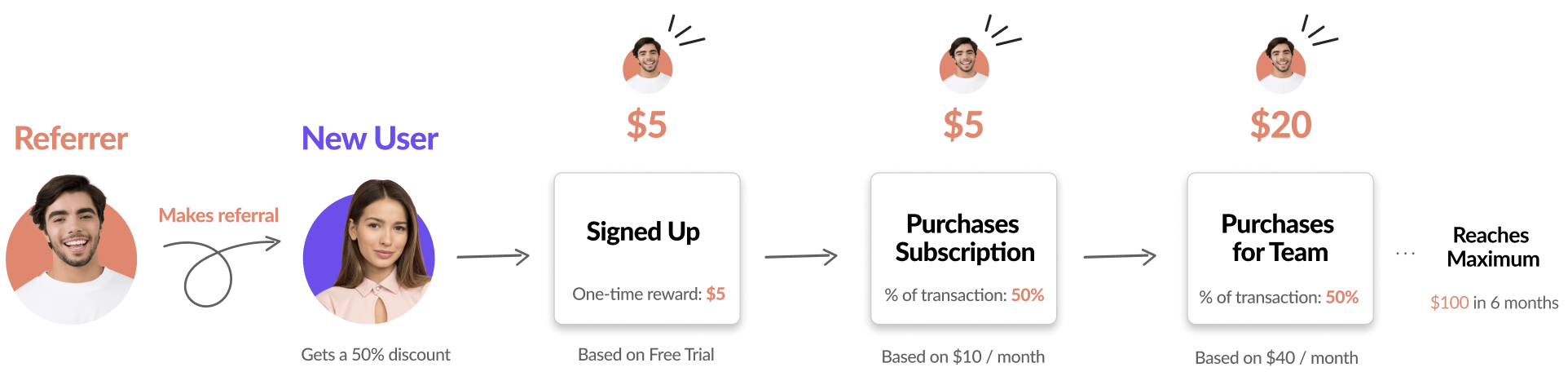 It's important to note that the **new user also receives an exclusive 50% discount** from the referrer when purchasing for the first 6 months. Our research shows that **symmetric rewards** (i.e., the referrer and the referred have incentives of similar values) work best because referrers invest their social capital when recommending a product; having similar incentives makes the referral look fair to both parties involved.
## Campaign Settings
All campaigns must have one or more rules to reward referrers for the referrals they made. **Campaign** settings can be configured in the [Cello portal in the Setup section](https://portal.cello.so/setup/campaigns).
It's important to note that the **new user also receives an exclusive 50% discount** from the referrer when purchasing for the first 6 months. Our research shows that **symmetric rewards** (i.e., the referrer and the referred have incentives of similar values) work best because referrers invest their social capital when recommending a product; having similar incentives makes the referral look fair to both parties involved.
## Campaign Settings
All campaigns must have one or more rules to reward referrers for the referrals they made. **Campaign** settings can be configured in the [Cello portal in the Setup section](https://portal.cello.so/setup/campaigns).
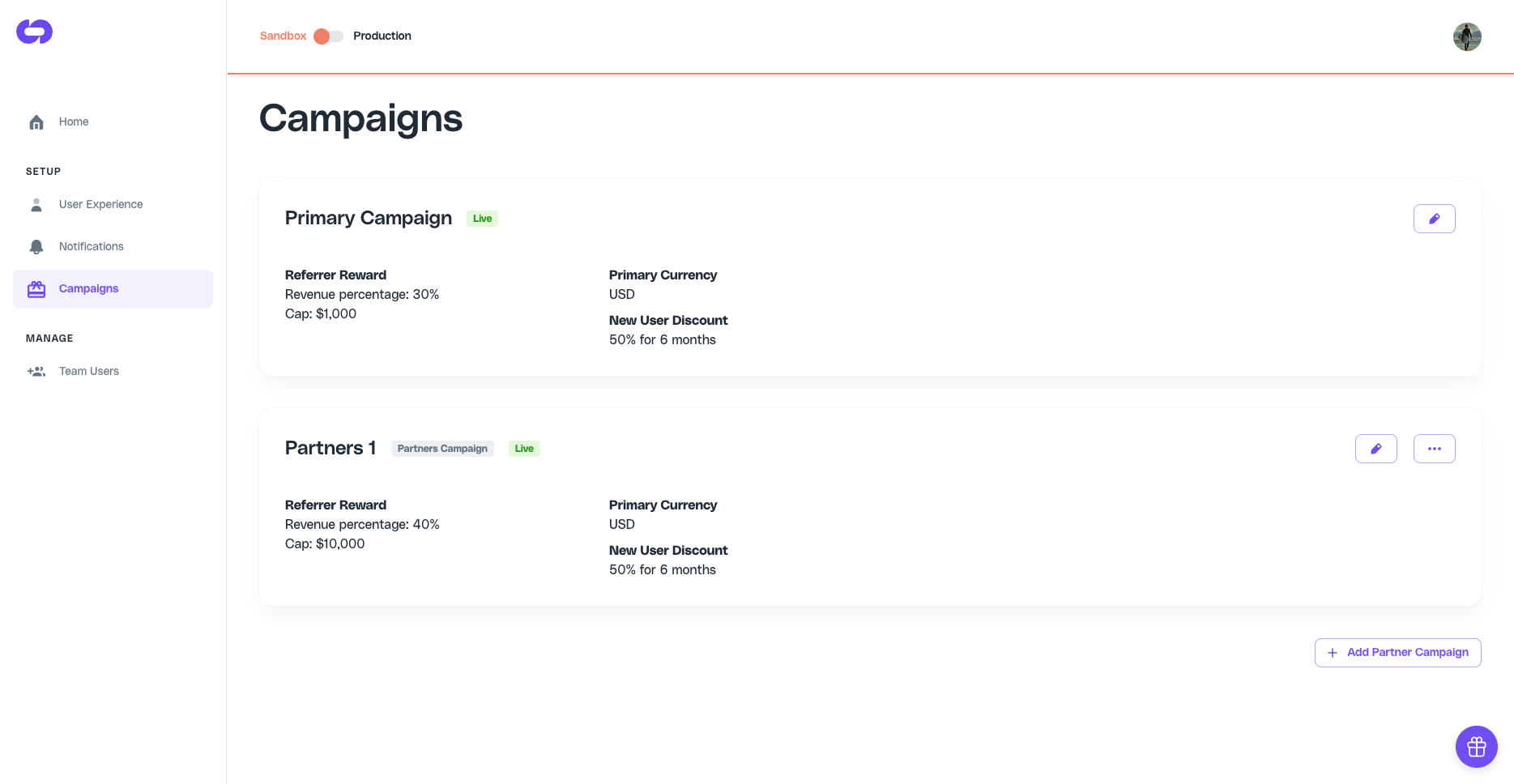 Rewards are typically based on a **percentage** of the transaction amount generated when new customers make a payment up to a **maximum** amount per referral. Additional rewards can also be set on other key events such as **signups** and **purchases** to help encourage more engagement and sharing.
| **Section** | **Rule** | **Description** |
| --------------- | ----------------------------- | --------------------------------------------------------------------------------------------------------------------------------------------------------------------------------- |
| Referrer Reward | Percentage of revenue | Percentage of attributed new revenue that will be paid as a reward |
| Referrer Reward | Maximum reward (per referrer) | The maximum reward that can be earned per referral |
| Referrer Reward | Bonus rewards | Additional rewards that can be set for signups or purchases to encourage more sharing. Bonus rewards are also recommended for products with longer free to paid conversion times. |
| New User Reward | Percent Discount and Months | The new user discount to encourage additional sharing. |
Cello uses the new user reward settings to display to the new user on your signup screens. You will need to take additional steps to implement the discount at the point of purchase. See the docs [here](referee-rewards-in-stripe) for more information.
### Running promotional campaigns
Cello supports one active campaign at a time. To run a time-limited promotion (e.g., Black Friday):
1. Adjust your reward percentages and new user discounts in [Campaign Settings](https://portal.cello.so/setup/campaigns)
2. Revert the settings when the promotion ends
There's no automated scheduling, so set a reminder to update your settings before and after the promotional period.
Rewards are typically based on a **percentage** of the transaction amount generated when new customers make a payment up to a **maximum** amount per referral. Additional rewards can also be set on other key events such as **signups** and **purchases** to help encourage more engagement and sharing.
| **Section** | **Rule** | **Description** |
| --------------- | ----------------------------- | --------------------------------------------------------------------------------------------------------------------------------------------------------------------------------- |
| Referrer Reward | Percentage of revenue | Percentage of attributed new revenue that will be paid as a reward |
| Referrer Reward | Maximum reward (per referrer) | The maximum reward that can be earned per referral |
| Referrer Reward | Bonus rewards | Additional rewards that can be set for signups or purchases to encourage more sharing. Bonus rewards are also recommended for products with longer free to paid conversion times. |
| New User Reward | Percent Discount and Months | The new user discount to encourage additional sharing. |
Cello uses the new user reward settings to display to the new user on your signup screens. You will need to take additional steps to implement the discount at the point of purchase. See the docs [here](referee-rewards-in-stripe) for more information.
### Running promotional campaigns
Cello supports one active campaign at a time. To run a time-limited promotion (e.g., Black Friday):
1. Adjust your reward percentages and new user discounts in [Campaign Settings](https://portal.cello.so/setup/campaigns)
2. Revert the settings when the promotion ends
There's no automated scheduling, so set a reminder to update your settings before and after the promotional period.