> ## Documentation Index
> Fetch the complete documentation index at: https://docs.cello.so/llms.txt
> Use this file to discover all available pages before exploring further.
# Optimize signup conversion
> Recommendations to optimize the signup conversion of referred users
Improve signup conversion for referred users with personalized experiences. These best practices can significantly increase conversion rates.
1. **Show personalization and discounts** - Display the referrer's name and discount offer on your website
2. **Custom referral landing page** - Create a dedicated landing page and disable the Cello-hosted page
## **Show personalization and discounts**
\~50% higher signup rate
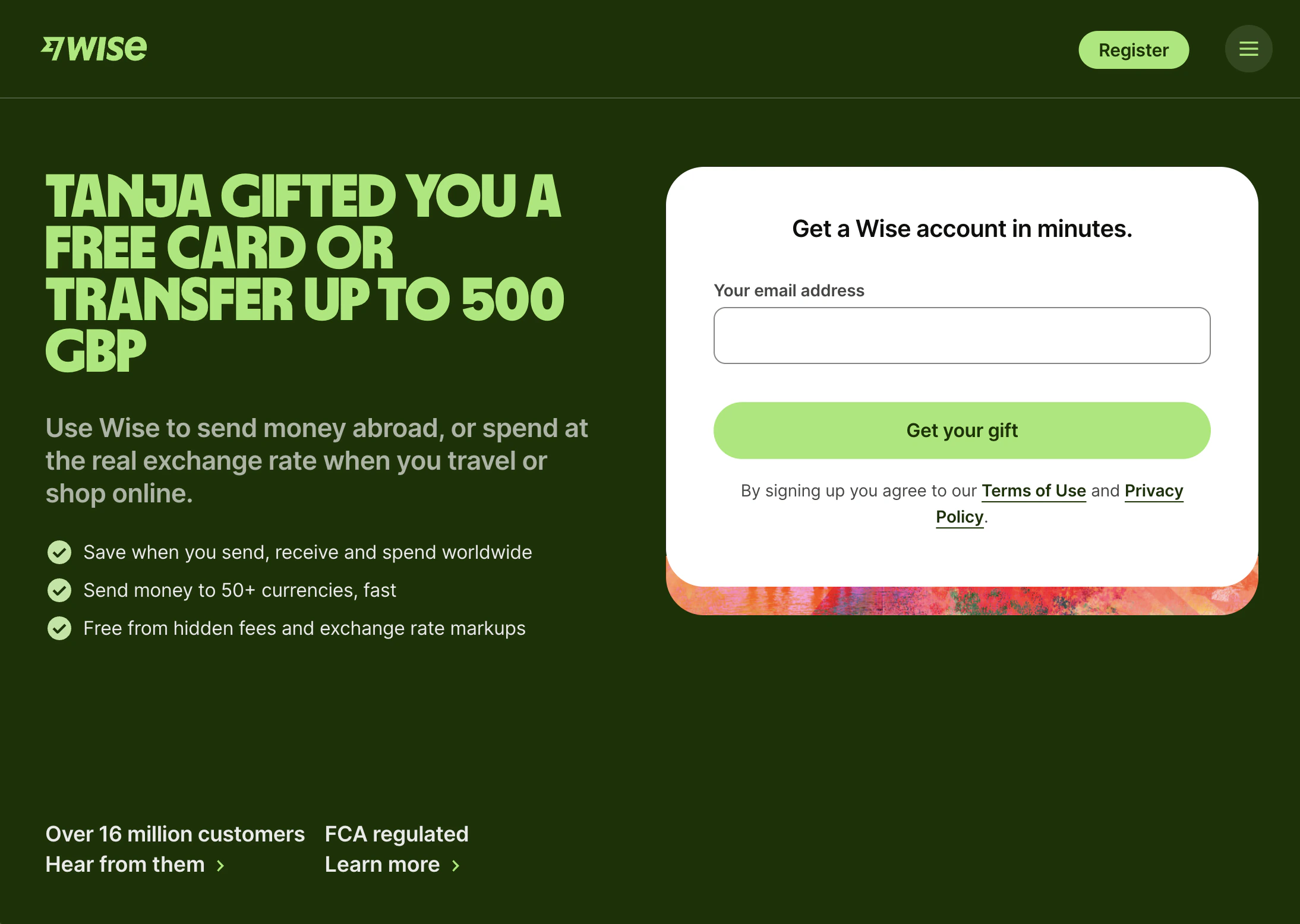
When a referred user lands on your website, showing them who referred them and what discount they're getting makes the offer feel personal.
They're not seeing a generic signup page. They're seeing a recommendation from someone they know, with a clear incentive to act.
 ### How it works
1. **Personalization**: Referrer names can be integrated into your website or into Cello's new user banner. The name is provided via the Cello boot inside your product.
2. **Full integration**: Your developer can set up personalization directly in your website based on URL parameters and cookie information provided by Cello.
3. **New user banner**: Cello can activate a banner on your website to display the offer to referred users. Personalization is optional.
4. **Disable Cello-hosted landing page**: The Cello hosted-landing page can be disabled since discount information is displayed on your website. One conversion step is eliminated.
### How to implement
Your developer can add personalization in two ways:
* **Inline personalization**: Use the [Cello Attribution script](/sdk/client-side/attribution-js-usage) to fetch referrer info and display it in your page headlines, banners, or CTAs
* **New user banner**: Enable the no-code [Cello banner](/guides/user-experience/personalizing-referrals#add-personalization-with-the-new-user-banner) that automatically appears for referred visitors
To fetch referrer information for personalization, use the [referral code API](/api-reference/referral-codes/fetch-referral-code-info).
For detailed implementation guides, see:
* [Personalizing referrals](/guides/user-experience/personalizing-referrals)
* [New user discounts](/guides/user-experience/new-user-discounts)
### Examples
🔗 [Wise referral program with personalization](https://wise.com/invite/dic/tanjam2?utm_source=desktop-invite-tab-copylink\&utm_medium=invite\&utm_campaign=\&utm_content=\&referralCode=tanjam2)
🔗 [MeetGeek with personalized new user banner](https://meetgeek.ai/meetgeek-referral?productId=app.meetgeek.ai\&ucc=vTlj7ne4Fkf\&n=VG9iaWFz)
***
## **Custom referral landing page**
\~2x higher signup rate
Instead of sending referred users to the Cello-hosted landing page, send them directly to a page you control. You can tailor the messaging, show your product's value, and get them to signup without an extra redirect. Fewer steps can lead to less drop-offs.
### Key building blocks
1. **Personalized headline** - Include the referrer's name
2. **New user discount** - Make the discount clear and visible
3. **Hero message** - Your key value proposition
4. **Product visual** - Show what the product does
5. **CTA** - Direct signup with the offer highlighted
6. **Social proof** - G2/Capterra badges, Trustpilot, customer logos
7. **Customer quotes** - Real testimonials
8. **FAQs** - Answer common questions
**Leverage existing assets** - Do you already have an optimized landing page for ads? Reuse the content and directly include the signup form for the fastest path to success.
### How to set up
1. Create your landing page using the building blocks above
2. Go to [New User Experience setup](https://portal.cello.so/setup/new-user-experience) in Cello Portal
3. Switch to **Custom landing page** and add your URL
For a detailed guide, see [Optimizing referral landing pages](/guides/user-experience/optimizing-landing-pages).
### Examples
🔗 [Typeform landing page](https://www.typeform.com/refer-a-friend/invite/?utm_medium=referrerlink\&utm_source=typeform\&utm_campaign=refer_a_friend_cello\&productId=admin.typeform.com\&ucc=ARn30TGHAsq)
🔗 [Superhuman landing page with personalization](https://superhuman.com/refer?utm_source=product\&utm_medium=signature\&utm_campaign=bob%40bobinsky.me)
🔗 [Heyflow standalone landing page](https://get.heyflow.app/referral-lp?productId=go.heyflow.app\&utm_source=cello\&utm_medium=referral\&utm_campaign=Cello-RS20-C1000-D50\&ucc=2dRGoRjgP7A#start)
🔗 [Cello standalone landing page with direct signup](https://cello.so/invitation/)
### How it works
1. **Personalization**: Referrer names can be integrated into your website or into Cello's new user banner. The name is provided via the Cello boot inside your product.
2. **Full integration**: Your developer can set up personalization directly in your website based on URL parameters and cookie information provided by Cello.
3. **New user banner**: Cello can activate a banner on your website to display the offer to referred users. Personalization is optional.
4. **Disable Cello-hosted landing page**: The Cello hosted-landing page can be disabled since discount information is displayed on your website. One conversion step is eliminated.
### How to implement
Your developer can add personalization in two ways:
* **Inline personalization**: Use the [Cello Attribution script](/sdk/client-side/attribution-js-usage) to fetch referrer info and display it in your page headlines, banners, or CTAs
* **New user banner**: Enable the no-code [Cello banner](/guides/user-experience/personalizing-referrals#add-personalization-with-the-new-user-banner) that automatically appears for referred visitors
To fetch referrer information for personalization, use the [referral code API](/api-reference/referral-codes/fetch-referral-code-info).
For detailed implementation guides, see:
* [Personalizing referrals](/guides/user-experience/personalizing-referrals)
* [New user discounts](/guides/user-experience/new-user-discounts)
### Examples
🔗 [Wise referral program with personalization](https://wise.com/invite/dic/tanjam2?utm_source=desktop-invite-tab-copylink\&utm_medium=invite\&utm_campaign=\&utm_content=\&referralCode=tanjam2)
🔗 [MeetGeek with personalized new user banner](https://meetgeek.ai/meetgeek-referral?productId=app.meetgeek.ai\&ucc=vTlj7ne4Fkf\&n=VG9iaWFz)
***
## **Custom referral landing page**
\~2x higher signup rate
Instead of sending referred users to the Cello-hosted landing page, send them directly to a page you control. You can tailor the messaging, show your product's value, and get them to signup without an extra redirect. Fewer steps can lead to less drop-offs.
### Key building blocks
1. **Personalized headline** - Include the referrer's name
2. **New user discount** - Make the discount clear and visible
3. **Hero message** - Your key value proposition
4. **Product visual** - Show what the product does
5. **CTA** - Direct signup with the offer highlighted
6. **Social proof** - G2/Capterra badges, Trustpilot, customer logos
7. **Customer quotes** - Real testimonials
8. **FAQs** - Answer common questions
**Leverage existing assets** - Do you already have an optimized landing page for ads? Reuse the content and directly include the signup form for the fastest path to success.
### How to set up
1. Create your landing page using the building blocks above
2. Go to [New User Experience setup](https://portal.cello.so/setup/new-user-experience) in Cello Portal
3. Switch to **Custom landing page** and add your URL
For a detailed guide, see [Optimizing referral landing pages](/guides/user-experience/optimizing-landing-pages).
### Examples
🔗 [Typeform landing page](https://www.typeform.com/refer-a-friend/invite/?utm_medium=referrerlink\&utm_source=typeform\&utm_campaign=refer_a_friend_cello\&productId=admin.typeform.com\&ucc=ARn30TGHAsq)
🔗 [Superhuman landing page with personalization](https://superhuman.com/refer?utm_source=product\&utm_medium=signature\&utm_campaign=bob%40bobinsky.me)
🔗 [Heyflow standalone landing page](https://get.heyflow.app/referral-lp?productId=go.heyflow.app\&utm_source=cello\&utm_medium=referral\&utm_campaign=Cello-RS20-C1000-D50\&ucc=2dRGoRjgP7A#start)
🔗 [Cello standalone landing page with direct signup](https://cello.so/invitation/)