> ## Documentation Index
> Fetch the complete documentation index at: https://docs.cello.so/llms.txt
> Use this file to discover all available pages before exploring further.
# Increase Discoverability Of Your Referral Program
> Learn how to drive organic activation of your referral program with high discoverability
To drive organic activation for your referral program, high discoverability is key.
1. **1st-level visibility** - Creating basic awareness for your referral program with a launcher that is always visible is an absolute must-have to see success.
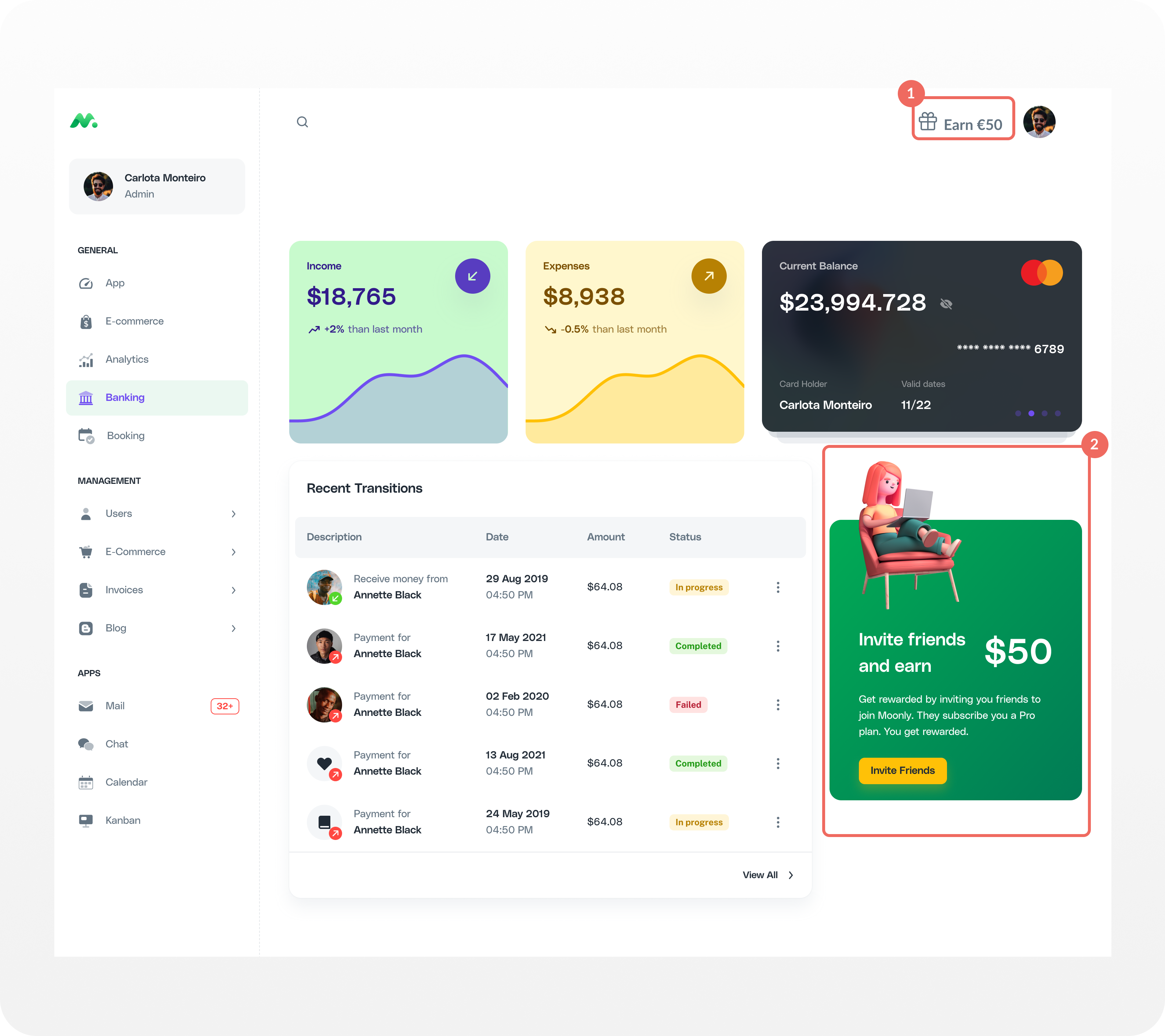
2. **Multiple referral launchers** - Add launchers in positions where they naturally attract user attention, the biggest lever for recurring traction
 ## **1st-level visibility**
+4.4x activation rate
+21 performance points
Display the **CTA link in the navigation menu at 1st-level**. When the link is displayed in a prominent position on screen, it can improve activation significantly. **Its positioning is crucial.** If the CTA is placed in a secondary menu, the activation rate is drastically reduced (\<1%).
### How to implement?
1. Choose a 1st level menu position and give it a unique html identifier.
2. Decide what your CTA is. We advice [adding a reward amount](https://docs.cello.so/referral-component/custom-launcher#add-reward-in-launcher) as it **increases activation by 1.5x** and give you score uplift by **6 performance points**.
3. Set the Custom Launcher Selector in [Cello Portal -> User Experience](https://portal.cello.so/setup/user-experience) to match your element identifier.
For a step-by-step guide, go to [Custom Launcher documentation](/referral-component/custom-launcher).
## **Multiple referral launchers**
+8.8x activation rate
+14 performance points
Integrating multiple launchers into your product pages can significantly increase activation, especially on pages where users are **primed for sharing such as upgrades, subscriptions, sharing content, and inviting team members.** The benefits of adding a custom launcher is that you can craft an activation message specific to that particular context.
### How to implement?
You can add a custom button anywhere in your UI and have it open the Referral Component.
1. Identify where to add the button together with your growth manager and UX designer.
2. Use [window.Cello("open")](/sdk/client-side/cello-js-usage#open-destination) method to open the Referral Component when the button is clicked.
```javascript theme={null}
window.Cello("open");
```
## Performance impact
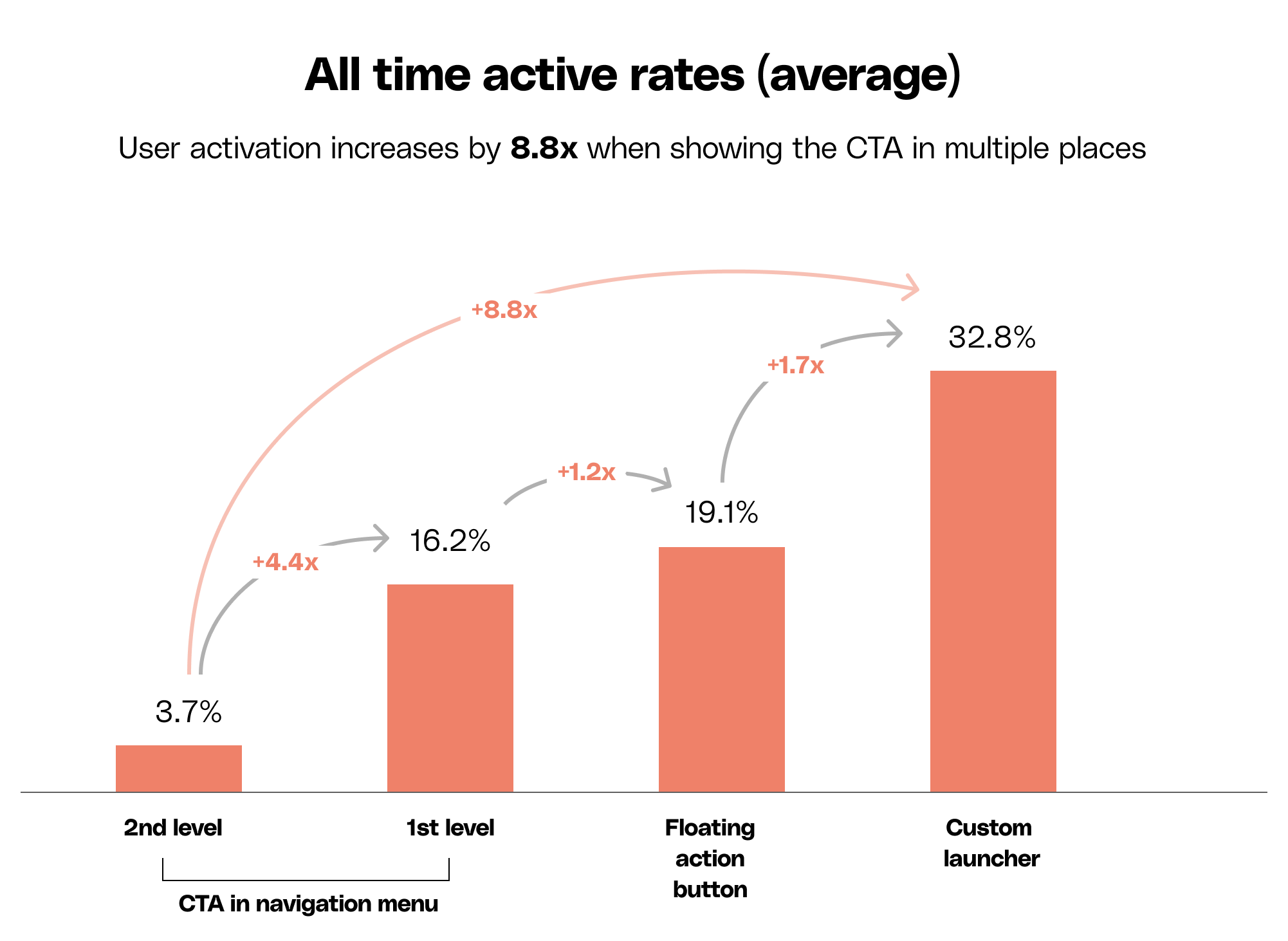
The chart below shows all Cello average active users rates. User activation increases by 8.8x when applying these 2 recommendations.
## **1st-level visibility**
+4.4x activation rate
+21 performance points
Display the **CTA link in the navigation menu at 1st-level**. When the link is displayed in a prominent position on screen, it can improve activation significantly. **Its positioning is crucial.** If the CTA is placed in a secondary menu, the activation rate is drastically reduced (\<1%).
### How to implement?
1. Choose a 1st level menu position and give it a unique html identifier.
2. Decide what your CTA is. We advice [adding a reward amount](https://docs.cello.so/referral-component/custom-launcher#add-reward-in-launcher) as it **increases activation by 1.5x** and give you score uplift by **6 performance points**.
3. Set the Custom Launcher Selector in [Cello Portal -> User Experience](https://portal.cello.so/setup/user-experience) to match your element identifier.
For a step-by-step guide, go to [Custom Launcher documentation](/referral-component/custom-launcher).
## **Multiple referral launchers**
+8.8x activation rate
+14 performance points
Integrating multiple launchers into your product pages can significantly increase activation, especially on pages where users are **primed for sharing such as upgrades, subscriptions, sharing content, and inviting team members.** The benefits of adding a custom launcher is that you can craft an activation message specific to that particular context.
### How to implement?
You can add a custom button anywhere in your UI and have it open the Referral Component.
1. Identify where to add the button together with your growth manager and UX designer.
2. Use [window.Cello("open")](/sdk/client-side/cello-js-usage#open-destination) method to open the Referral Component when the button is clicked.
```javascript theme={null}
window.Cello("open");
```
## Performance impact
The chart below shows all Cello average active users rates. User activation increases by 8.8x when applying these 2 recommendations.