> ## Documentation Index
> Fetch the complete documentation index at: https://docs.cello.so/llms.txt
> Use this file to discover all available pages before exploring further.
# Program Performance and ARR
> Understand how Cello calculates Annual Recurring Revenue to measure your referral program's performance
Cello tracks **Net New Annual Recurring Revenue (ARR)** - the annualized value of recurring revenue from referred customers. ARR is calculated from **invoice paid events** rather than looking at subscription objects in Stripe or Chargebee. This approach reflects actual revenue collected and works consistently across different billing systems.
## Why invoice-based?
Using invoice paid events means you see real revenue collected, not theoretical subscription values. It also handles complex scenarios like prorations, upgrades, and plan changes automatically - without requiring special configuration.
## Annualizing different billing intervals
Customers pay on different schedules, so Cello normalizes everything to an annual basis. This lets you compare the true value of different customers regardless of how they chose to pay.
Here are examples of how subscription intervals are annualized:
* A \$50 **monthly** subscription becomes \$600 ARR
* A \$150 **quarterly** subscription becomes \$600 ARR
* A \$600 **yearly** subscription stays at \$600 ARR
* A \$1,200 two-year **biannual** contract becomes \$600 ARR
## Rolling forward recurring revenue
When a customer pays for a yearly subscription in January, that revenue represents value for the entire year. Cello "rolls forward" non-monthly subscriptions so your monthly ARR charts reflect ongoing revenue, not just the months when invoices happen to be paid.
This also means churn is detected automatically - if a renewal invoice doesn't arrive when expected, the ARR stops being rolled forward and drops off your charts.
### What this means for your dashboard
The ARR shown in Cello represents actual paid revenue from referred customers, annualized. When comparing to your billing system's total ARR, remember that Cello shows only **attributed ARR** - revenue from customers who came through your referral program.
## Handling real-world billing scenarios
Cello automatically adjusts for common situations:
* **Late invoicing** – If an invoice comes in a few days late (within 7 days), it's attributed to the expected month to prevent artificial dips or jumps in your charts
* **Early renewals** – Overlapping subscription periods are detected to avoid double-counting
* **Prorations** – When customers upgrade mid-cycle, proration credits are factored in to show the true subscription value
The Proration feature gradually being rolled out gradually across customers where applicable.
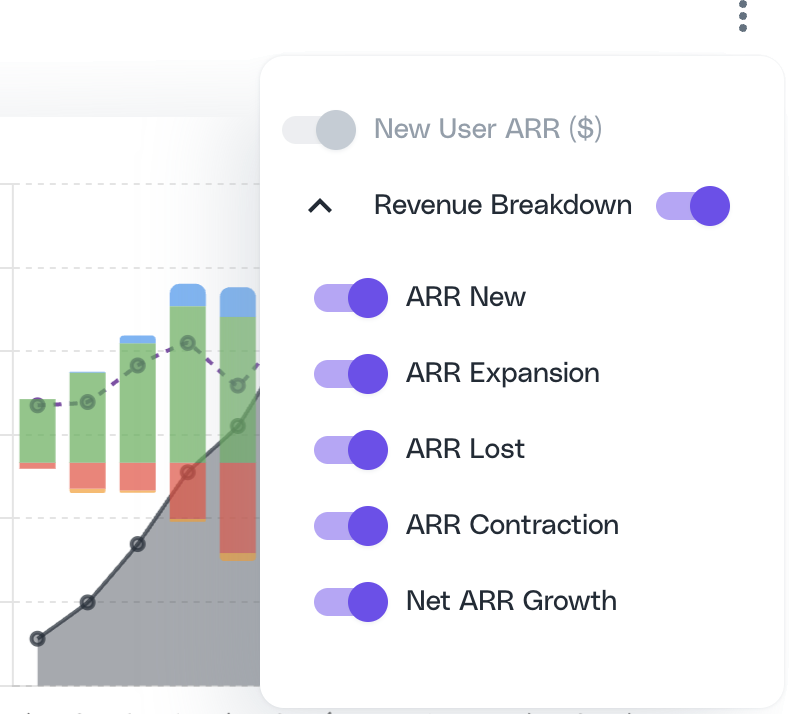
## ARR movement breakdown
Cello breaks down ARR changes into components so you can understand what's driving growth:
* **New ARR** – Revenue from newly referred customers
* **Expansion ARR** – Increases from existing customers upgrading or adding seats
* **Contraction ARR** – Decreases from downgrades
* **Churned ARR** – Lost revenue when customers cancel or don't renew
You can choose to enable or disable the ARR movement from the **New User ARR** chart menu.
 You can query program performance data from your own AI client using [`cello_get_program_metrics`](/mcp/tools#cello_get_program_metrics) via the [Cello MCP](/mcp/growth/use-cases).