> ## Documentation Index
> Fetch the complete documentation index at: https://docs.cello.so/llms.txt
> Use this file to discover all available pages before exploring further.
# Manual Attribution
> At Cello, we understand that there may be instances where automated referral attribution doesn't work as expected
At Cello, we understand that there may be instances where automated referral attribution doesn't work as expected. In such cases, our platform provides the flexibility to manually attribute referrals to ensure that your users receive the proper rewards for their efforts. This guide will walk you through the steps of manually attributing referrals within the Cello platform.
## When to Manually Attribute Referrals
1. **Technical Glitches**: If you encounter technical issues or glitches that prevent automated attribution, manual attribution allows you to override these challenges.
2. **User Disputes**: In cases where users claim they referred someone but the system did not capture it correctly, manual attribution provides a resolution path.
3. **Custom Scenarios**: For unique situations or custom referral setups, manual attribution offers a tailored solution.
Cello will only import transaction events linked to a manually attributed referral that is less than 30 days old. If a purchase is older, please reach out to the Cello support team.
## How to Manually Attribute Referrals
1. Customer gets `cello_ucc` of referrer from the Cello Portal and retrieves `cello_ucc` of referrer and `new_user_id` (former product\_user\_id) new user from their own system. If data cannot be found, please reach out to Cello.
2. Customer adds `cello_ucc` of referrer and `new_user_id` (former product\_user\_id) ID of new user to the existing Stripe customer of new user in Stripe.
3. Cello receives a `customer.updated` event from Stripe for the customer.
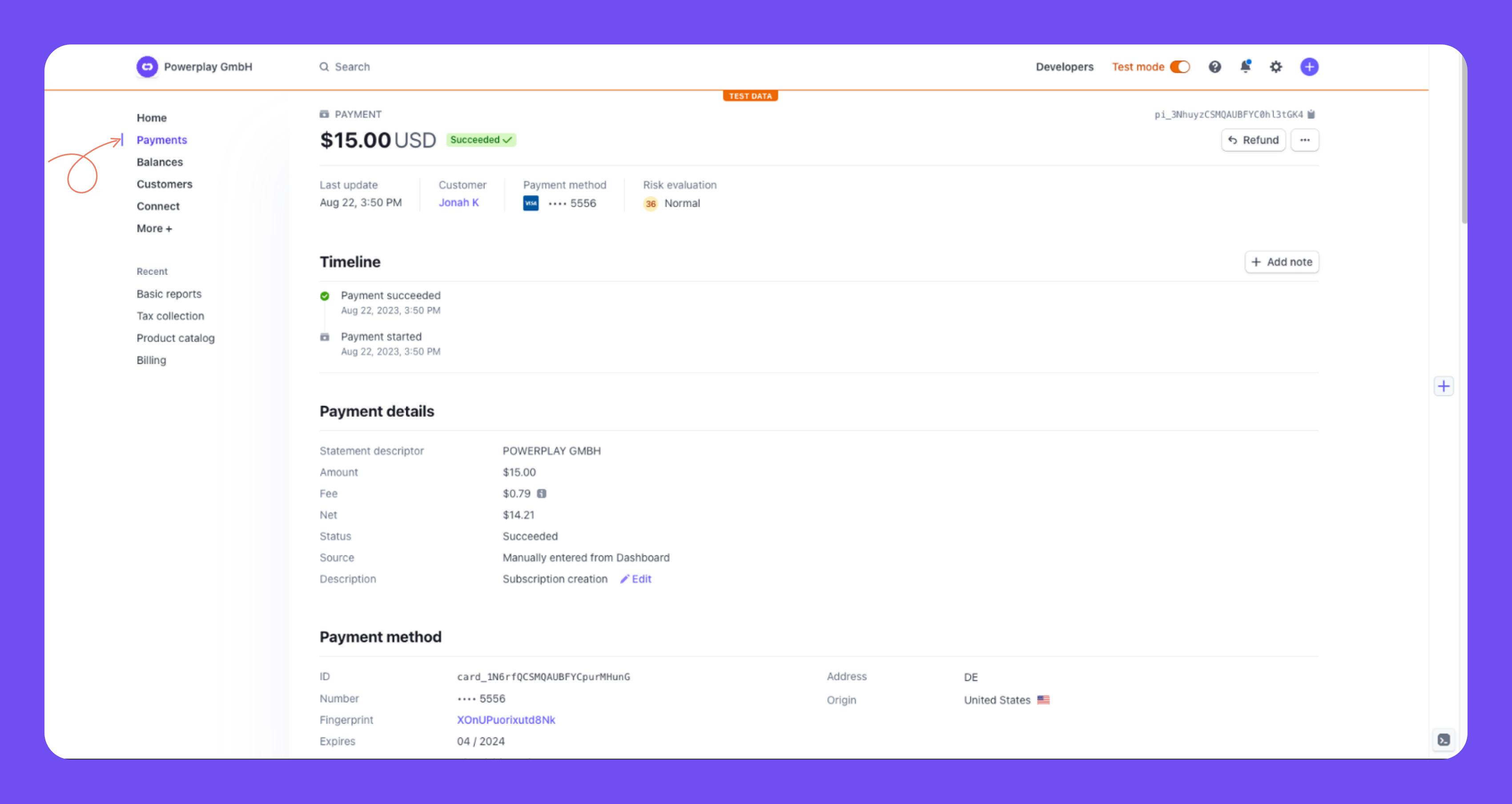
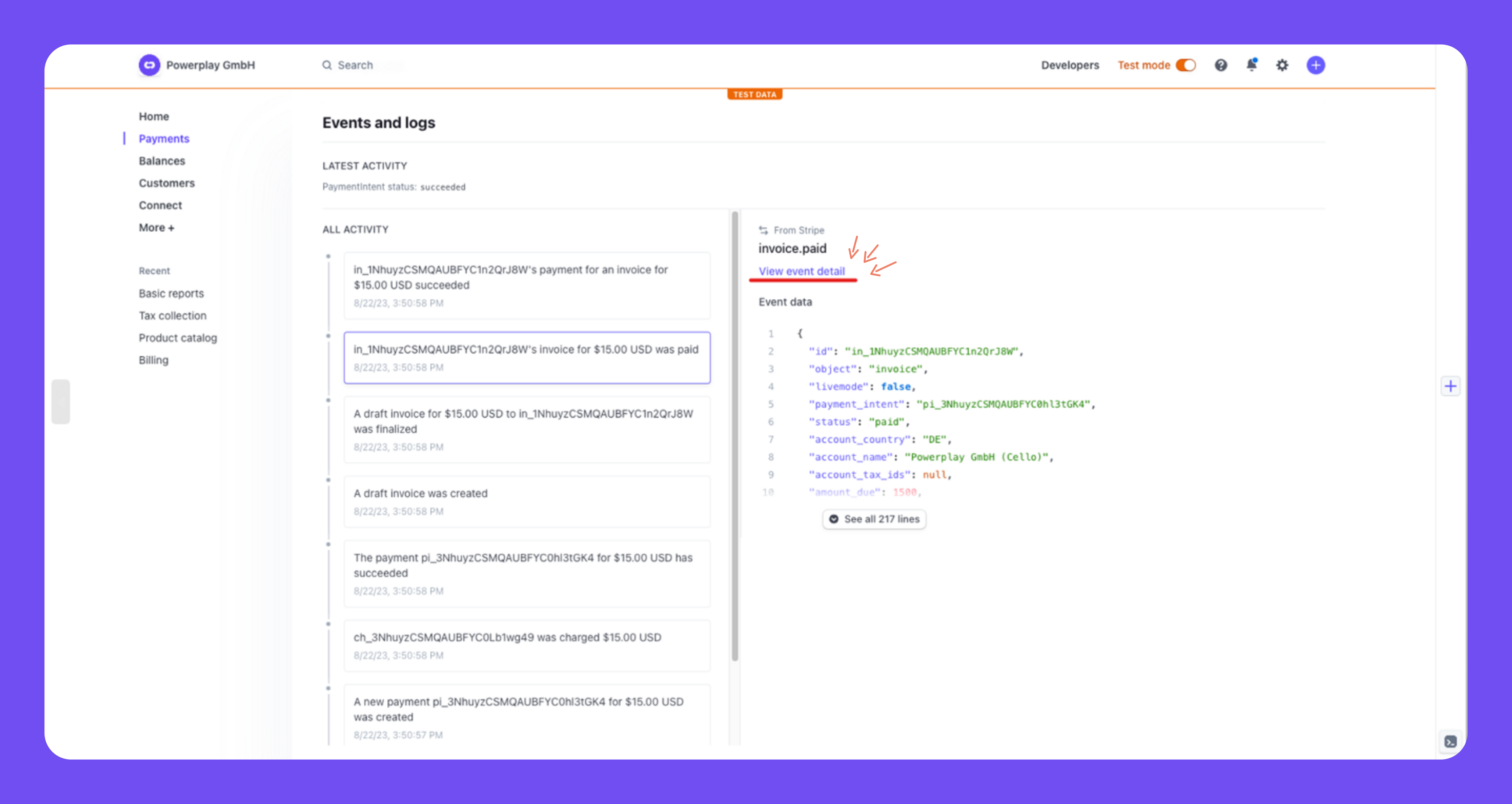
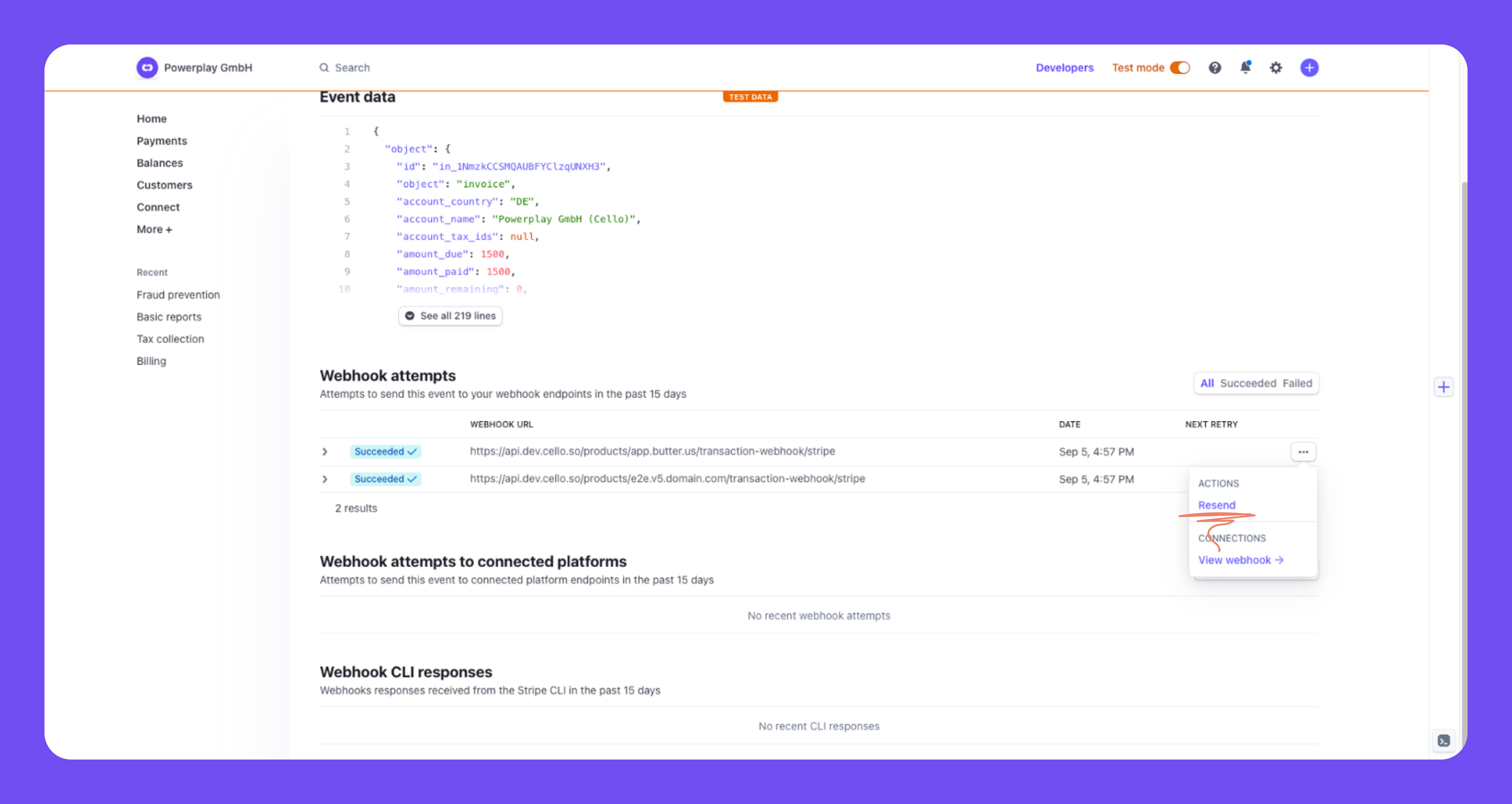
4. If there were already paid invoices, please resend the past `invoice.paid` events of the new user to Cello. This can be done by:
1. Go to the transaction
2. Select the `invoice.paid` event in the feed at the bottom
3. Click **View event details**
4. Check webhook attempts and resend the event
 1. Customer gets `cello_ucc` of referrer from the Cello Portal and retrieves `cello_ucc` of referrer and `new_user_id` (former product\_user\_id) ID of new user from their own system. If data cannot be found, please reach out to Cello.
2. In Chargebee, you add `cello_ucc` of referrer and `new_user_id` (former product\_user\_id) of new user to the metadata of the new user's Chargebee customer.
3. We automatically receive a `customer_changed` event via the webhook.
4. If there were already payments from the new user, you need to resend the past `payment_succeeded` events via the webhook. You can trigger this inside Chargebee manually.
1. Customer gets `cello_ucc` of referrer from the Cello Portal and retrieves `new_user_id` ID of new user from their own system. If data cannot be found, please reach out to Cello.
2. Customer resends the signup event manually via the Cello API. Fields are filled as in the automated Cello API events. The detailed documentation can be found in the [Example Requests](/api-reference/generic-events/send-event).
3. To add the parameters to the metadata in your payment gateway and resend past transactions, follow step 2-4 from the tab applicable for your payment gateway.
In case Cello API events can not be resend via API, manual reports can be provided to Cello. The reports need to contain equivalent information as the specific event. The report templates will be provided by Cello Support team.
1. Customer gets `cello_ucc` of referrer from the Cello Portal and retrieves `new_user_id` ID of new user from their own system. If data cannot be found, please reach out to Cello.
2. Customer resends the signup event manually via the Cello API. Fields are filled as in the automated Cello API events. The detailed documentation can be found in the [Example Requests](/api-reference/generic-events/send-event).
3. Customer resends past transaction events manually via the Cello API. Fields are filled as in the automated Cello API events. The detailed documentation can be found in the [Example Requests](/api-reference/generic-events/send-event).
In case Cello API events can not be resend via API, manual reports can be provided to Cello. The reports need to contain equivalent information as the specific event. The report templates will be provided by Cello Support team.
## Contact Support
If you encounter challenges or have questions during the manual attribution process, our support team is here to assist you. Reach out to us via [support@cello.so](mailto:support@cello.so) with detailed information about the referral in question, and we'll promptly assist you in resolving the matter.
1. Customer gets `cello_ucc` of referrer from the Cello Portal and retrieves `cello_ucc` of referrer and `new_user_id` (former product\_user\_id) ID of new user from their own system. If data cannot be found, please reach out to Cello.
2. In Chargebee, you add `cello_ucc` of referrer and `new_user_id` (former product\_user\_id) of new user to the metadata of the new user's Chargebee customer.
3. We automatically receive a `customer_changed` event via the webhook.
4. If there were already payments from the new user, you need to resend the past `payment_succeeded` events via the webhook. You can trigger this inside Chargebee manually.
1. Customer gets `cello_ucc` of referrer from the Cello Portal and retrieves `new_user_id` ID of new user from their own system. If data cannot be found, please reach out to Cello.
2. Customer resends the signup event manually via the Cello API. Fields are filled as in the automated Cello API events. The detailed documentation can be found in the [Example Requests](/api-reference/generic-events/send-event).
3. To add the parameters to the metadata in your payment gateway and resend past transactions, follow step 2-4 from the tab applicable for your payment gateway.
In case Cello API events can not be resend via API, manual reports can be provided to Cello. The reports need to contain equivalent information as the specific event. The report templates will be provided by Cello Support team.
1. Customer gets `cello_ucc` of referrer from the Cello Portal and retrieves `new_user_id` ID of new user from their own system. If data cannot be found, please reach out to Cello.
2. Customer resends the signup event manually via the Cello API. Fields are filled as in the automated Cello API events. The detailed documentation can be found in the [Example Requests](/api-reference/generic-events/send-event).
3. Customer resends past transaction events manually via the Cello API. Fields are filled as in the automated Cello API events. The detailed documentation can be found in the [Example Requests](/api-reference/generic-events/send-event).
In case Cello API events can not be resend via API, manual reports can be provided to Cello. The reports need to contain equivalent information as the specific event. The report templates will be provided by Cello Support team.
## Contact Support
If you encounter challenges or have questions during the manual attribution process, our support team is here to assist you. Reach out to us via [support@cello.so](mailto:support@cello.so) with detailed information about the referral in question, and we'll promptly assist you in resolving the matter.