> ## Documentation Index
> Fetch the complete documentation index at: https://docs.cello.so/llms.txt
> Use this file to discover all available pages before exploring further.
# Changelog
> Major updates and new features on the Cello platform
## Real-time analytics
Analytics data in the Cello Portal is now available in near real time. We upgraded our data infrastructure, so new activity in your referral program appears in your dashboards within moments.
Purchase conversions and rewards are processed separately and can still take more than 24 hours to appear, as they go through additional validation and calculation steps.
## MCP Growth Tools and Expanded Client Support
The Cello MCP now includes [growth manager tools](/mcp/growth/use-cases) alongside the existing developer tools. Query program performance, benchmark your metrics, surface top referrers, and get prioritized recommendations in natural language from your own AI client.
**What's new:**
* **Growth manager tools** — program metrics and trends, benchmarks, top referrers, and recommendations. See [use cases](/mcp/growth/use-cases) and [tools](/mcp/growth/tools).
* **Expanded client support** — Claude, Claude Code, Cursor, VS Code, Windsurf, Lovable, and more. See [Connect your client](/mcp/connect).
## Integration Status
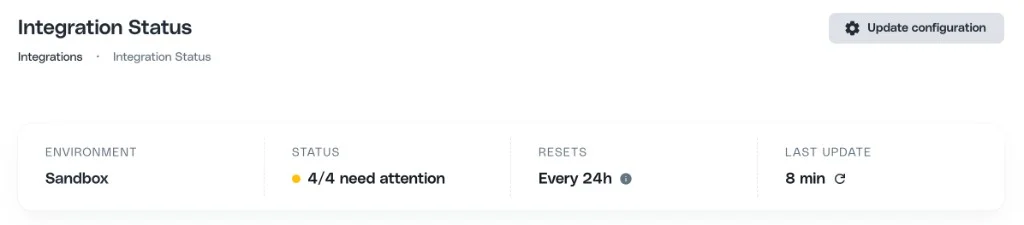
Get a real-time health view of your Cello integration with the new Integration Status page. See whether each of the four core components - Referral component, Attribution library, Signups tracking, and Purchases tracking - is **Connected**, **Connected with warnings**, or **Not connected**, against a defined health window. When something needs a closer look, jump straight into the [Event Feed](/guides/support/portal/event-feed) for per-event detail. You can also change your signup and purchase sources directly from the page in sandbox. Learn more in the [Integration Status documentation](/guides/support/portal/integration-status).
 ## Cello MCP Server
The Cello MCP Server is now available for developers. Connect your AI coding tool to your Cello account to search documentation, verify all integration components are connected, inspect incoming events with per-field validation, and surface prioritized best practices for your referral program setup to improve performance.
Learn more in the [Cello MCP documentation](/mcp/introduction).
## Event Feed
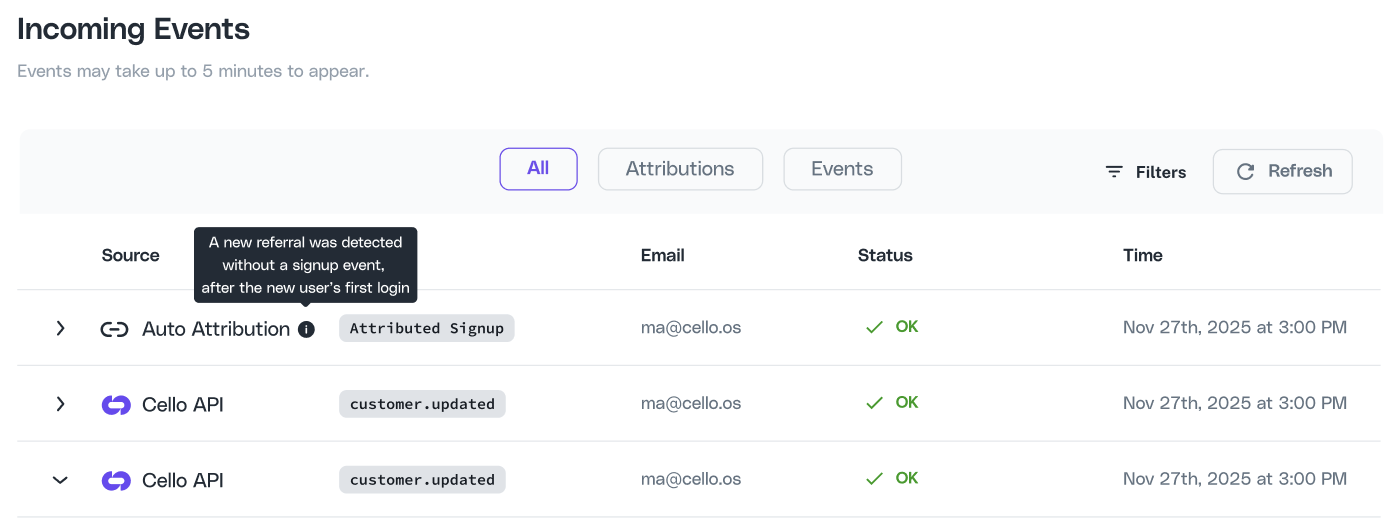
Monitor and debug your integration events with the new Event Feed. See every incoming signup and transaction event from all sources - webhooks, Cello API, and auto attribution - with per-field validation that highlights exactly what's missing or malformed. Learn more in the [Event Feed documentation](/guides/support/portal/event-feed).
## Cello MCP Server
The Cello MCP Server is now available for developers. Connect your AI coding tool to your Cello account to search documentation, verify all integration components are connected, inspect incoming events with per-field validation, and surface prioritized best practices for your referral program setup to improve performance.
Learn more in the [Cello MCP documentation](/mcp/introduction).
## Event Feed
Monitor and debug your integration events with the new Event Feed. See every incoming signup and transaction event from all sources - webhooks, Cello API, and auto attribution - with per-field validation that highlights exactly what's missing or malformed. Learn more in the [Event Feed documentation](/guides/support/portal/event-feed).
 ## AI Assistant
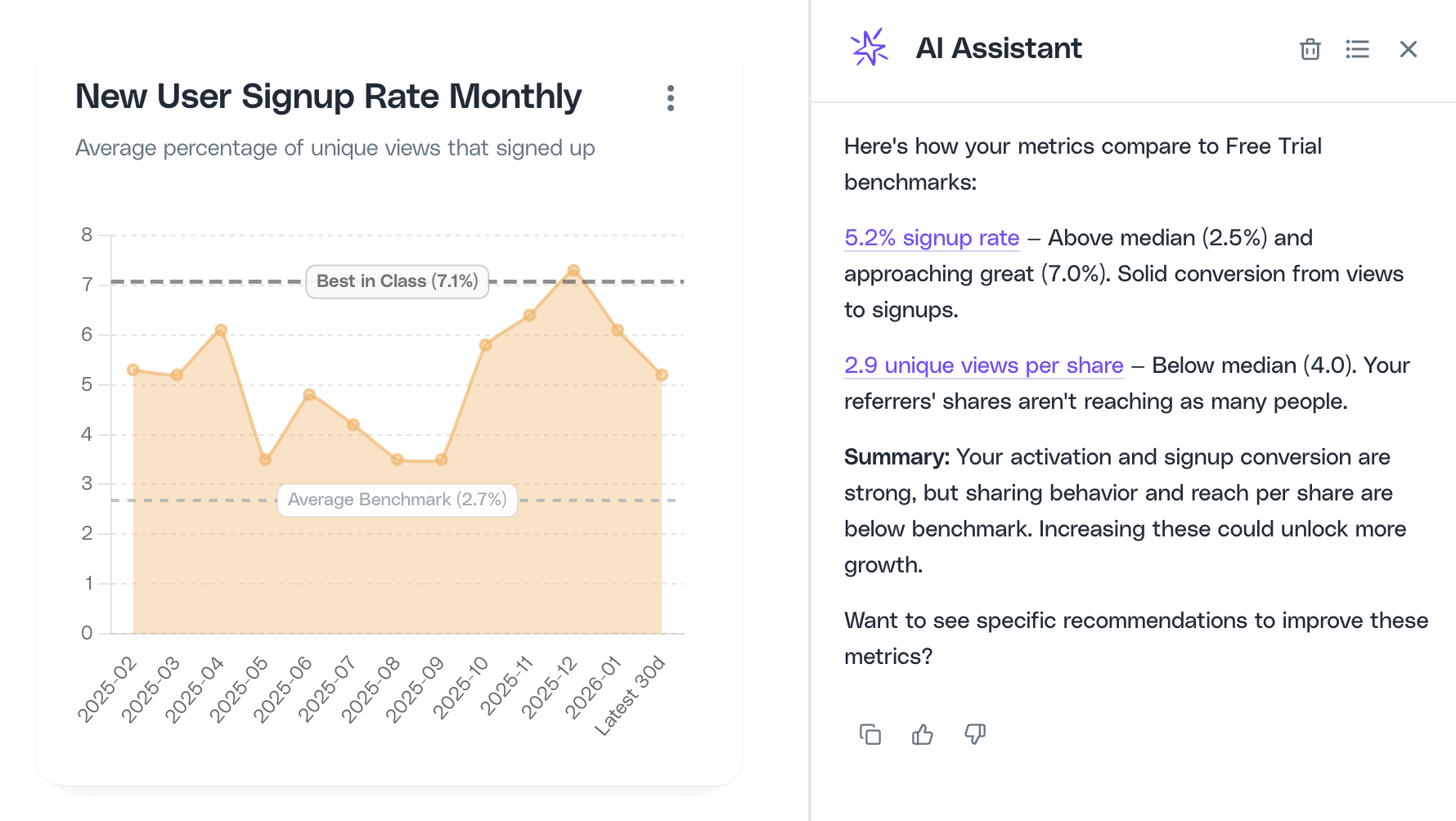
The Cello AI Assistant is now available for growth managers in the portal. Ask questions about your program performance, get optimization recommendations, and take action faster - all grounded in your Cello data and hosted in our EU environment. Learn more in the [AI Assistant documentation](/guides/ai-assistant/overview).
## AI Assistant
The Cello AI Assistant is now available for growth managers in the portal. Ask questions about your program performance, get optimization recommendations, and take action faster - all grounded in your Cello data and hosted in our EU environment. Learn more in the [AI Assistant documentation](/guides/ai-assistant/overview).
 ## Performance Benchmarks
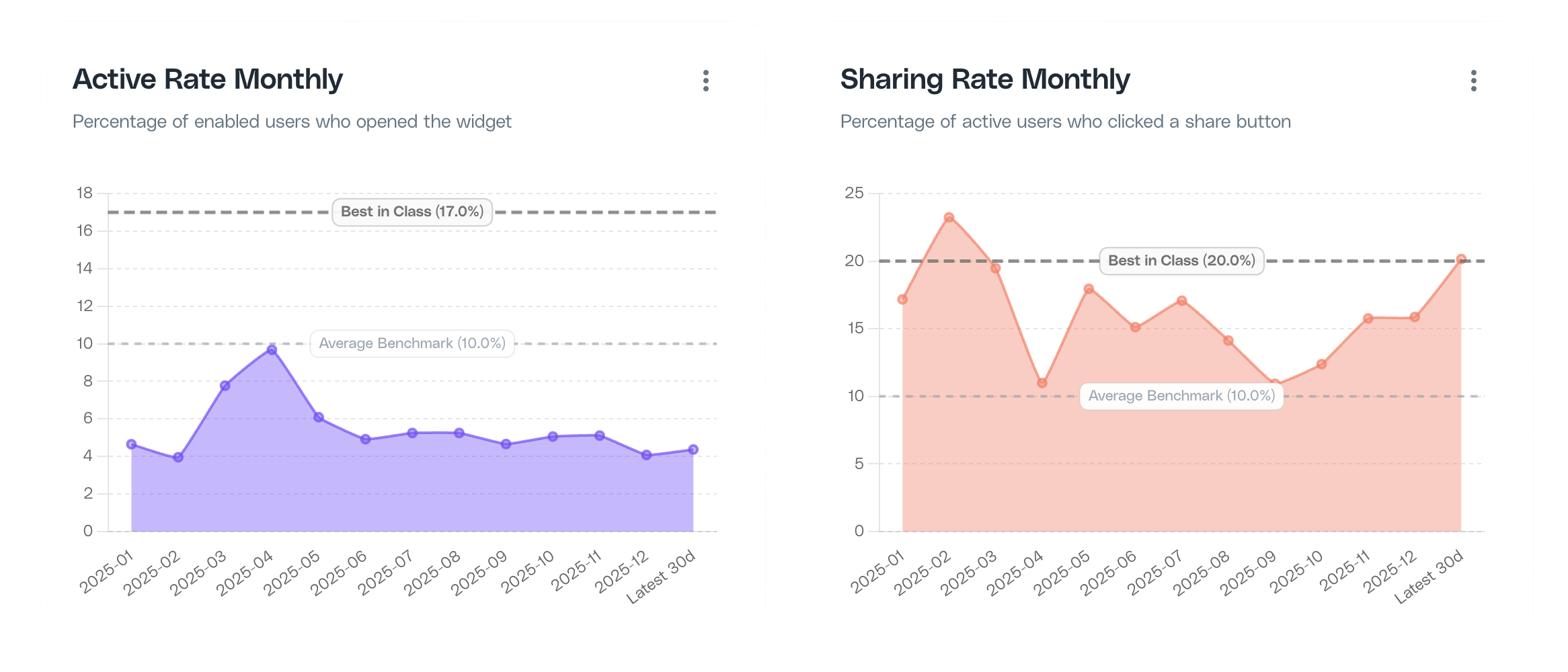
Cello now provides industry benchmarks so you can see how your referral program compares to similar companies. Benchmarks appear as reference lines on your dashboard charts for key metrics like active rate, sharing rate, signup rate, and unique views per share. Learn more in the [Performance Benchmarks documentation](/guides/attribution/benchmarks).
## Performance Benchmarks
Cello now provides industry benchmarks so you can see how your referral program compares to similar companies. Benchmarks appear as reference lines on your dashboard charts for key metrics like active rate, sharing rate, signup rate, and unique views per share. Learn more in the [Performance Benchmarks documentation](/guides/attribution/benchmarks).
 ## Performance Recommendations
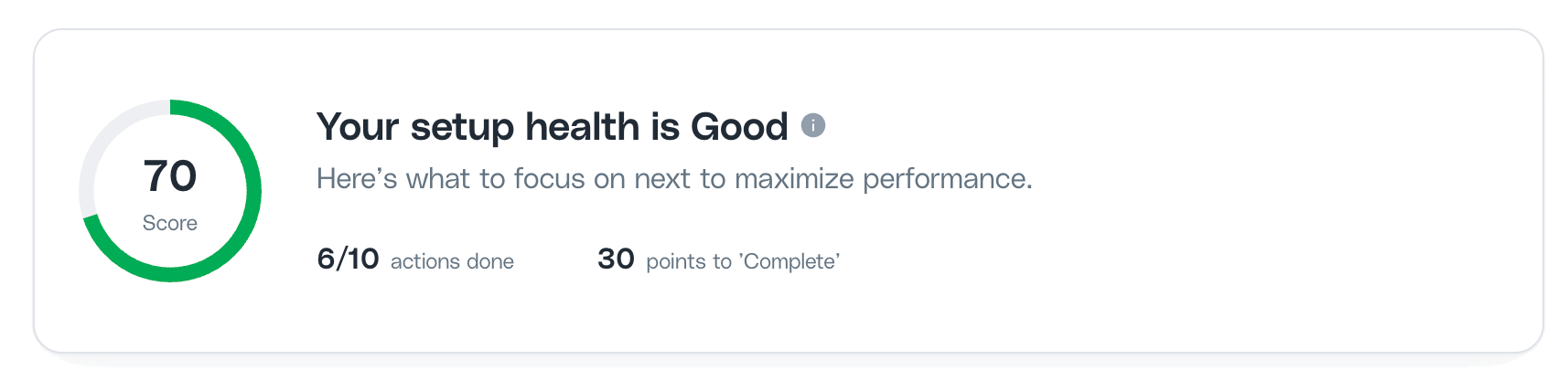
The Cello portal now includes a Recommendations Score - a prioritized list of actions to improve your referral program. Each recommendation shows its potential impact across activation, sharing, and conversion, so you know exactly where to focus next. Learn more in the [Performance Recommendations documentation](/guides/attribution/recommendations).
## Performance Recommendations
The Cello portal now includes a Recommendations Score - a prioritized list of actions to improve your referral program. Each recommendation shows its potential impact across activation, sharing, and conversion, so you know exactly where to focus next. Learn more in the [Performance Recommendations documentation](/guides/attribution/recommendations).
 ## Flutter SDK (Beta)
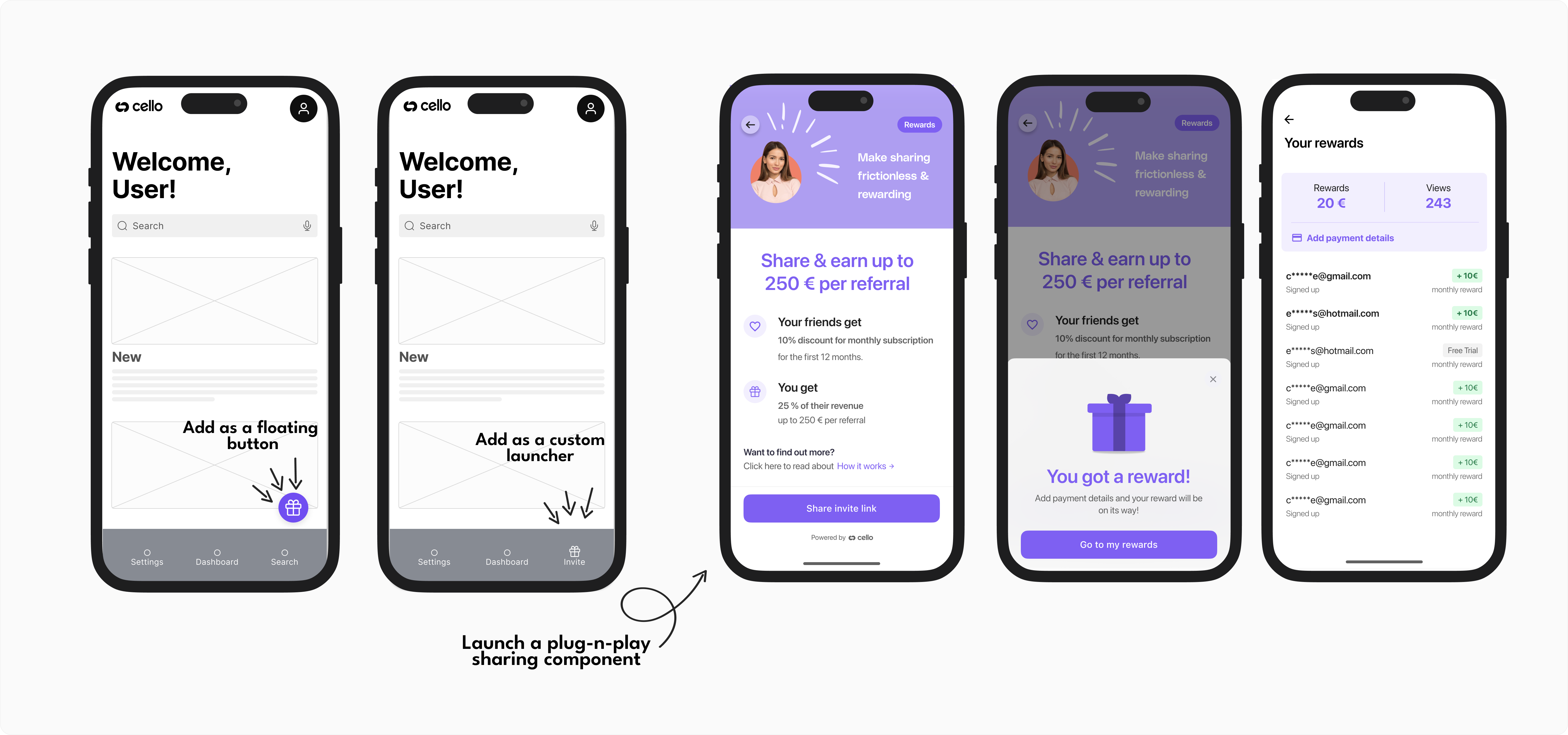
Cello SDK for **Flutter** is now in Beta. Now you can add sharing into your Android and iOS apps built with React Native. With a plug-n-play mobile sharing component, your users can easily share their invite link with their friends and network using mobile sharing options convenient for them. Find out more [here 👉](/sdk/flutter)
## Flutter SDK (Beta)
Cello SDK for **Flutter** is now in Beta. Now you can add sharing into your Android and iOS apps built with React Native. With a plug-n-play mobile sharing component, your users can easily share their invite link with their friends and network using mobile sharing options convenient for them. Find out more [here 👉](/sdk/flutter)
 ## Dual offer component design
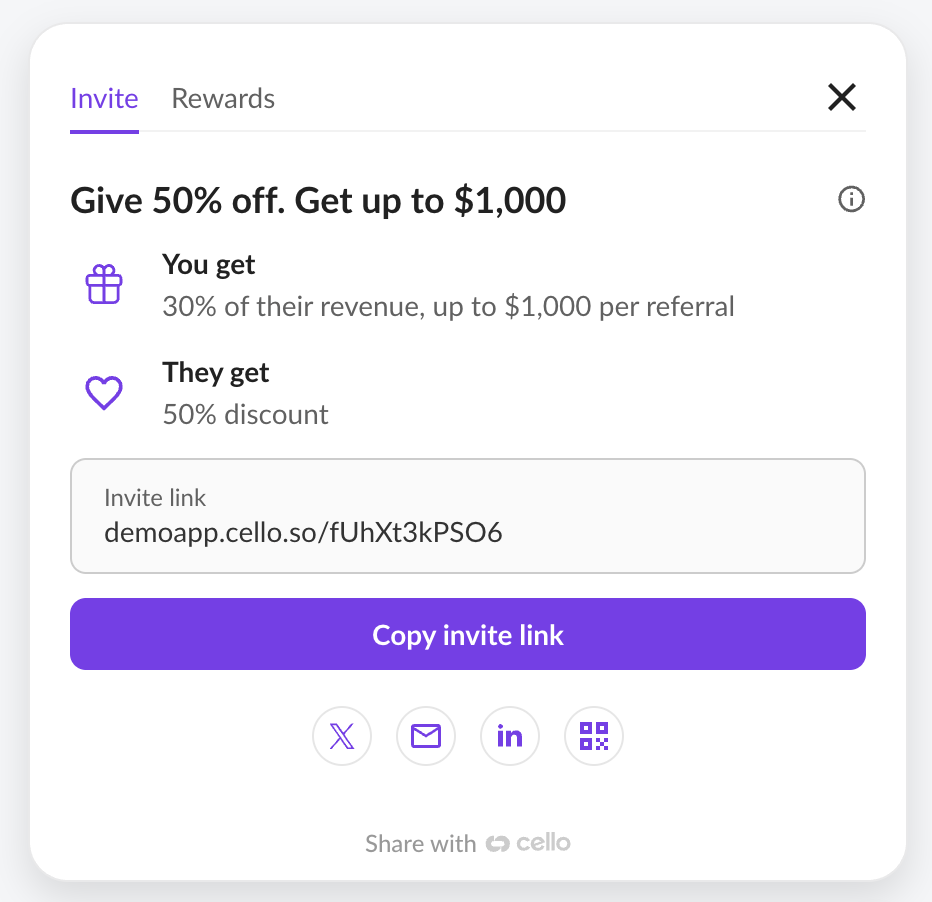
You can now select the Invite tab design that best fits your program. If your program uses dual-sided incentives - where both the referrer and the new user receive a reward - the *Dual Offer* layout is recommended.
To preview and choose your preferred design, go to [Cello Portal → User Experience](https://portal.cello.so/setup/user-experience).
## Dual offer component design
You can now select the Invite tab design that best fits your program. If your program uses dual-sided incentives - where both the referrer and the new user receive a reward - the *Dual Offer* layout is recommended.
To preview and choose your preferred design, go to [Cello Portal → User Experience](https://portal.cello.so/setup/user-experience).
 ## Dark Mode 🕶️
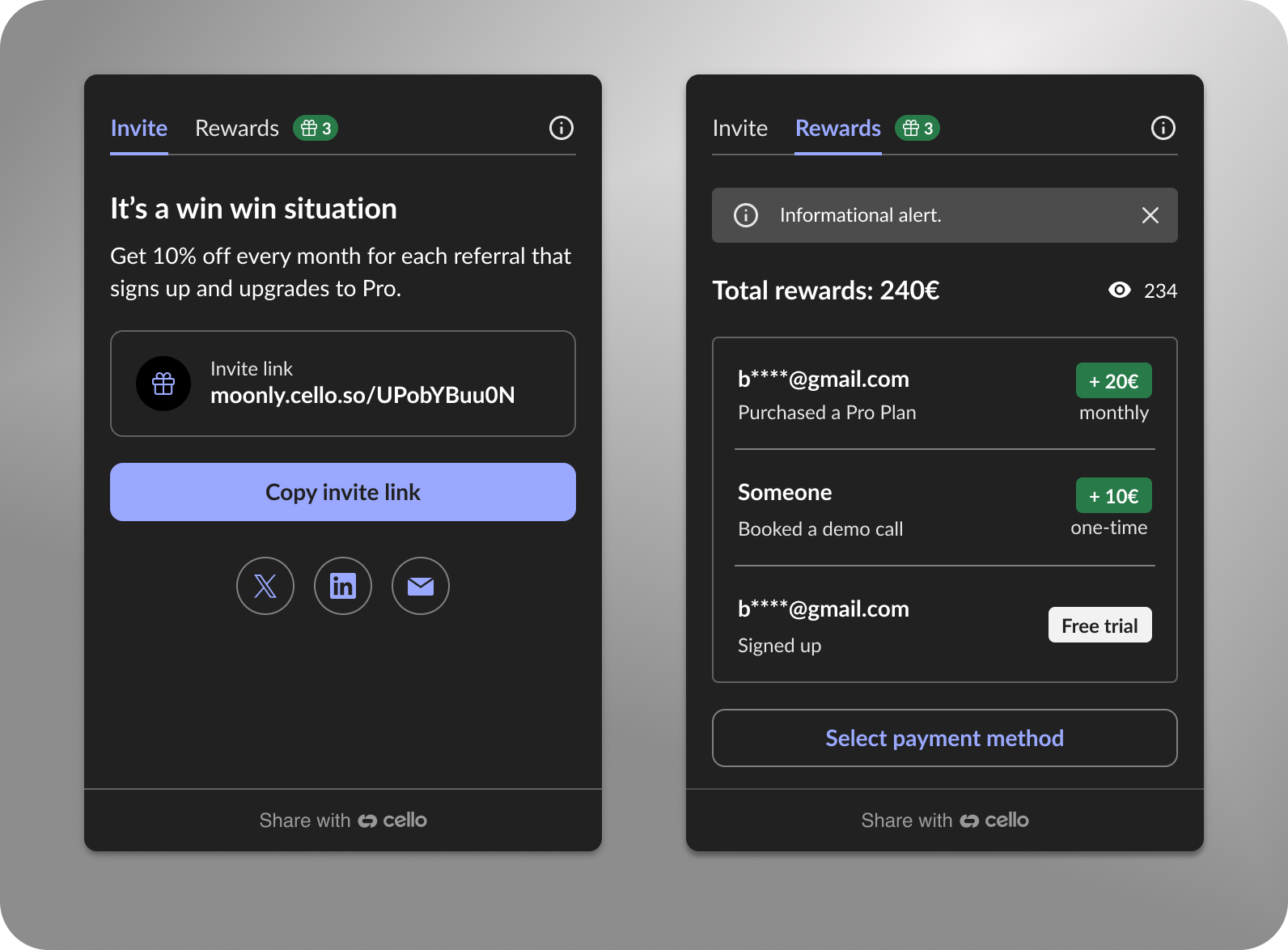
[Cello Referral Component](/referral-component/introduction) now supports dark mode! Choose your preferred look - light, dark, or let the component follow your interface's theme.
## Dark Mode 🕶️
[Cello Referral Component](/referral-component/introduction) now supports dark mode! Choose your preferred look - light, dark, or let the component follow your interface's theme.
 You can now control the widget's theme to better match your app's interface.
Set the theme directly in the Referral Component boot command:
```javascript theme={null}
window.cello = window.cello || { cmd: [] };
window.cello.cmd.push(async (cello) => {
try {
const options = {
productId: "REPLACE_WITH_PRODUCT_ID",
token: "REPLACE_WITH_TOKEN",
language: "en",
themeMode: 'dark'
productUserDetails: {
firstName: "Bob",
lastName: "Bobsky",
fullName: "Bob B Bobsky",
email: "bob@gmail.com",
},
};
await cello.boot(options);
// Call other Cello commands, if necessary
} catch (error) {
console.error("Failed to boot cello:", error);
}
});
```
You can also switch the theme dynamically if your app's interface changes:
```javascript theme={null}
cello.setThemeMode('light' | 'dark')
```
## Micro-loop announcements
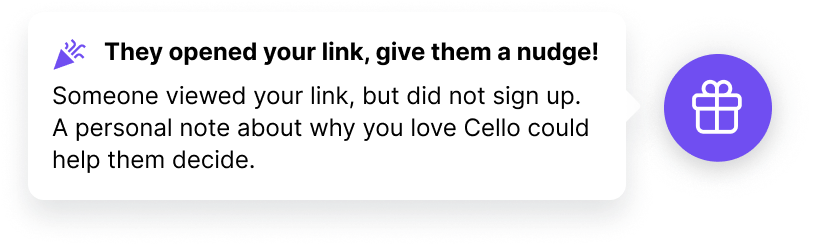
Lightweight micro-loops improve the engagement with interested referrers. The announcements re-engage interested users who haven't yet shared, created views, or earned rewards.
Your referrers receive contextual reminders tied to their behaviours within the referral widget or tied to the behavior of invited new users.
### AI-powered sharing suggestions (experimental)
We're testing a new way to help referrers personalize their invite messages using AI.
When sharing, users see smart suggestions based on your product's context and key value propositions. AI helps to craft a compelling message in seconds.
This is **experimental** and is only rolled out to a few customers for now.
Want to try it? We're looking for partners to explore how AI might lift sharing performance.
We've shipped a collection of updates focused on flexibility, reliability, and a smoother user experience.
## New Languages Added
We have expanded our language support by adding 🇩🇰 **Danish (DA)** and 🇸🇰 **Slovak (SK)**. This makes it possible to provide a fully integrated referral experience for more and more users.
## Improved Referrer Email Deliverability
Referrer emails have been optimized to prevent them from landing in spam folders, ensuring that your users receive [referral-related communications](/docs/notifications) without interruption.
## Chargebee Webhook Now Supports Custom Fields
Our **Chargebee webhook** now fully supports **custom fields (CF)**, providing more flexibility [in sending Cello signup and transaction events](/docs/chargebee-conversion-tracking#4-send-signup-and-transaction-events-to-cello). Learn more about custom fields in the [Chargebee documentation](https://www.chargebee.com/docs/billing/2.0/site-configuration/custom_fields).
## Enhanced Mobile SDK Referral Component
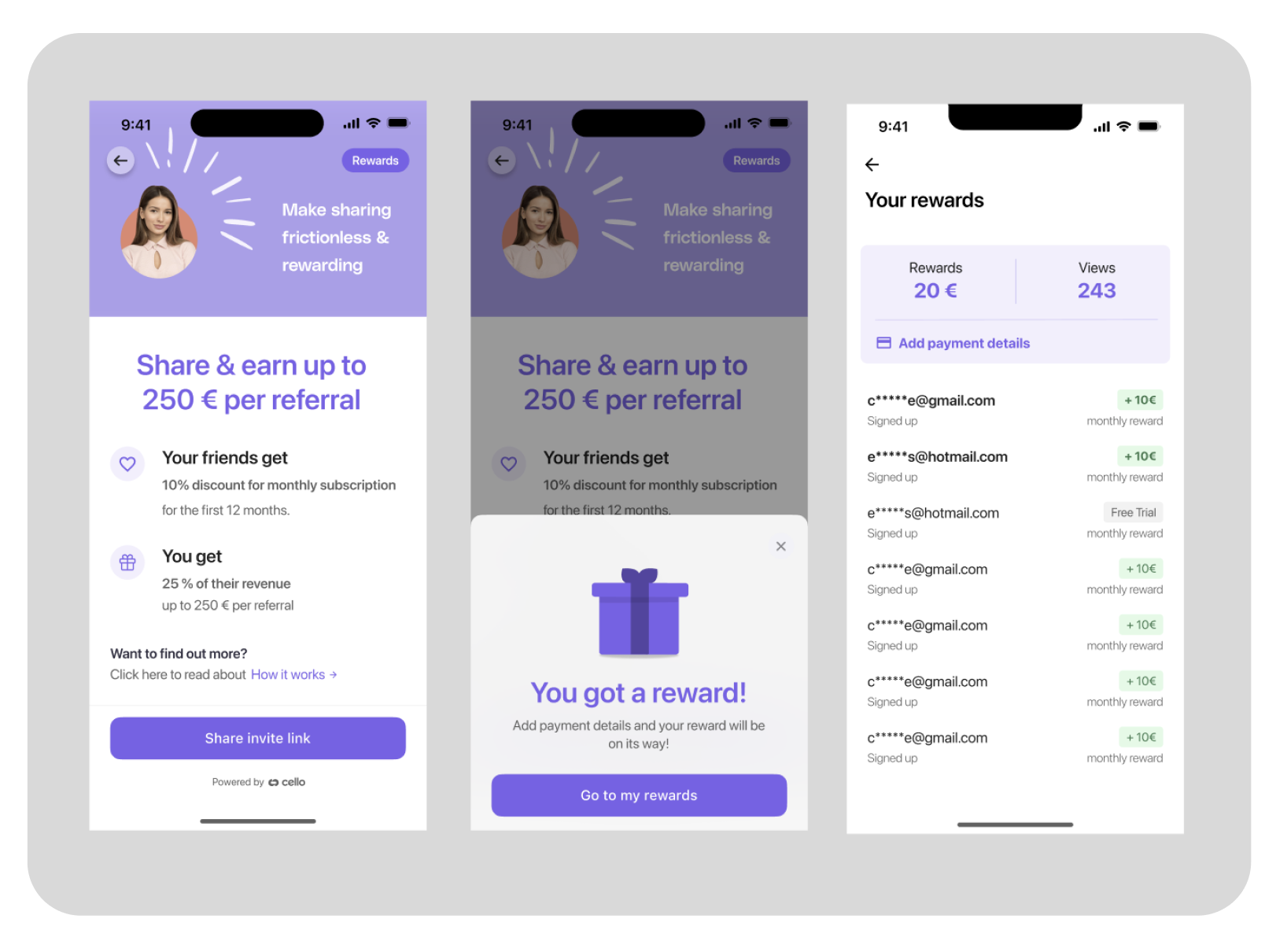
The **referral component for the mobile SDK** has been significantly improved for a smoother user experience. Users now have:
* An always accessible **Rewards** page.
* Notifications about their **first link view** and **first reward**, helping them stay informed and engaged.
## Revenue Growth Analysis
Cello now provides detailed revenue growth analysis on your Purchases page. These charts help you understand exactly how your recurring revenue is growing and where opportunities or risks may exist:
* **New ARR** - Revenue from first-time customers
* **Expansion ARR** - Revenue growth from upgrades and upsells
* **Contraction ARR** - Revenue lost from downgrades
* **Lost ARR** - Revenue lost from churn
* **Net ARR Growth** - Overall monthly revenue change
Each component can be individually enabled or disabled using the chart menu in the upper right corner.
## Recovered attributions
Cello now detects and recovers missed attributions to avoid gaps and strengthen the attribution flow. These recovered referrals are clearly marked on the New Signup and Purchase pages within the Cello Portal.
## Multi-campaign support
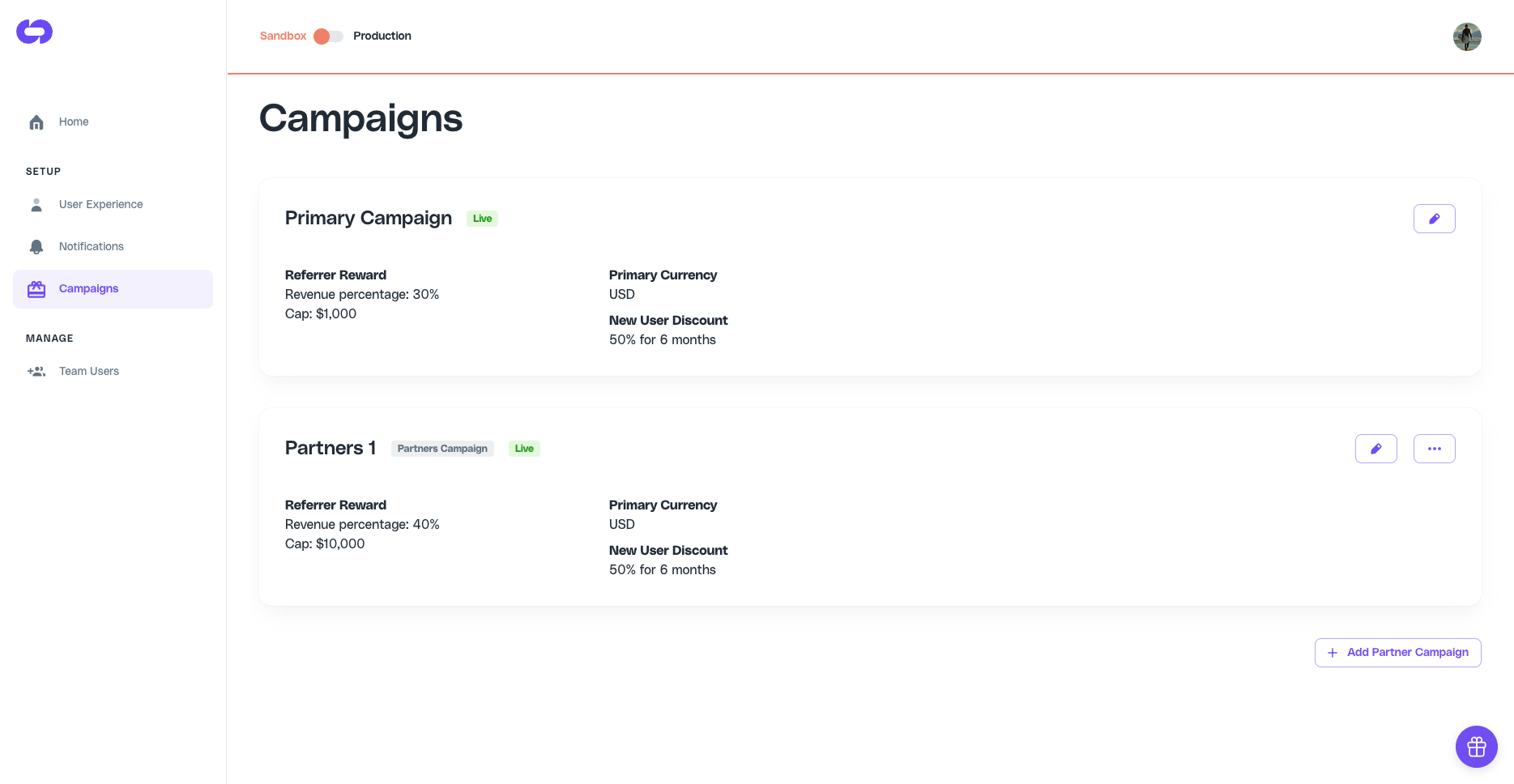
The Cello portal now shows all active campaigns for your product. You can add new partner campaigns and change existing ones.
## Announcement improvements
This release we have added a few improvements for [announcements](/docs/notifications#announcement):
### Announcements with CTA
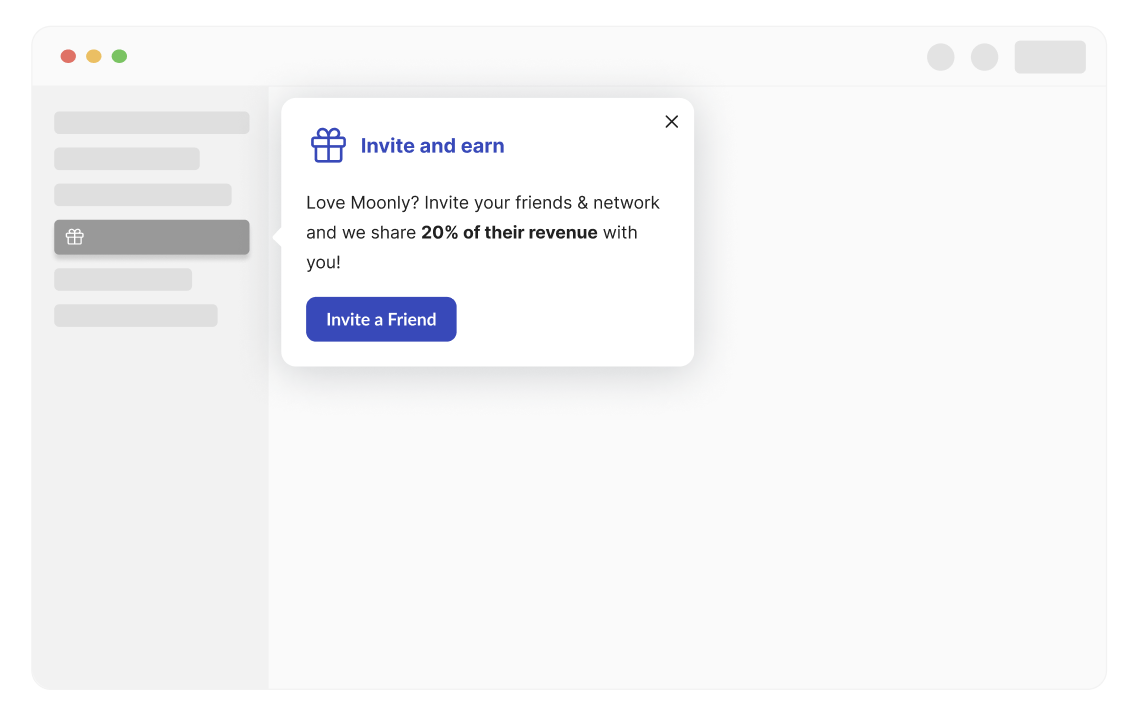
You can now add a button to announcements which provide a clear call-to-action for referrers and can increase activation rate.
### Cello.js API to trigger announcement
Now you can trigger an [announcement](/docs/notifications#announcement) using [a client-side JS method](/docs/javascript-browser#referral-library-sdk). Example below will trigger the default welcome announcement:
```javascript theme={null}
window.Cello("showAnnouncement", { "type": "welcome-announcement-1" } );
```
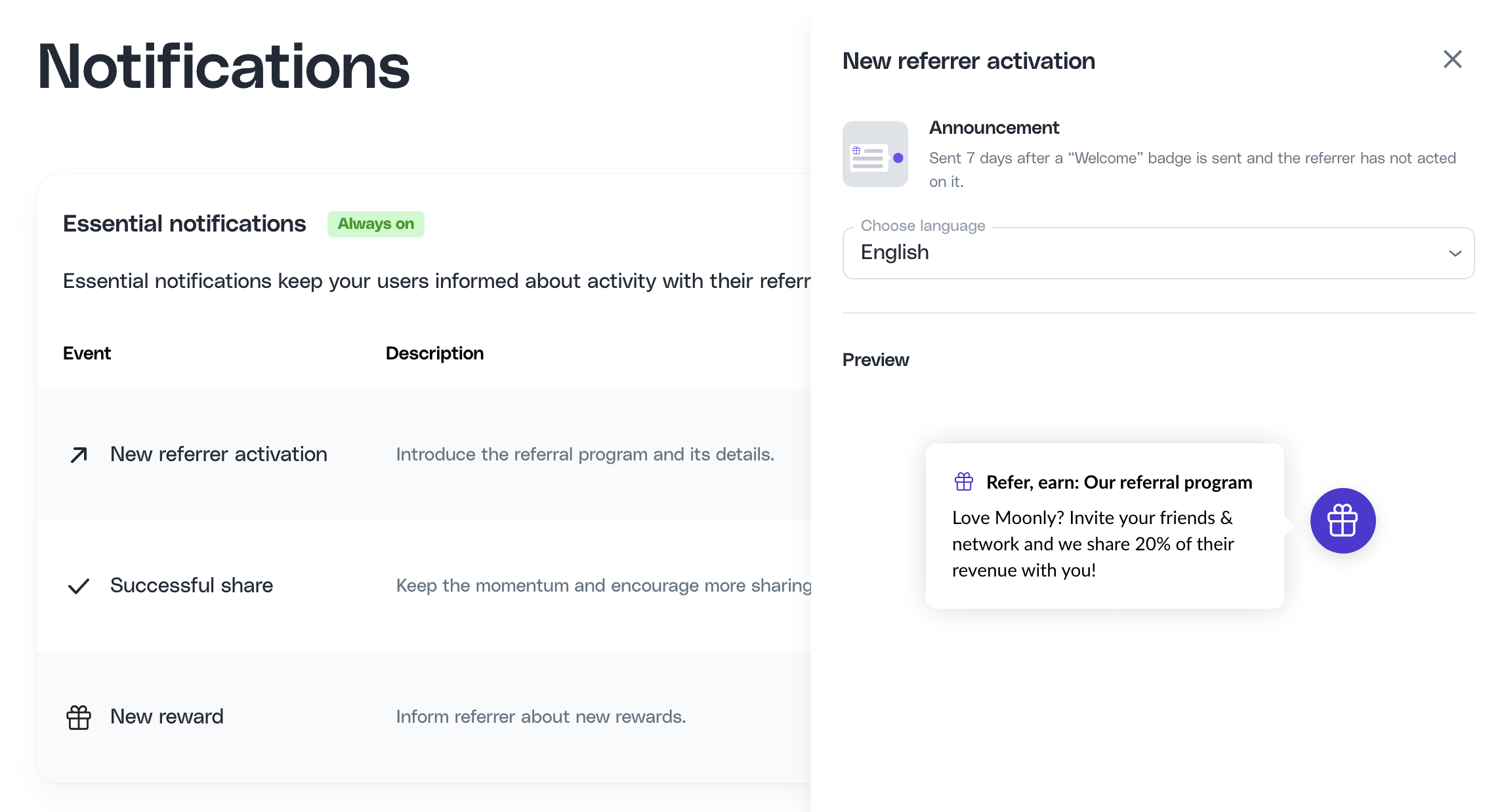
## Notifications preview
The [Notifications setup](https://portal.cello.so/setup/notifications) in Portal has been updated! You can now preview [all notifications](/docs/notifications) sent during the referrer's journey. Easily review alerts, announcements, and emails to see their design, copy and preview them in different language.
## Cello for mobile
We have released new versions of our mobile SDK's for iOS, Android and ReactNative. This version contains:
* 🤳 Full featured Cello Widget that allows users to track their views and rewards, and enter payment details to claim their rewards
* 🐞 General bugfixes
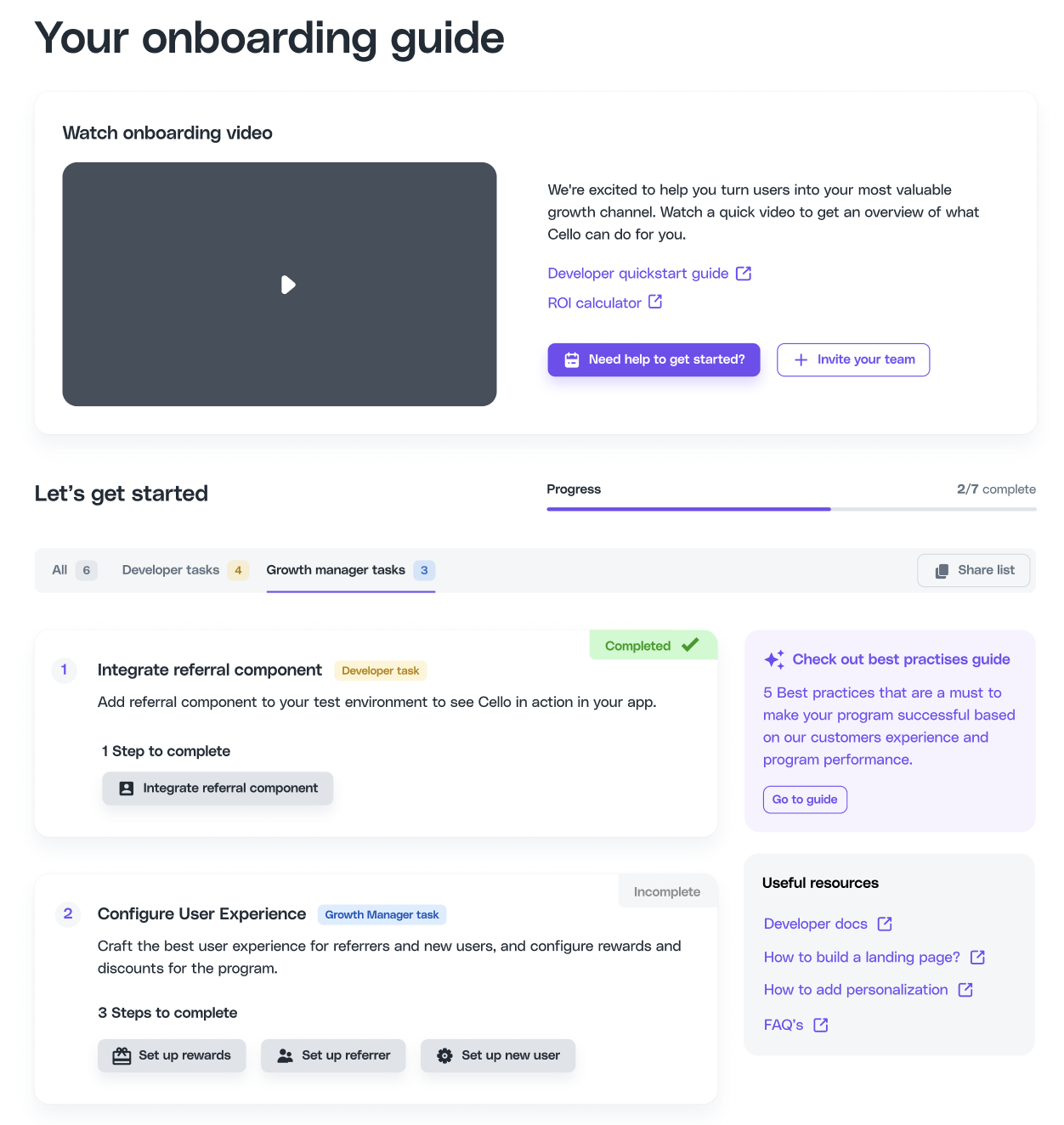
## Onboarding guide update
[Onboarding guide](https://portal.cello.so/setup/onboarding-tasks) in the Cello Portal is now your one-stop destination for everything you need for a seamless onboarding experience, including a clear view of your progress with completed and pending tasks.
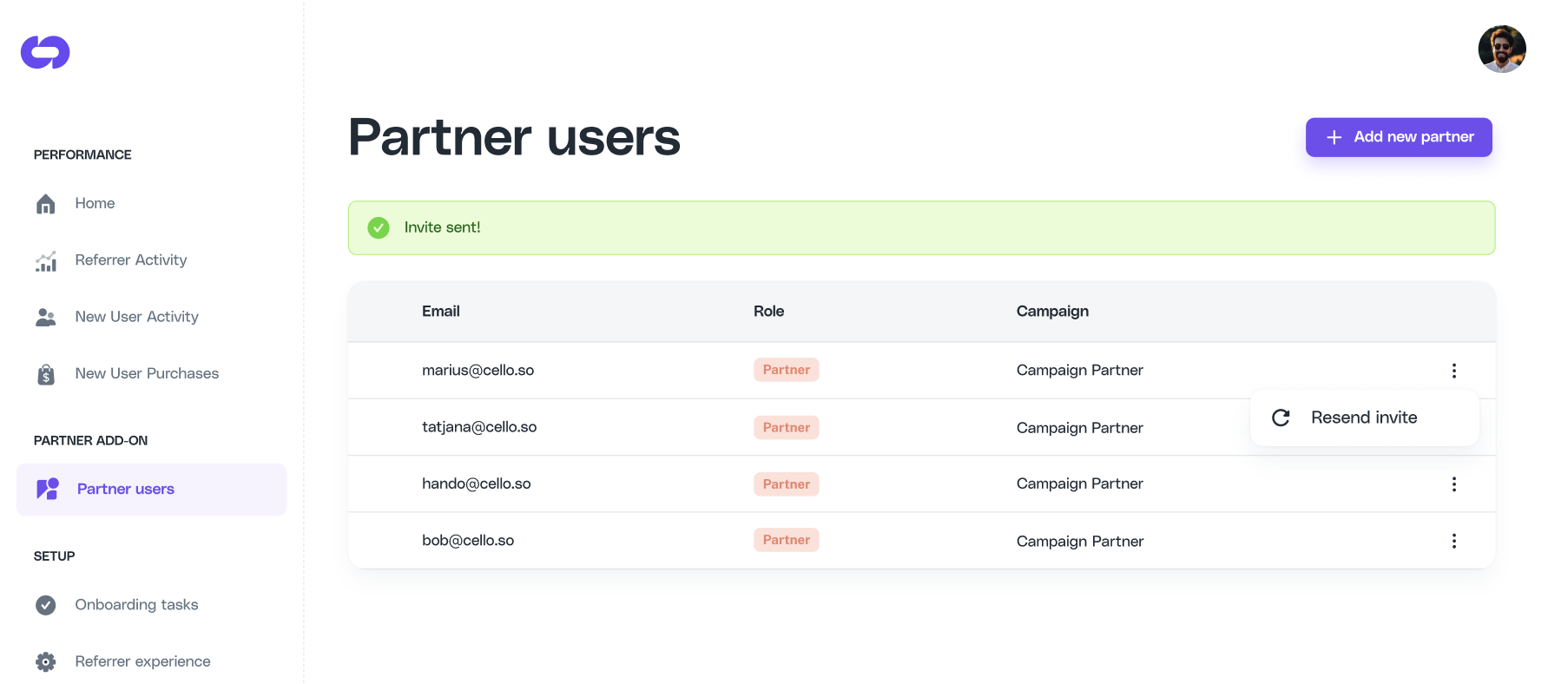
## Partner management
You can now add partners to your [Partner Program](/docs/partner-add-on) directly in Cello Portal.
## Attribution library improvements
Our Attribution library has gotten a few exciting improvements 🎉
### Async methods and race condition handling
[Attribution library](/docs/connect-attribution) methods are asynchronous and return a promise. This guarantees that developer does not have to implement their own blocking mechanism and the promise resolves once the action or data is available. Developer can use either the straight up cookie handling with **.then** methods or with **async/await** .
In addition to that, to avoid race condition of our script loading and your application trying to communicate to it, you should add the following javascript code before any of the calls to the library.
```javascript theme={null}
window.CelloAttribution=window.CelloAttribution||async function(t,...o){if("getReferral"===t)throw new Error("getReferral is not supported in this context. Use getUcc instead.");let e,n;const i=new Promise((t,o)=>(e=t,n=o));return(window.CelloAttributionCmd=window.CelloAttributionCmd||[]).push({command:t,args:o,resolve:e,reject:n}),i};
```
### New JS Methods for custom cookie handling
We have added 2 new methods for [custom cookie handling](/docs/managing-cookie-consent#1-custom-method), to dynamically inform it when a visitor has consented to cookie storage. This method offers full control over the timing of cookie storage, allowing you to align it with your user consent process.
**allowCookies** - To allow the storage of the referral code cookie:
```javascript theme={null}
window.CelloAttribution('allowCookies');
```
**deleteCookies** - To halt the storage of the referral code cookie and clear it:
```javascript theme={null}
window.CelloAttribution('deleteCookies');
```
🐞 Bugfixes and improvements
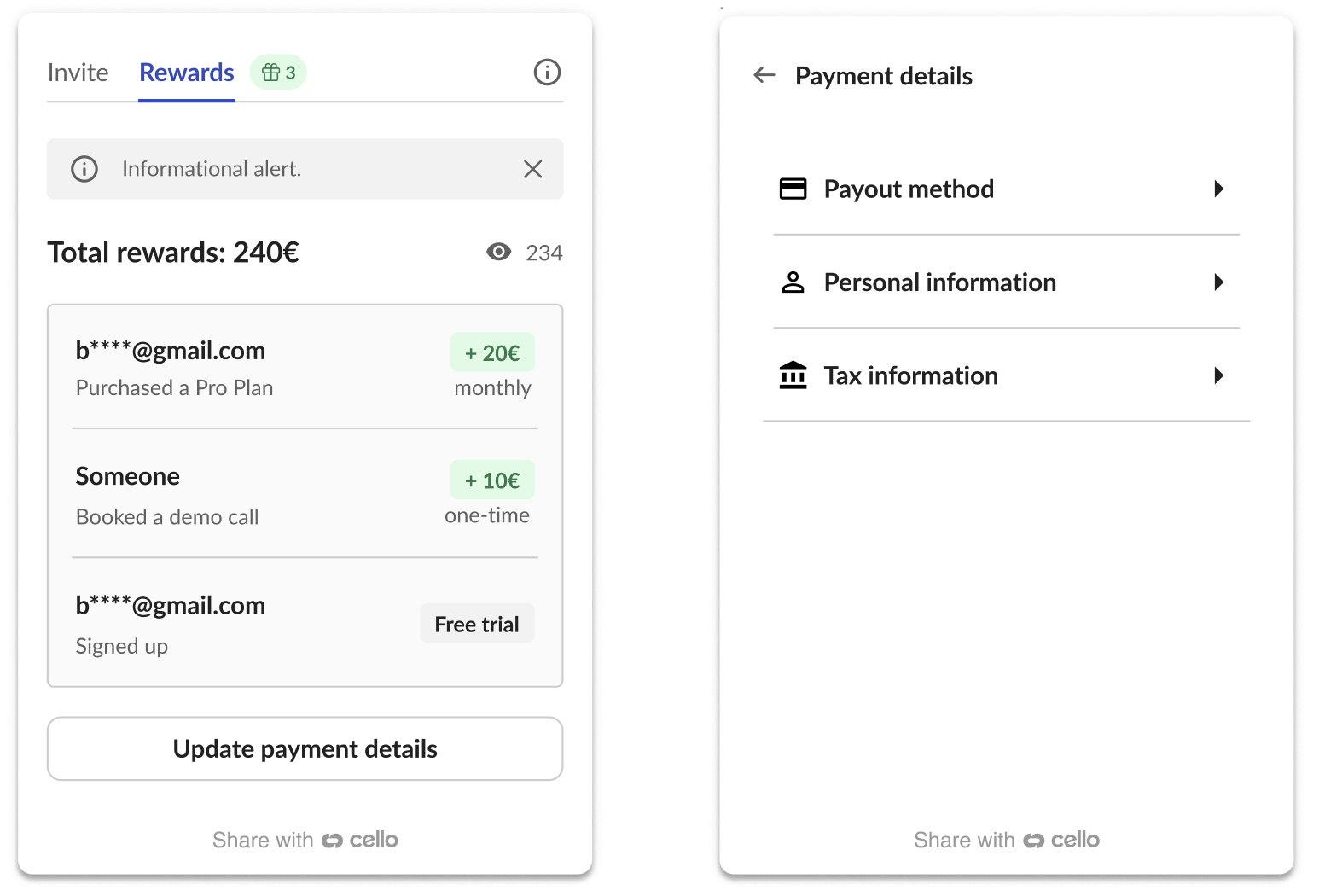
## Improved payment details screen
We've made it easier to update your payment details in the Referral component. Now, there's no need to re-enter all info. Users can change what's needed, and they're set!
We've also enhanced privacy and security around users' personal data. Sensitive info like address isn't visible anymore once it's entered - users can only update it. This change makes it tougher for the bad guys to get their hands on users details.
## Easier token management
By default, there will be no need to keep updating the [Referral Component user authentication token](/docs/user-authentication) every 24h. Now, tokens are issued to be long-lived and won't expire unless you want them to. Prefer your tokens with an expiry date? No problem. Just reach out to our Customer Support to enable token expiration.
## Self-referral exclusion
Self-referral signups are now automatically excluded from trends and can be reviewed in the Cello Portal. From **New User Signups**, you will find these marked as **Excluded** in the list and no longer included in the overall aggregate trends.
## React Native SDK
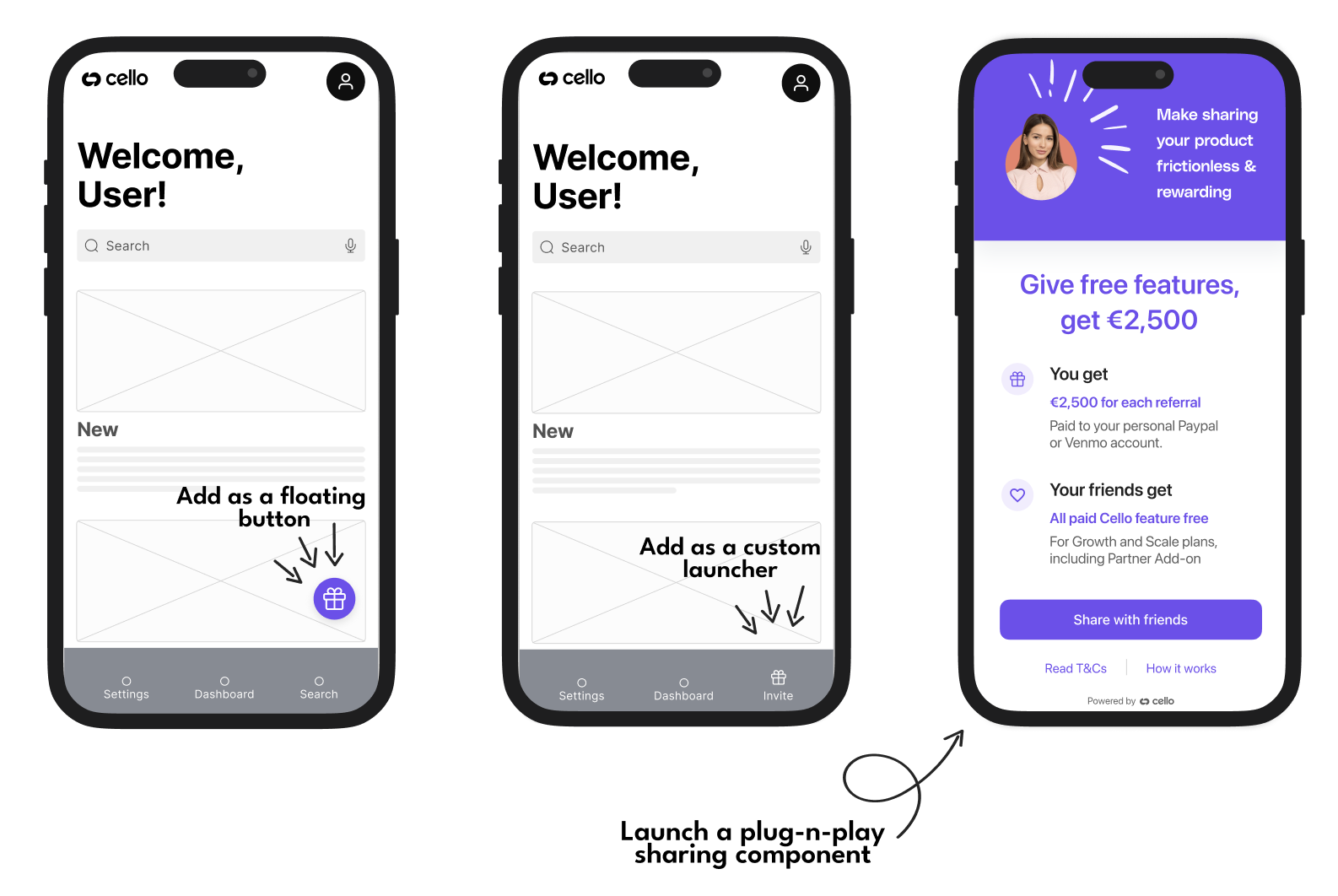
Cello SDK for **React Native** is now available. Now you can add sharing into your Android and iOS apps built with React Native. With a plug-n-play mobile sharing component, your users can easily share their invite link with their friends and network using mobile sharing options convenient for them. Find out more [here 👉](/docs/cello-for-react-native)
## Android SDK
Cello SDK for **Android** is now available. Now you can add sharing into your Android app. With a plug-n-play mobile sharing component, your users can easily share their invite link with their friends and network using mobile sharing options convenient for them. Find out more [here 👉](/docs/cello-for-android)
## Boot command returns a promise
We have improved [Referral Component](/docs/javascript-browser#cellobootoptions) `boot()` command to **return a promise** that is resolved once the whole initialization process is finished or rejected if the boot command failed. It is optional to use if you want to wait in your code until `boot()` command has finished.
```javascript theme={null}
window.cello = window.cello || { cmd: [] };
window.cello.cmd.push(async function (cello) {
try {
await cello.boot({
productId: 'CELLO_PRODUCT_ID',
token: 'REPLACE_ME',
language: "en"
});
// call other Cello commands, if necessary
} catch (error) {
console.error("Failed to boot cello:", error);
// Handle the error appropriately
}
});
```
## Data processing improvements
We have rolled out back-end improvements to data processing and data aggregation in the Cello Portal, especially around how unique view counts are aggregated. While these changes are mostly transparent to users, there may be minor differences in daily or monthly counts across metrics as a result of these improvements and resulting rate calculations.
## iOS SDK
Cello SDK for **iOS** is now available. Now you can add sharing into your iOS app. With a plug-n-play mobile sharing component, your users can easily share their invite link with their friends and network using mobile sharing options convenient for them. Find out more [here 👉](/docs/cello-for-ios)

## Partner add-on
🤝 We are excited to announce **our Partner add-on,** which allows you to set up and manage your own partner program. Cello now unifies both use cases of user referrals and partner programs in one platform.
Additional partner features are offered as an add-on to the core Cello platform (no additional technical effort needed). If your are interested in this functionality or you already have a program that you would like to transfer to Cello, feel free to contact our support team to guide you through the setup.
🐞 Bugfixes and improvements
## Welcome email notifications
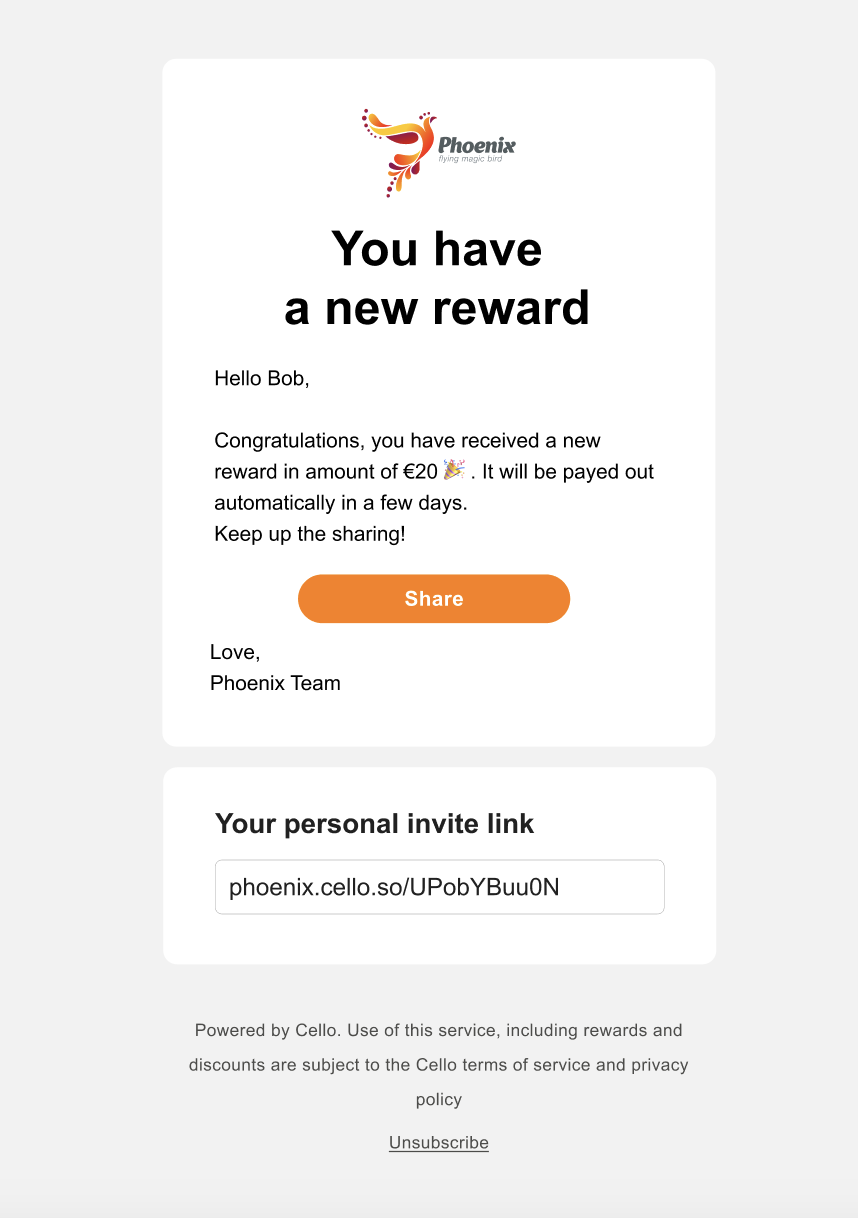
Referral programs thrive on timely engagement. Knowing instantly when there's activity tied to a referrals means your users can celebrate successes and continue to share more effectively. Whether it's their first successful share, a brand-new signup or unlocking a new reward, email notifications ensure they never miss a beat in the referral journey.
To enable Email notifications, make sure you are passing user details in the [Referral component initialization](/docs/javascript-browser#launch-referral-component).
```html theme={null}
```
🐞 Bugfixes and improvements
## Deep-linking to Referral Component tabs
We have added a way to open [Referral component](/docs/javascript-browser) on a specific tab/page either using [a new JS method](/docs/javascript-browser#opendestination) page or [a deep-linking with a URL parameter.](/docs/javascript-browser#open-the-referral-component-with-a-link) Now you can direct your users to a specific area of the sharing experience based on the call to action in either [your communication](/docs/contextual-sharing#regular-communication) or [in-product triggers](/docs/contextual-sharing#aha-moments).
Example of how to use JS method to open the component on Rewards tab:
```javascript theme={null}
window.Cello("open","rewards")
```
Example of how to use deep-linking to open the component on Rewards tab:
```html theme={null}
https://your-product.com?cello-open=rewards
```
## Referral code lookup API
You can now find out which one of your users has referred a new user. Using [Cello API /referral-codes](/docs/cello-api#referral-codes-referral-codes) simply pass the [unique campaign code](/docs/key-concepts) the new user signed up with and get back the user's `productUserId` the `ucc` belongs to.
```javascript theme={null}
{
"code": "UIPIWa2Hnnr",
"productUserId":"12345678"
"valid": true
}
200 OK
```
## Personalization and QR code improvements
**Personalization for new user message**
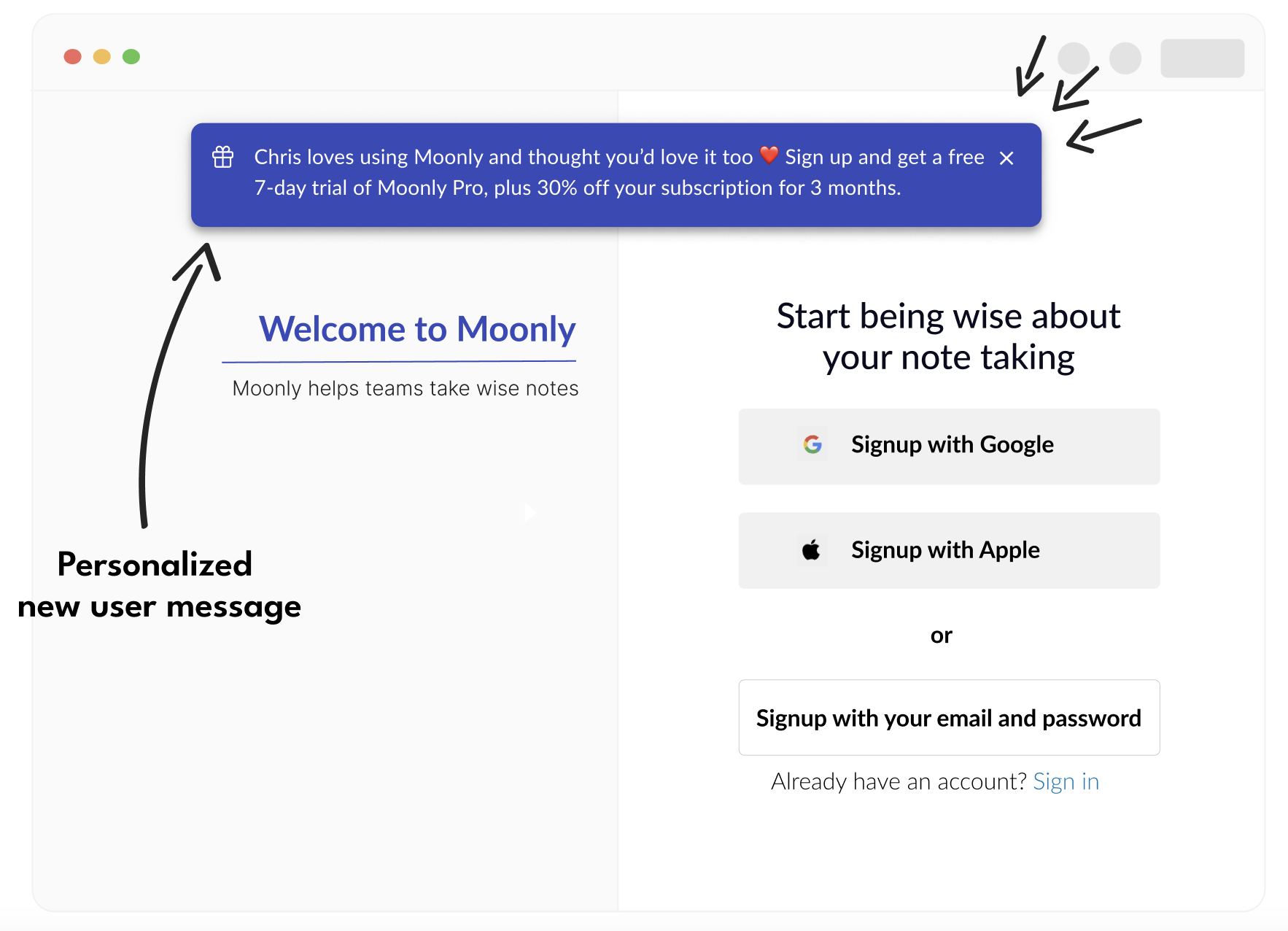
Now, you can incorporate the **referrer's name** into the [message displayed for new users](/docs/add-personalized-message) on your signup page. When visitors use the Cello invite link, they'll be greeted with a personalized banner, adding an element of social proof to the onboarding process.
**QR Code has moved**
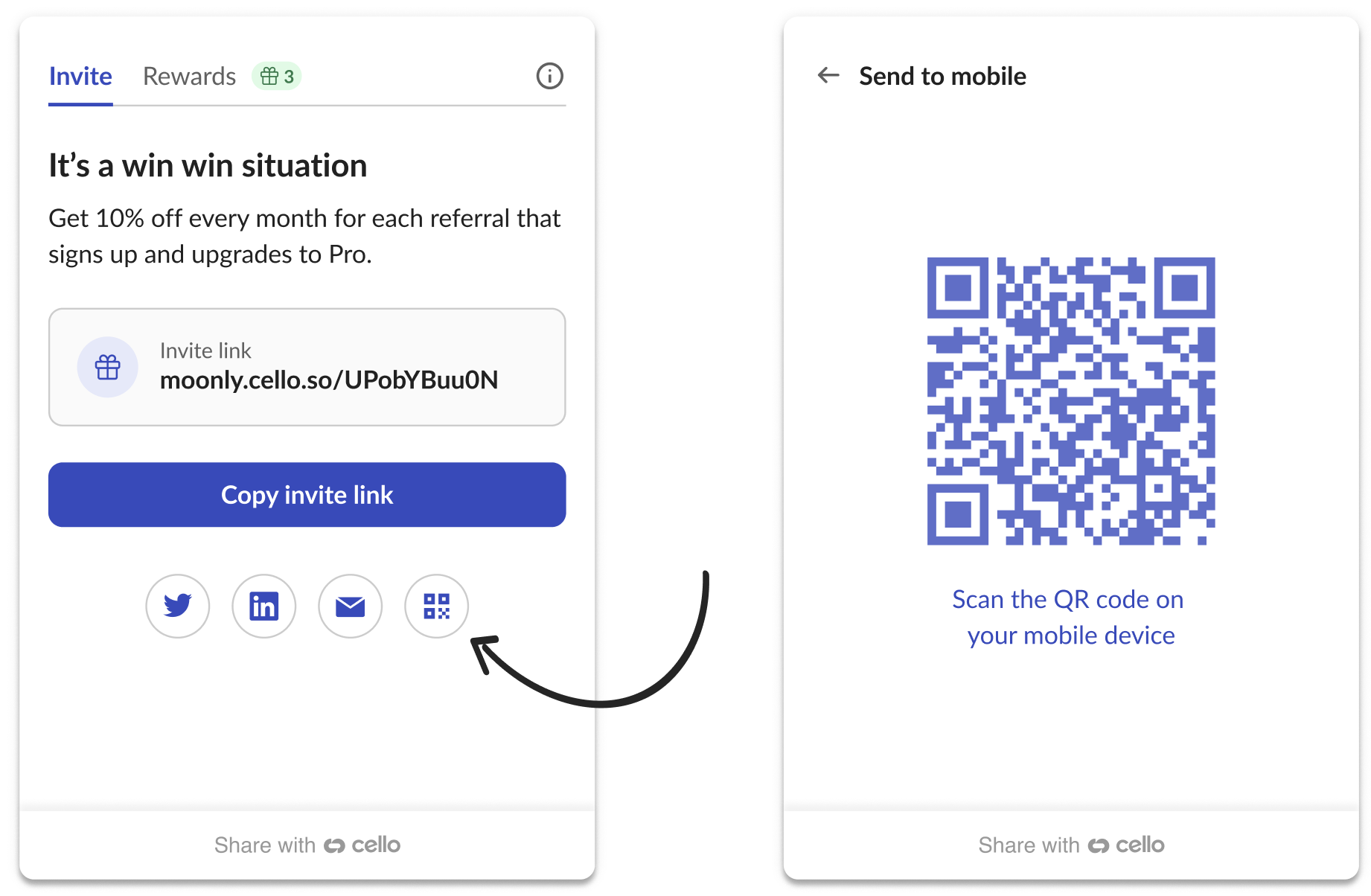
We've enhanced our user experience! Mobile sharing option, i.e. QR code scanning, is now conveniently located on a dedicated page. Access them with the QR code button next to other sharing choices. This refinement ensures the main page spotlights your program's offer while keeping all sharing functionalities organized and within easy reach.
## New languages and JS method
We now support 4 new [languages](/docs/component-overview#texts-and-language): French, Dutch, Spanish and Italian. 🇫🇷 Bonjour! 🇳🇱 Hallo! 🇪🇸 ¡Hola! 🇮🇹 Ciao!
### New referral component JS method to unlock Aha moments
Cello referral component has just gotten a [new JS method getActiveUcc()](/docs/javascript-browser#getactiveucc). This allows you to display referrers link anywhere the user flow, specifically during moments of delights when sharing is most relevant and contextual for your user. Find out more about in our [contextual sharing guide](/docs/contextual-sharing).
## Active link API endpoint
We're pleased to announce the release of a new endpoint in the Cello API, [/active-link](https://docs.cello.so/docs/cello-api#coming-soon-active-link-active-link), to facilitate the retrieval of active link and campaign code associated with your user (`productUserId`). This enhancement serves as a powerful tool, enabling a broad range of contextual sharing use cases, and potentially broadening the scope and impact of your referral program.
For insights into how best to leverage this addition and explore various use cases, please refer to our [Contextual sharing guide.](/docs/contextual-sharing)
To understand the specifics of the new [/active-link](https://docs.cello.so/docs/cello-api#coming-soon-active-link-active-link) endpoint, you can visit the [Cello API Reference](/docs/cello-api). This is a significant step towards enriching your user experience, and we look forward to seeing the innovative ways you'll make use of this feature.
## Updated Referral Component design rollout
We are excited to announce that our latest Cello component design, which was introduced in May, is showing promising results in sharing metrics. As a result, we've decided to phase out the previous version of the component and update our existing CDN URL (`https://assets.cello.so/app/latest/cello.js`) to direct to the newer version.
### What Does This Mean For You?
No action is required on your part. The transition to the updated version of the component will occur seamlessly in your application. The new component is designed to operate flawlessly within your existing configuration, without the need for any adjustments.
### Timeline of the Update
* Starting **Monday, July 3**, URLs for dev and stage accounts will direct to the updated version of the component. This allows you to preview and test the update, providing us with any feedback or necessary adjustments.
* From **Monday, July 10**, the current production URLs will redirect to the updated component version.
### Key Update Note
The new component design introduces the functionality to update the token used for user authentication. We encourage you to review and adjust your logic to accommodate this new feature. Detailed information regarding this change can be found in our [documentation](https://docs.cello.so/docs/user-authentication#updating-token).
## New Referral Component design and JWT token update
* **New Referral component design** - UX with tabbed navigation, descriptive notifications and more accessible design. Switching to the new referral component requires minimal effort. Just switch the CDN URL in your code to `https://assets.cello.so/app/v2/latest/cello.js` . No other migration effort needed. The v1 Referral Component will remain functional and supported, but will not receive any new updates apart from critical security fixes.
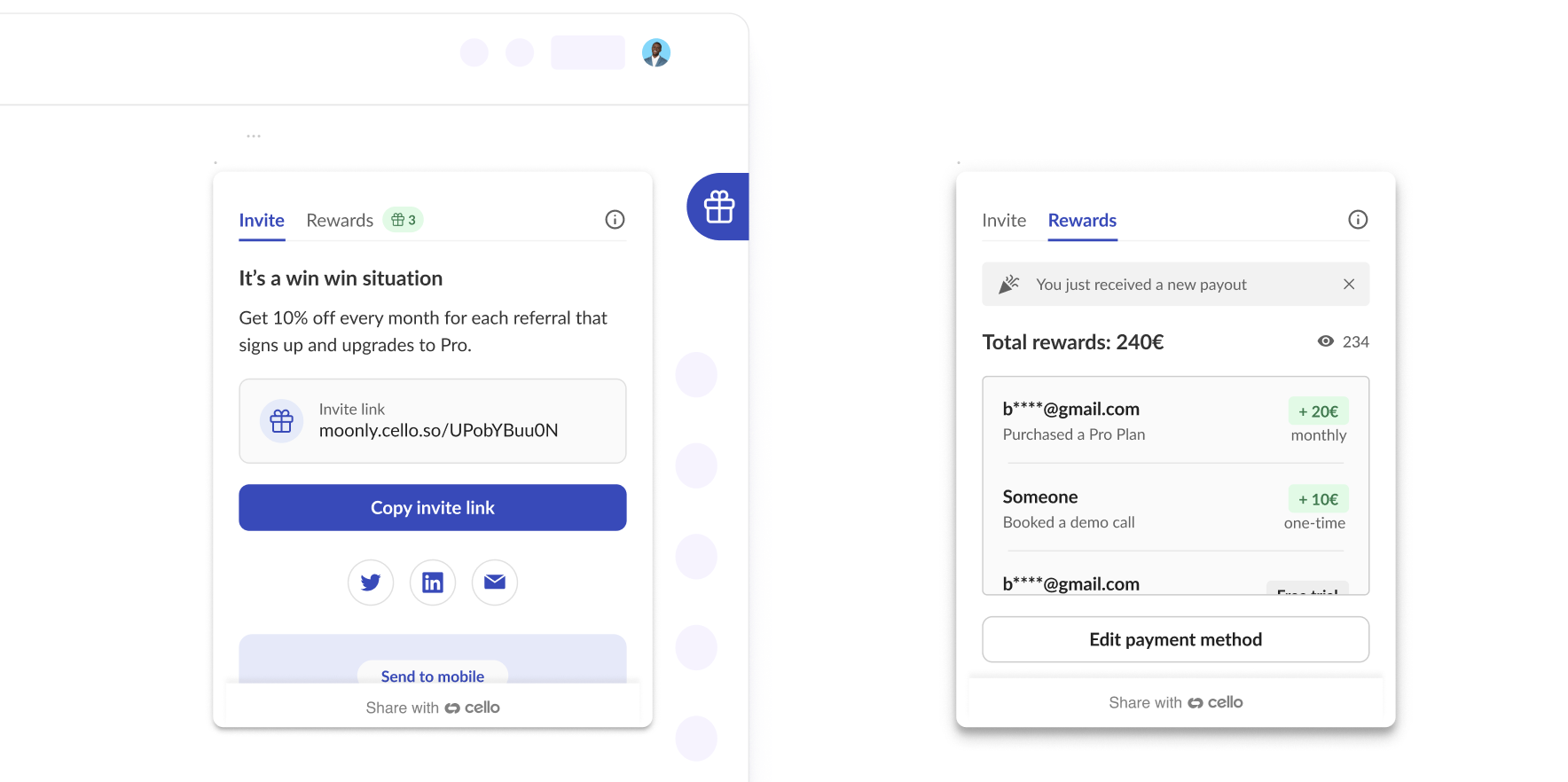
* **JWT token update** - Simplify how you update JWT token for Cello Referral component with new method and events. Cello tokens are kept alive 24h. To allow users uninterrupted access to Cello throughout their session in your product, listen to `onTokenExpiring` event and pass in a new token using `updateToken(token)` method. For more details go to [User authentication guide](/docs/user-authentication).
## Open component with URL, Norwegian language, and announcement customization
* We have made opening of the Cello referral component with a link super easy. Just add `?cello-open=true` param to your the URL. Add a link to referral component to your email communication to help your users access the sharing directly from the email. For more details, go to [Referral Component docs](https://docs.cello.so/docs/javascript-browser#open-the-referral-component-with-a-link)
```markdown theme={null}
https://your-product.com?cello-open=true
```
* We have added support for Norwegian language to the Referral Component. Now we support [English, German and Norwegian](https://docs.cello.so/docs/customization#texts-and-language).
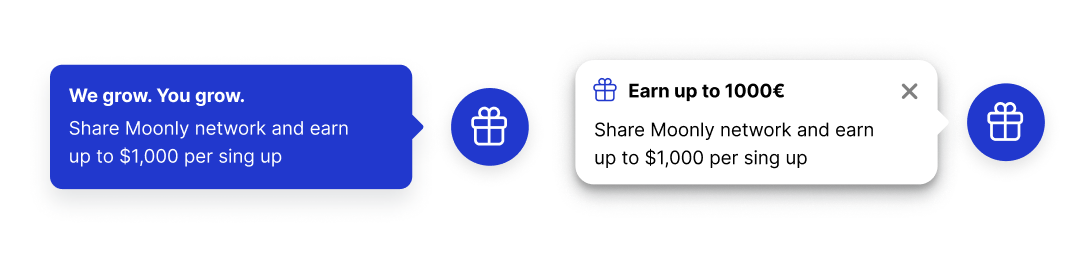
* Announcements now have much more customization options. You can now change background color, add a dismiss button and an icon.
A handful of bug fixes and minor improvements
## Cross-subdomain attribution
Improved [attribution library](/docs/pre-signup-tracking) - now referral code (UCC) cookie also works across subdomains.
## Fixed cello.hide() behavior
Fixed `cello.hide()` method behaviour. Now Referral Component will also be closed automatically, when `cello.hide()` method is called
A handful of bug fixes and minor improvements
## onOpen and onClose callbacks
We have introduced new options to Cello.js API: `onOpen()` and `onClose()` - callbacks to allow you to hook into event when Cello Referral Component is opened or closed. More details in [JavaScript Browser docs](/docs/javascript-browser).
Please download & install the updated Chrome Extension if you want to simulate the referral experience.
## New Cello.js API and payment details
* **New Cello.js API to improve loading of Cello Referral Component** - now all interactions with the cello API are being done in a queue of callbacks to guarantee the right order of commands for Cello Referral Component boot during page load. The old API is still functional, but will be deprecated eventually so **we advice to switch to the new way**. More information can be found on our [JavaScript Browser docs](/docs/javascript-browser) page.
* **Updated payment details screen** - enhancements to support multiple countries and receiving reward payouts to a business account.
Bug fixes and minor improvements
## Improved initialization flow
Improved Referral Component (cello.js script) initialization and authentication flow
## Notification badge fix
**Fixed** a notification bug that cause the notification badge to intermittently appear after page refresh
## Analytics and bug fixes
* Improved conversion funnel analytics and KPI reports
* A handful of bug fixes and minor improvements
## Short referral links and unique campaign codes
In this release we are introducing **short referral links** and **unique campaign codes or ucc**.
### Shorter links
Now referrer will be able to share a shorter, neater looking link which will also have the product name included in it.
The new structure of the links:
```markdown theme={null}
https://[product_name].cello.so/[ucc]
```
Example:
```markdown theme={null}
https://curlytics.cello.so/SgqXJPU3n0X
```
### UCC or Unique Campaign Code
Referrers will now be identified by a unique campaign code or `ucc`, instead of the `referrerId`. ucc represents exactly what its name implies. It identifies who the referrer is, but also what the campaign that the referrer shared was. As campaign's get updated, a ucc will also change, but the old links, that have already been share will keep working and point back to the correct campaign terms.
All the old long form links will keep working and referrerId's issued will still be valid and can be used for attribution.
## Signup and demo notifications
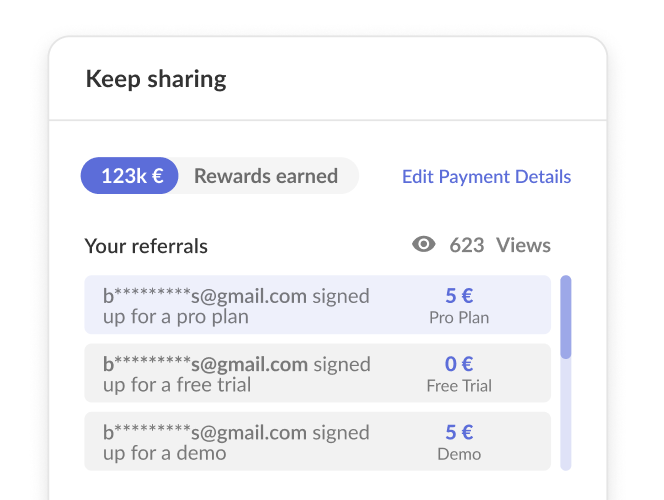
* Added **Notifications for new signup or demo events.** Referrers will now be notified when someone they have referred has signed up for free trials or requested a demo for the product.
* Fixed a bug with notifications badge position on the Cello button.
## Named user whitelist, how-it-works screen, and positioning
* Added **Named user whitelist** for Referral component. Now when Piloting Cello Referral program, you can start with a small cohort of selected users, by providing a list of their UID's (`productUserId's`) to Cello and only these users will have access to the Referral component until you are ready to rollout to your entire user base. Read more about Named user whitelist [here](/docs/javascript-browser#named-user-whitelist).
* Added a configurable **"How does it work" instruction screen**. Now you can provide description of your referral program to your users from inside the Referral Component, so they know exactly what to expect.

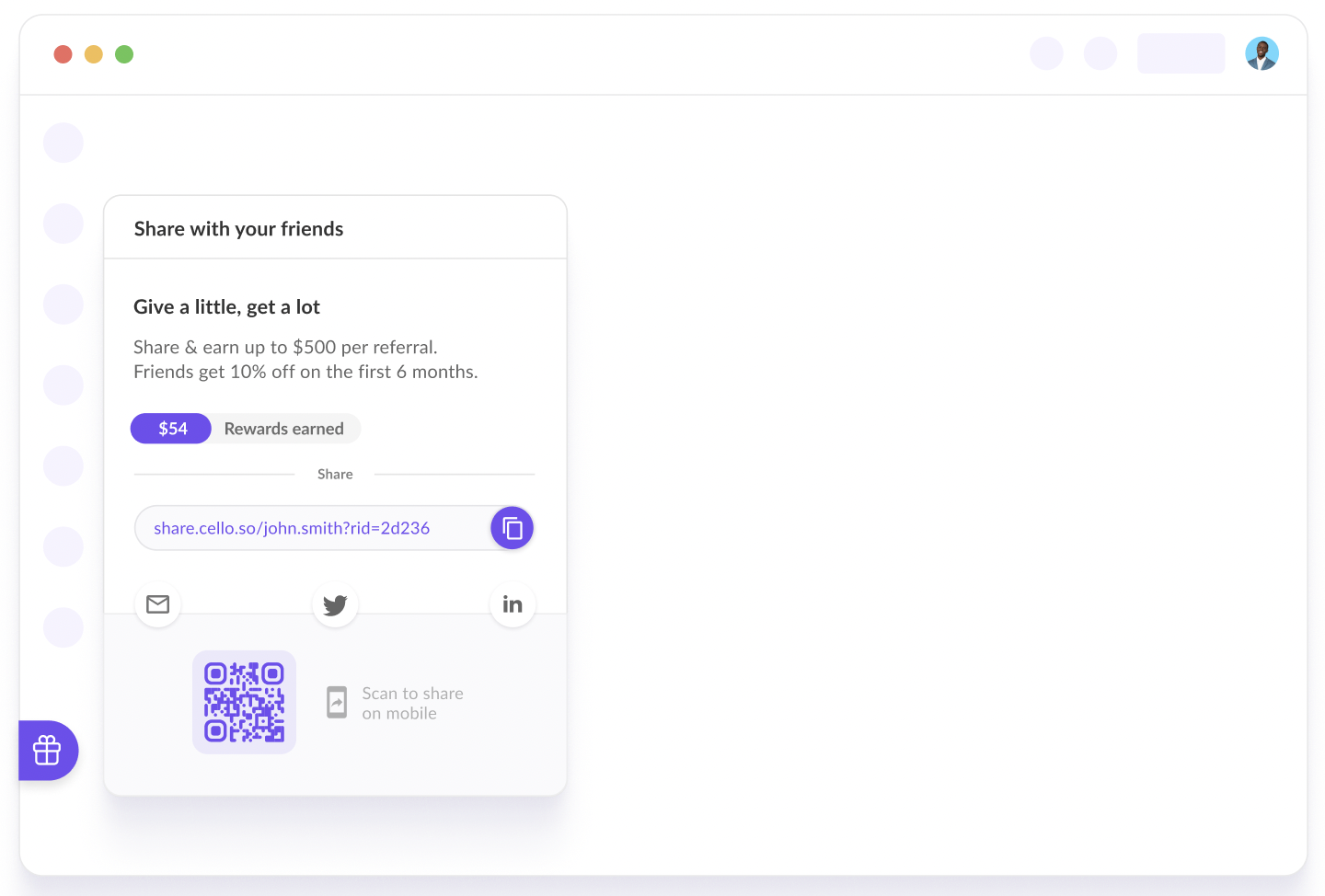
* Added options for Referral Component position. Now the Cello button, used to launch the component, can be positioned anywhere on the left side of the screen
## Smooth animations
* Added motion animation for a smoother transition when opening and closing the Referral component and QR code for mobile sharing
You can now control the widget's theme to better match your app's interface.
Set the theme directly in the Referral Component boot command:
```javascript theme={null}
window.cello = window.cello || { cmd: [] };
window.cello.cmd.push(async (cello) => {
try {
const options = {
productId: "REPLACE_WITH_PRODUCT_ID",
token: "REPLACE_WITH_TOKEN",
language: "en",
themeMode: 'dark'
productUserDetails: {
firstName: "Bob",
lastName: "Bobsky",
fullName: "Bob B Bobsky",
email: "bob@gmail.com",
},
};
await cello.boot(options);
// Call other Cello commands, if necessary
} catch (error) {
console.error("Failed to boot cello:", error);
}
});
```
You can also switch the theme dynamically if your app's interface changes:
```javascript theme={null}
cello.setThemeMode('light' | 'dark')
```
## Micro-loop announcements
Lightweight micro-loops improve the engagement with interested referrers. The announcements re-engage interested users who haven't yet shared, created views, or earned rewards.
Your referrers receive contextual reminders tied to their behaviours within the referral widget or tied to the behavior of invited new users.

### AI-powered sharing suggestions (experimental)
We're testing a new way to help referrers personalize their invite messages using AI.
When sharing, users see smart suggestions based on your product's context and key value propositions. AI helps to craft a compelling message in seconds.
This is **experimental** and is only rolled out to a few customers for now.
Want to try it? We're looking for partners to explore how AI might lift sharing performance.
We've shipped a collection of updates focused on flexibility, reliability, and a smoother user experience.
## New Languages Added
We have expanded our language support by adding 🇩🇰 **Danish (DA)** and 🇸🇰 **Slovak (SK)**. This makes it possible to provide a fully integrated referral experience for more and more users.
## Improved Referrer Email Deliverability
Referrer emails have been optimized to prevent them from landing in spam folders, ensuring that your users receive [referral-related communications](/docs/notifications) without interruption.
## Chargebee Webhook Now Supports Custom Fields
Our **Chargebee webhook** now fully supports **custom fields (CF)**, providing more flexibility [in sending Cello signup and transaction events](/docs/chargebee-conversion-tracking#4-send-signup-and-transaction-events-to-cello). Learn more about custom fields in the [Chargebee documentation](https://www.chargebee.com/docs/billing/2.0/site-configuration/custom_fields).
## Enhanced Mobile SDK Referral Component

The **referral component for the mobile SDK** has been significantly improved for a smoother user experience. Users now have:
* An always accessible **Rewards** page.
* Notifications about their **first link view** and **first reward**, helping them stay informed and engaged.
## Revenue Growth Analysis
Cello now provides detailed revenue growth analysis on your Purchases page. These charts help you understand exactly how your recurring revenue is growing and where opportunities or risks may exist:
* **New ARR** - Revenue from first-time customers
* **Expansion ARR** - Revenue growth from upgrades and upsells
* **Contraction ARR** - Revenue lost from downgrades
* **Lost ARR** - Revenue lost from churn
* **Net ARR Growth** - Overall monthly revenue change
Each component can be individually enabled or disabled using the chart menu in the upper right corner.
## Recovered attributions
Cello now detects and recovers missed attributions to avoid gaps and strengthen the attribution flow. These recovered referrals are clearly marked on the New Signup and Purchase pages within the Cello Portal.
## Multi-campaign support
The Cello portal now shows all active campaigns for your product. You can add new partner campaigns and change existing ones.

## Announcement improvements
This release we have added a few improvements for [announcements](/docs/notifications#announcement):
### Announcements with CTA
You can now add a button to announcements which provide a clear call-to-action for referrers and can increase activation rate.

### Cello.js API to trigger announcement
Now you can trigger an [announcement](/docs/notifications#announcement) using [a client-side JS method](/docs/javascript-browser#referral-library-sdk). Example below will trigger the default welcome announcement:
```javascript theme={null}
window.Cello("showAnnouncement", { "type": "welcome-announcement-1" } );
```
## Notifications preview
The [Notifications setup](https://portal.cello.so/setup/notifications) in Portal has been updated! You can now preview [all notifications](/docs/notifications) sent during the referrer's journey. Easily review alerts, announcements, and emails to see their design, copy and preview them in different language.

## Cello for mobile
We have released new versions of our mobile SDK's for iOS, Android and ReactNative. This version contains:
* 🤳 Full featured Cello Widget that allows users to track their views and rewards, and enter payment details to claim their rewards
* 🐞 General bugfixes
## Onboarding guide update
[Onboarding guide](https://portal.cello.so/setup/onboarding-tasks) in the Cello Portal is now your one-stop destination for everything you need for a seamless onboarding experience, including a clear view of your progress with completed and pending tasks.

## Partner management
You can now add partners to your [Partner Program](/docs/partner-add-on) directly in Cello Portal.

## Attribution library improvements
Our Attribution library has gotten a few exciting improvements 🎉
### Async methods and race condition handling
[Attribution library](/docs/connect-attribution) methods are asynchronous and return a promise. This guarantees that developer does not have to implement their own blocking mechanism and the promise resolves once the action or data is available. Developer can use either the straight up cookie handling with **.then** methods or with **async/await** .
In addition to that, to avoid race condition of our script loading and your application trying to communicate to it, you should add the following javascript code before any of the calls to the library.
```javascript theme={null}
window.CelloAttribution=window.CelloAttribution||async function(t,...o){if("getReferral"===t)throw new Error("getReferral is not supported in this context. Use getUcc instead.");let e,n;const i=new Promise((t,o)=>(e=t,n=o));return(window.CelloAttributionCmd=window.CelloAttributionCmd||[]).push({command:t,args:o,resolve:e,reject:n}),i};
```
### New JS Methods for custom cookie handling
We have added 2 new methods for [custom cookie handling](/docs/managing-cookie-consent#1-custom-method), to dynamically inform it when a visitor has consented to cookie storage. This method offers full control over the timing of cookie storage, allowing you to align it with your user consent process.
**allowCookies** - To allow the storage of the referral code cookie:
```javascript theme={null}
window.CelloAttribution('allowCookies');
```
**deleteCookies** - To halt the storage of the referral code cookie and clear it:
```javascript theme={null}
window.CelloAttribution('deleteCookies');
```
🐞 Bugfixes and improvements
## Improved payment details screen
We've made it easier to update your payment details in the Referral component. Now, there's no need to re-enter all info. Users can change what's needed, and they're set!
We've also enhanced privacy and security around users' personal data. Sensitive info like address isn't visible anymore once it's entered - users can only update it. This change makes it tougher for the bad guys to get their hands on users details.

## Easier token management
By default, there will be no need to keep updating the [Referral Component user authentication token](/docs/user-authentication) every 24h. Now, tokens are issued to be long-lived and won't expire unless you want them to. Prefer your tokens with an expiry date? No problem. Just reach out to our Customer Support to enable token expiration.
## Self-referral exclusion
Self-referral signups are now automatically excluded from trends and can be reviewed in the Cello Portal. From **New User Signups**, you will find these marked as **Excluded** in the list and no longer included in the overall aggregate trends.
## React Native SDK
Cello SDK for **React Native** is now available. Now you can add sharing into your Android and iOS apps built with React Native. With a plug-n-play mobile sharing component, your users can easily share their invite link with their friends and network using mobile sharing options convenient for them. Find out more [here 👉](/docs/cello-for-react-native)

## Android SDK
Cello SDK for **Android** is now available. Now you can add sharing into your Android app. With a plug-n-play mobile sharing component, your users can easily share their invite link with their friends and network using mobile sharing options convenient for them. Find out more [here 👉](/docs/cello-for-android)
## Boot command returns a promise
We have improved [Referral Component](/docs/javascript-browser#cellobootoptions) `boot()` command to **return a promise** that is resolved once the whole initialization process is finished or rejected if the boot command failed. It is optional to use if you want to wait in your code until `boot()` command has finished.
```javascript theme={null}
window.cello = window.cello || { cmd: [] };
window.cello.cmd.push(async function (cello) {
try {
await cello.boot({
productId: 'CELLO_PRODUCT_ID',
token: 'REPLACE_ME',
language: "en"
});
// call other Cello commands, if necessary
} catch (error) {
console.error("Failed to boot cello:", error);
// Handle the error appropriately
}
});
```
## Data processing improvements
We have rolled out back-end improvements to data processing and data aggregation in the Cello Portal, especially around how unique view counts are aggregated. While these changes are mostly transparent to users, there may be minor differences in daily or monthly counts across metrics as a result of these improvements and resulting rate calculations.
## iOS SDK
Cello SDK for **iOS** is now available. Now you can add sharing into your iOS app. With a plug-n-play mobile sharing component, your users can easily share their invite link with their friends and network using mobile sharing options convenient for them. Find out more [here 👉](/docs/cello-for-ios)

## Partner add-on
🤝 We are excited to announce **our Partner add-on,** which allows you to set up and manage your own partner program. Cello now unifies both use cases of user referrals and partner programs in one platform.
Additional partner features are offered as an add-on to the core Cello platform (no additional technical effort needed). If your are interested in this functionality or you already have a program that you would like to transfer to Cello, feel free to contact our support team to guide you through the setup.
🐞 Bugfixes and improvements
## Welcome email notifications

Referral programs thrive on timely engagement. Knowing instantly when there's activity tied to a referrals means your users can celebrate successes and continue to share more effectively. Whether it's their first successful share, a brand-new signup or unlocking a new reward, email notifications ensure they never miss a beat in the referral journey.
To enable Email notifications, make sure you are passing user details in the [Referral component initialization](/docs/javascript-browser#launch-referral-component).
```html theme={null}
```
🐞 Bugfixes and improvements
## Deep-linking to Referral Component tabs
We have added a way to open [Referral component](/docs/javascript-browser) on a specific tab/page either using [a new JS method](/docs/javascript-browser#opendestination) page or [a deep-linking with a URL parameter.](/docs/javascript-browser#open-the-referral-component-with-a-link) Now you can direct your users to a specific area of the sharing experience based on the call to action in either [your communication](/docs/contextual-sharing#regular-communication) or [in-product triggers](/docs/contextual-sharing#aha-moments).
Example of how to use JS method to open the component on Rewards tab:
```javascript theme={null}
window.Cello("open","rewards")
```
Example of how to use deep-linking to open the component on Rewards tab:
```html theme={null}
https://your-product.com?cello-open=rewards
```
## Referral code lookup API
You can now find out which one of your users has referred a new user. Using [Cello API /referral-codes](/docs/cello-api#referral-codes-referral-codes) simply pass the [unique campaign code](/docs/key-concepts) the new user signed up with and get back the user's `productUserId` the `ucc` belongs to.
```javascript theme={null}
{
"code": "UIPIWa2Hnnr",
"productUserId":"12345678"
"valid": true
}
200 OK
```
## Personalization and QR code improvements
**Personalization for new user message**
Now, you can incorporate the **referrer's name** into the [message displayed for new users](/docs/add-personalized-message) on your signup page. When visitors use the Cello invite link, they'll be greeted with a personalized banner, adding an element of social proof to the onboarding process.

**QR Code has moved**
We've enhanced our user experience! Mobile sharing option, i.e. QR code scanning, is now conveniently located on a dedicated page. Access them with the QR code button next to other sharing choices. This refinement ensures the main page spotlights your program's offer while keeping all sharing functionalities organized and within easy reach.

## New languages and JS method
We now support 4 new [languages](/docs/component-overview#texts-and-language): French, Dutch, Spanish and Italian. 🇫🇷 Bonjour! 🇳🇱 Hallo! 🇪🇸 ¡Hola! 🇮🇹 Ciao!
### New referral component JS method to unlock Aha moments
Cello referral component has just gotten a [new JS method getActiveUcc()](/docs/javascript-browser#getactiveucc). This allows you to display referrers link anywhere the user flow, specifically during moments of delights when sharing is most relevant and contextual for your user. Find out more about in our [contextual sharing guide](/docs/contextual-sharing).
## Active link API endpoint
We're pleased to announce the release of a new endpoint in the Cello API, [/active-link](https://docs.cello.so/docs/cello-api#coming-soon-active-link-active-link), to facilitate the retrieval of active link and campaign code associated with your user (`productUserId`). This enhancement serves as a powerful tool, enabling a broad range of contextual sharing use cases, and potentially broadening the scope and impact of your referral program.
For insights into how best to leverage this addition and explore various use cases, please refer to our [Contextual sharing guide.](/docs/contextual-sharing)
To understand the specifics of the new [/active-link](https://docs.cello.so/docs/cello-api#coming-soon-active-link-active-link) endpoint, you can visit the [Cello API Reference](/docs/cello-api). This is a significant step towards enriching your user experience, and we look forward to seeing the innovative ways you'll make use of this feature.
## Updated Referral Component design rollout
We are excited to announce that our latest Cello component design, which was introduced in May, is showing promising results in sharing metrics. As a result, we've decided to phase out the previous version of the component and update our existing CDN URL (`https://assets.cello.so/app/latest/cello.js`) to direct to the newer version.
### What Does This Mean For You?
No action is required on your part. The transition to the updated version of the component will occur seamlessly in your application. The new component is designed to operate flawlessly within your existing configuration, without the need for any adjustments.
### Timeline of the Update
* Starting **Monday, July 3**, URLs for dev and stage accounts will direct to the updated version of the component. This allows you to preview and test the update, providing us with any feedback or necessary adjustments.
* From **Monday, July 10**, the current production URLs will redirect to the updated component version.
### Key Update Note
The new component design introduces the functionality to update the token used for user authentication. We encourage you to review and adjust your logic to accommodate this new feature. Detailed information regarding this change can be found in our [documentation](https://docs.cello.so/docs/user-authentication#updating-token).
## New Referral Component design and JWT token update
* **New Referral component design** - UX with tabbed navigation, descriptive notifications and more accessible design. Switching to the new referral component requires minimal effort. Just switch the CDN URL in your code to `https://assets.cello.so/app/v2/latest/cello.js` . No other migration effort needed. The v1 Referral Component will remain functional and supported, but will not receive any new updates apart from critical security fixes.

* **JWT token update** - Simplify how you update JWT token for Cello Referral component with new method and events. Cello tokens are kept alive 24h. To allow users uninterrupted access to Cello throughout their session in your product, listen to `onTokenExpiring` event and pass in a new token using `updateToken(token)` method. For more details go to [User authentication guide](/docs/user-authentication).
## Open component with URL, Norwegian language, and announcement customization
* We have made opening of the Cello referral component with a link super easy. Just add `?cello-open=true` param to your the URL. Add a link to referral component to your email communication to help your users access the sharing directly from the email. For more details, go to [Referral Component docs](https://docs.cello.so/docs/javascript-browser#open-the-referral-component-with-a-link)
```markdown theme={null}
https://your-product.com?cello-open=true
```
* We have added support for Norwegian language to the Referral Component. Now we support [English, German and Norwegian](https://docs.cello.so/docs/customization#texts-and-language).
* Announcements now have much more customization options. You can now change background color, add a dismiss button and an icon.

A handful of bug fixes and minor improvements
## Cross-subdomain attribution
Improved [attribution library](/docs/pre-signup-tracking) - now referral code (UCC) cookie also works across subdomains.
## Fixed cello.hide() behavior
Fixed `cello.hide()` method behaviour. Now Referral Component will also be closed automatically, when `cello.hide()` method is called
A handful of bug fixes and minor improvements
## onOpen and onClose callbacks
We have introduced new options to Cello.js API: `onOpen()` and `onClose()` - callbacks to allow you to hook into event when Cello Referral Component is opened or closed. More details in [JavaScript Browser docs](/docs/javascript-browser).
Please download & install the updated Chrome Extension if you want to simulate the referral experience.
## New Cello.js API and payment details
* **New Cello.js API to improve loading of Cello Referral Component** - now all interactions with the cello API are being done in a queue of callbacks to guarantee the right order of commands for Cello Referral Component boot during page load. The old API is still functional, but will be deprecated eventually so **we advice to switch to the new way**. More information can be found on our [JavaScript Browser docs](/docs/javascript-browser) page.
* **Updated payment details screen** - enhancements to support multiple countries and receiving reward payouts to a business account.
Bug fixes and minor improvements
## Improved initialization flow
Improved Referral Component (cello.js script) initialization and authentication flow
## Notification badge fix
**Fixed** a notification bug that cause the notification badge to intermittently appear after page refresh
## Analytics and bug fixes
* Improved conversion funnel analytics and KPI reports
* A handful of bug fixes and minor improvements
## Short referral links and unique campaign codes
In this release we are introducing **short referral links** and **unique campaign codes or ucc**.
### Shorter links
Now referrer will be able to share a shorter, neater looking link which will also have the product name included in it.
The new structure of the links:
```markdown theme={null}
https://[product_name].cello.so/[ucc]
```
Example:
```markdown theme={null}
https://curlytics.cello.so/SgqXJPU3n0X
```
### UCC or Unique Campaign Code
Referrers will now be identified by a unique campaign code or `ucc`, instead of the `referrerId`. ucc represents exactly what its name implies. It identifies who the referrer is, but also what the campaign that the referrer shared was. As campaign's get updated, a ucc will also change, but the old links, that have already been share will keep working and point back to the correct campaign terms.
All the old long form links will keep working and referrerId's issued will still be valid and can be used for attribution.
## Signup and demo notifications
* Added **Notifications for new signup or demo events.** Referrers will now be notified when someone they have referred has signed up for free trials or requested a demo for the product.

* Fixed a bug with notifications badge position on the Cello button.
## Named user whitelist, how-it-works screen, and positioning
* Added **Named user whitelist** for Referral component. Now when Piloting Cello Referral program, you can start with a small cohort of selected users, by providing a list of their UID's (`productUserId's`) to Cello and only these users will have access to the Referral component until you are ready to rollout to your entire user base. Read more about Named user whitelist [here](/docs/javascript-browser#named-user-whitelist).
* Added a configurable **"How does it work" instruction screen**. Now you can provide description of your referral program to your users from inside the Referral Component, so they know exactly what to expect.

* Added options for Referral Component position. Now the Cello button, used to launch the component, can be positioned anywhere on the left side of the screen

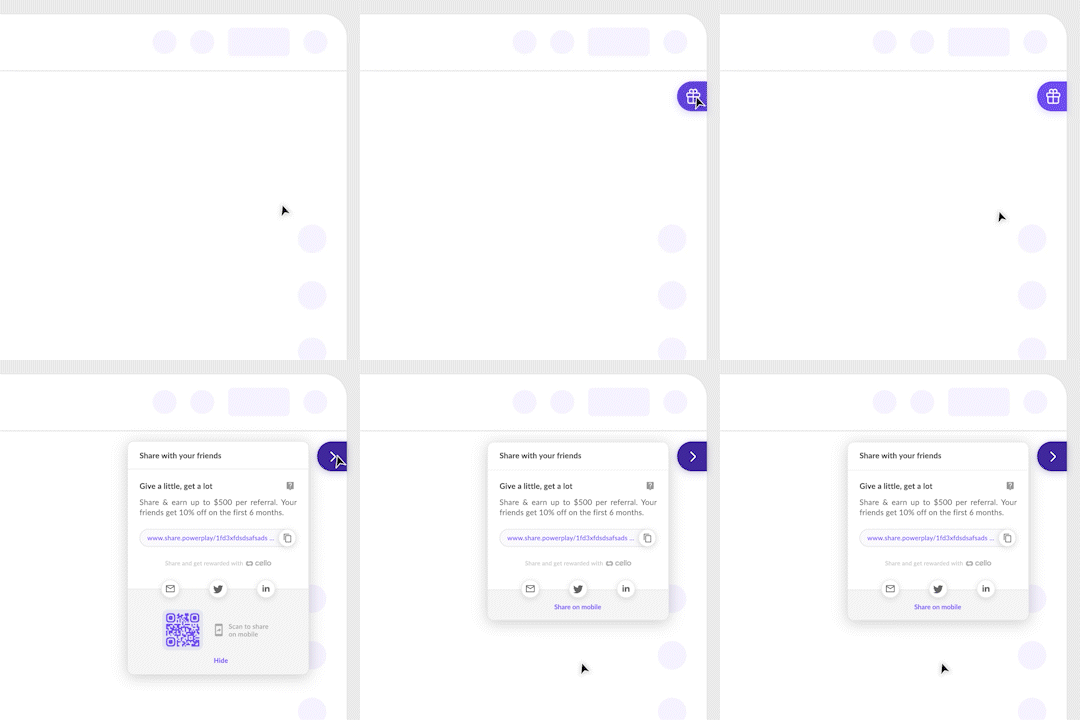
## Smooth animations
* Added motion animation for a smoother transition when opening and closing the Referral component and QR code for mobile sharing
