> ## Documentation Index
> Fetch the complete documentation index at: https://docs.cello.so/llms.txt
> Use this file to discover all available pages before exploring further.
# Introduction
> Learn how to implement referral attribution to track signups and purchases back to their original referrers
Referral conversion enables you to track and attribute user signups and purchases back to their original referrers and reward them for conversions.
Cello helps you capture referral codes `ucc` from landing pages and maintains attribution throughout the entire user journey, from initial visit to final purchase.
# How it works
The referral conversion process follows a four-step attribution flow:
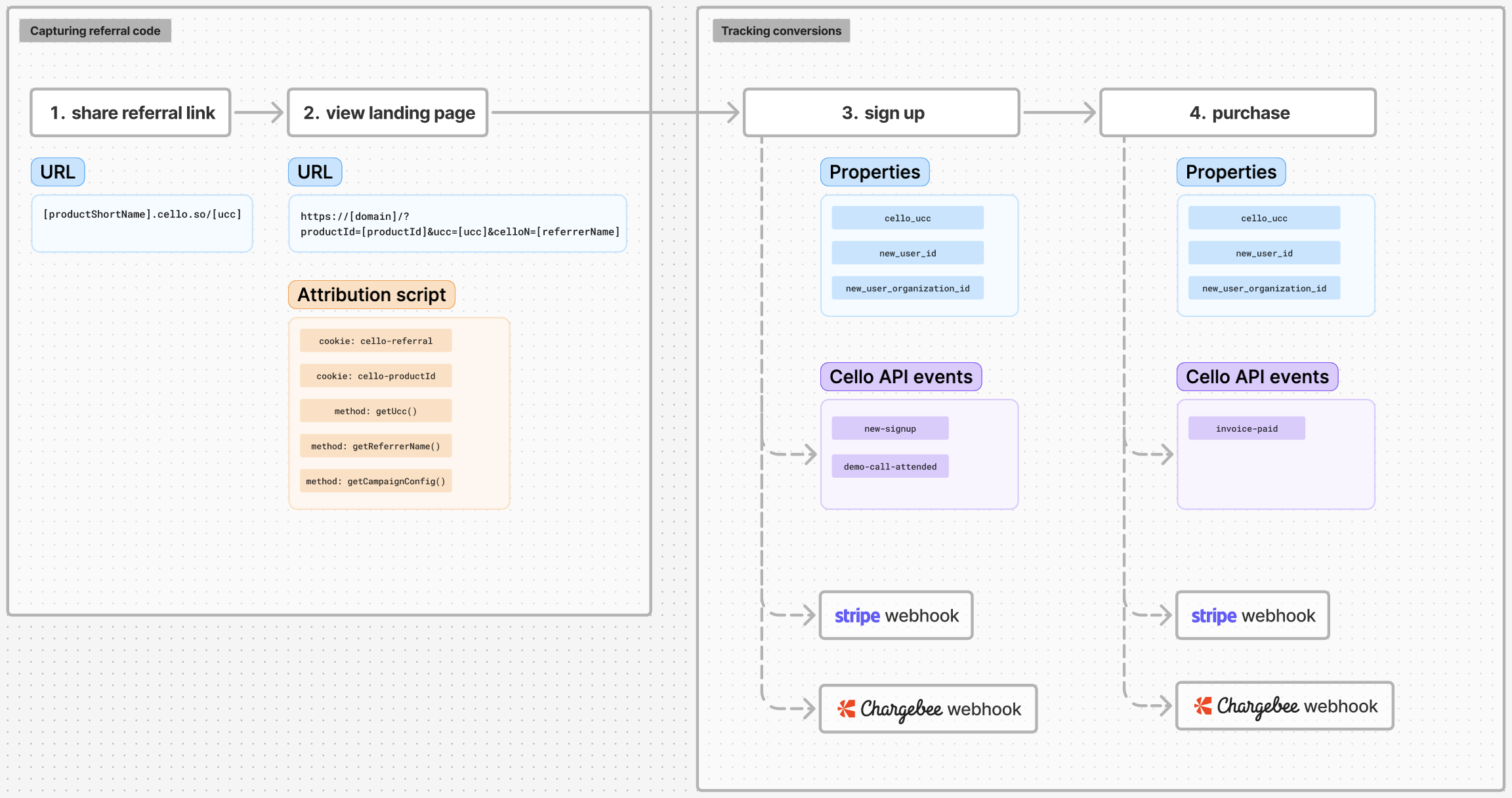 1. **Referral Link Sharing** - Referrers share links containing unique codes (`ucc` parameters)
2. **Landing Page Capture** - Your website captures and stores referral codes `ucc` as first-party cookies
3. **Signup Tracking** - New user registrations are linked to their referrer
4. **Purchase Tracking** - Revenue events are attributed back to the original referrers
Accurate referral conversion tracking depends on properly passing the referral code `ucc` through each step of the referral journey.
**Attribution based on organization level**
If the buying persona is the organization and you want to attribute purchases on the organization level always provide the **ID of the organization** in the parameter `payload.newUserId`
# Getting started with referral conversion tracking
Learn how to track conversions with Cello in the following resources:
Capture referral code during web signup flow
Capture referral code during mobile signup
A full guide on tracking signup events
A full guide on tracking purchase events
or choose a step-by-step quickstart guide for your integration scenario:
1. **Referral Link Sharing** - Referrers share links containing unique codes (`ucc` parameters)
2. **Landing Page Capture** - Your website captures and stores referral codes `ucc` as first-party cookies
3. **Signup Tracking** - New user registrations are linked to their referrer
4. **Purchase Tracking** - Revenue events are attributed back to the original referrers
Accurate referral conversion tracking depends on properly passing the referral code `ucc` through each step of the referral journey.
**Attribution based on organization level**
If the buying persona is the organization and you want to attribute purchases on the organization level always provide the **ID of the organization** in the parameter `payload.newUserId`
# Getting started with referral conversion tracking
Learn how to track conversions with Cello in the following resources:
Capture referral code during web signup flow
Capture referral code during mobile signup
A full guide on tracking signup events
A full guide on tracking purchase events
or choose a step-by-step quickstart guide for your integration scenario: