> ## Documentation Index
> Fetch the complete documentation index at: https://docs.cello.so/llms.txt
> Use this file to discover all available pages before exploring further.
# HubSpot Forms
> Integrate the Cello attribution library with HubSpot forms to track referral conversions
## Overview
This guide shows you how to capture referral codes (`ucc`) from visitors and automatically populate them into HubSpot forms when users submit lead generation or contact forms. This enables you to track which referrals lead to qualified leads and conversions.
## Considerations when creating the `ucc` property in HubSpot
When creating a custom property in HubSpot, it is important that the internal name of the property is `ucc`. This sets up the property in either company or deal. The one to choose depends on your specific sales process and the corresponding HubSpot setup.
These instructions describe creating the `ucc` property in the object type **Company**, group **Company information**. Often, it can make sense to create the `ucc` property in the **Deal** object type. A custom property can be created following the instructions of HubSpot [here](https://knowledge.hubspot.com/properties/create-and-edit-properties).
## Step 1: Create a form with a hidden `ucc` field in HubSpot
To properly capture referral data, you need to add a `ucc` field to your HubSpot form:
1. Create a customized form in HubSpot by following the instructions [here](https://knowledge.hubspot.com/forms/create-forms).
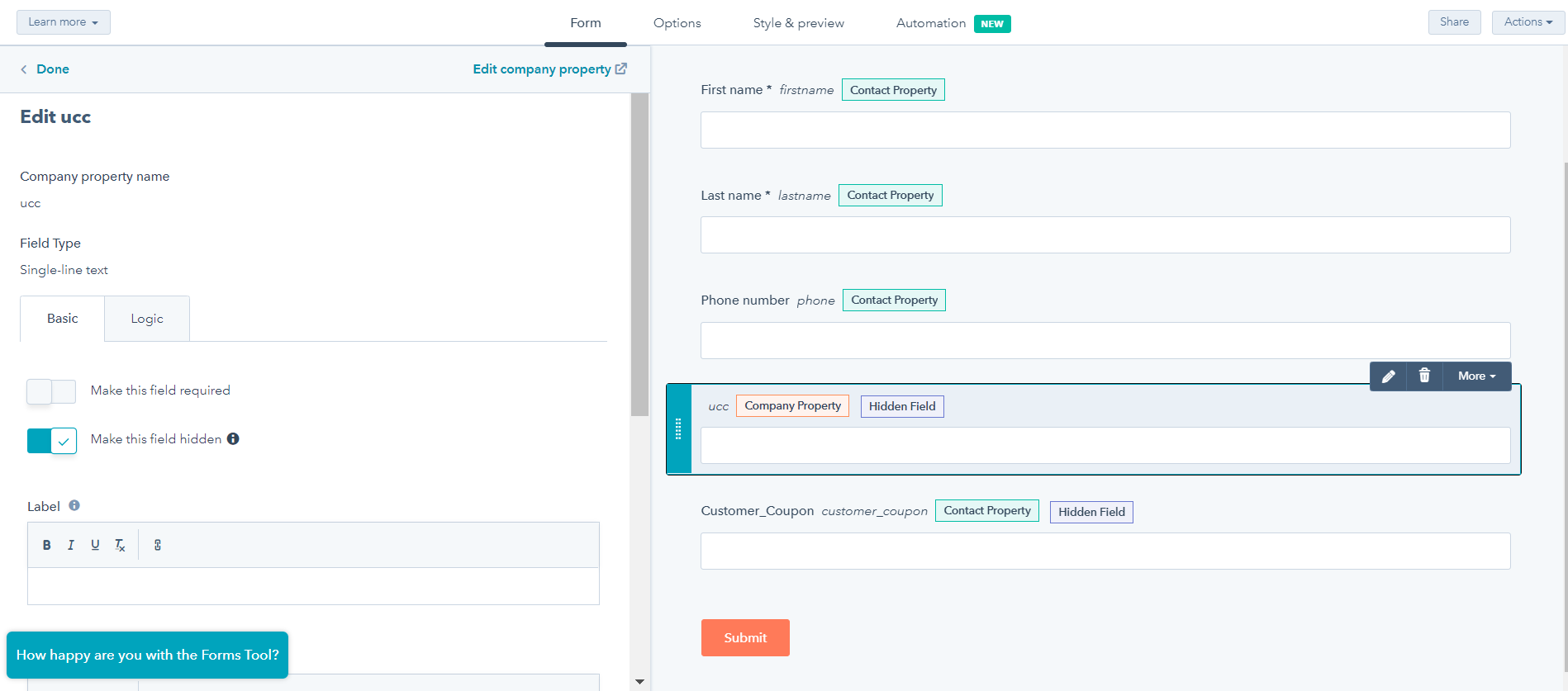
2. In your form, create a hidden field called `ucc`. This field automatically picks up the `ucc` from the link and feeds it into the create `ucc` property in HubSpot. The result should look like this:
 ## Step 2: Include the Cello Attribution Library
Add the Cello attribution script to your website's `` section or before the closing `` tag:
```html theme={null}
```
## Step 3: Add the Attribution Command Queue
Since HubSpot forms are loaded dynamically, include this script to handle race conditions between your code and the Cello library loading:
```html theme={null}
```
**Important:** This script must be added before any calls to `window.CelloAttribution()` to prevent race conditions.
## Step 3: Integrate with HubSpot Form Creation
When creating your HubSpot form, use the `onFormReady` callback to populate the referral code. Replace the placeholder values with your actual HubSpot configuration:
```javascript theme={null}
hbspt.forms.create({
region: "AAA", // Replace with your HubSpot region (e.g., "na1")
portalId: "BBB", // Replace with your HubSpot Portal ID
formId: "CCC", // Replace with your HubSpot Form ID
onFormReady(form, ctx) {
window.CelloAttribution('getUcc').then((celloUcc) => {
console.log('Incoming Referral:', celloUcc);
// Find all ucc fields and populate them
document.querySelectorAll('input[name="ucc"]').forEach(
el => {
el.value = celloUcc;
}
);
}).catch((error) => {
console.log('No referral code found or error occurred:', error);
});
}
});
```
## Test Your Implementation
### 1. Test Referral Code Capture
1. Visit your page with a referral parameter:
```
https://yoursite.com/landing-page?ucc=test123&productId=yourproduct
```
2. Open browser developer tools and check:
```javascript theme={null}
// Test if ucc is available
window.CelloAttribution('getUcc')
```
Expected response: `Promise {: 'test123'}`
### 2. Test Form Integration
1. Open the page with the created form
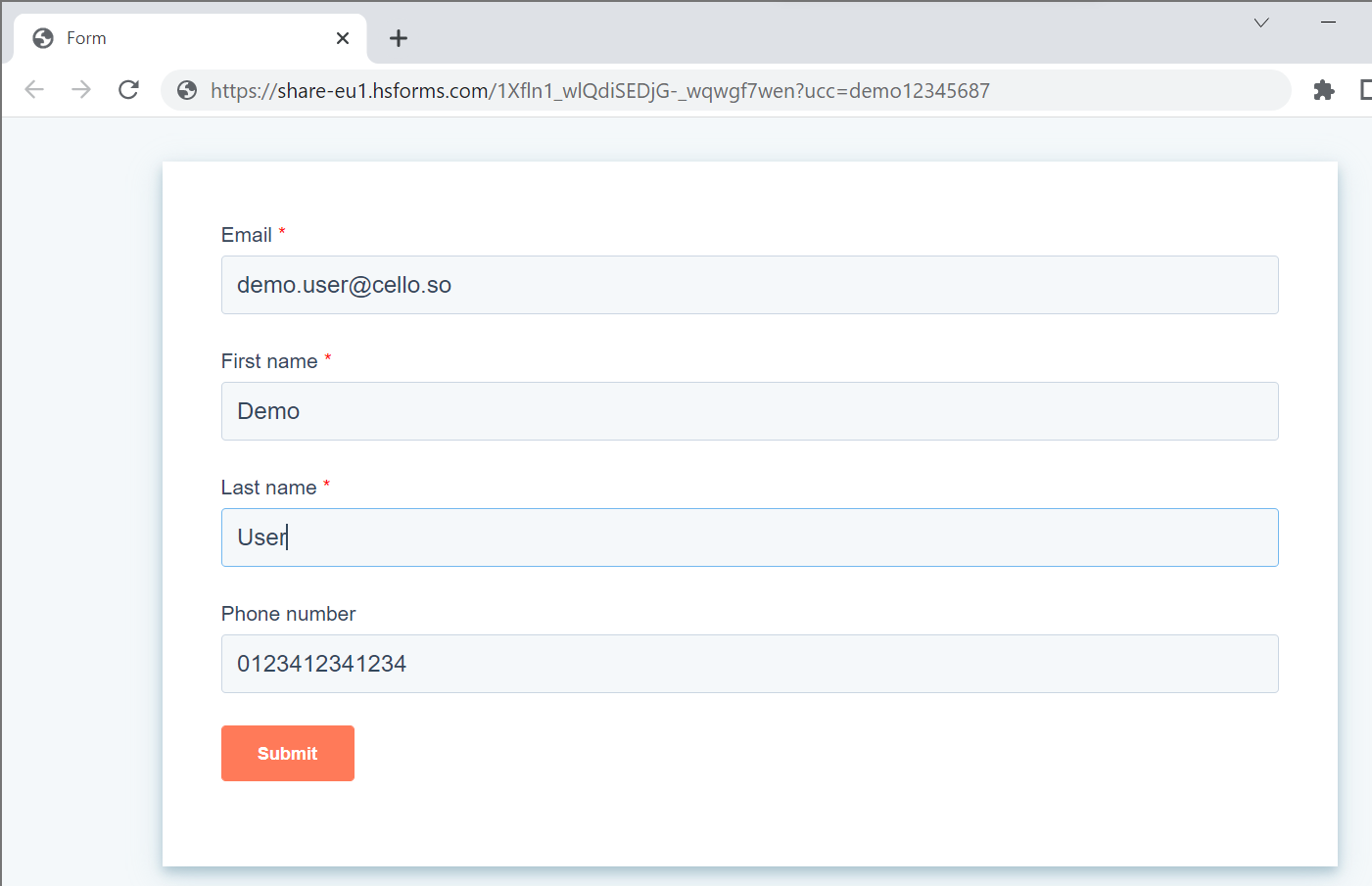
2. Add `?ucc=demo12345687` to the link and reload the page. After the initialization of the config, this will be added automatically to the link by Cello
3. Enter some test data into the form. The result should look similar to the following
## Step 2: Include the Cello Attribution Library
Add the Cello attribution script to your website's `` section or before the closing `` tag:
```html theme={null}
```
## Step 3: Add the Attribution Command Queue
Since HubSpot forms are loaded dynamically, include this script to handle race conditions between your code and the Cello library loading:
```html theme={null}
```
**Important:** This script must be added before any calls to `window.CelloAttribution()` to prevent race conditions.
## Step 3: Integrate with HubSpot Form Creation
When creating your HubSpot form, use the `onFormReady` callback to populate the referral code. Replace the placeholder values with your actual HubSpot configuration:
```javascript theme={null}
hbspt.forms.create({
region: "AAA", // Replace with your HubSpot region (e.g., "na1")
portalId: "BBB", // Replace with your HubSpot Portal ID
formId: "CCC", // Replace with your HubSpot Form ID
onFormReady(form, ctx) {
window.CelloAttribution('getUcc').then((celloUcc) => {
console.log('Incoming Referral:', celloUcc);
// Find all ucc fields and populate them
document.querySelectorAll('input[name="ucc"]').forEach(
el => {
el.value = celloUcc;
}
);
}).catch((error) => {
console.log('No referral code found or error occurred:', error);
});
}
});
```
## Test Your Implementation
### 1. Test Referral Code Capture
1. Visit your page with a referral parameter:
```
https://yoursite.com/landing-page?ucc=test123&productId=yourproduct
```
2. Open browser developer tools and check:
```javascript theme={null}
// Test if ucc is available
window.CelloAttribution('getUcc')
```
Expected response: `Promise {: 'test123'}`
### 2. Test Form Integration
1. Open the page with the created form
2. Add `?ucc=demo12345687` to the link and reload the page. After the initialization of the config, this will be added automatically to the link by Cello
3. Enter some test data into the form. The result should look similar to the following
 4. Submit your HubSpot form
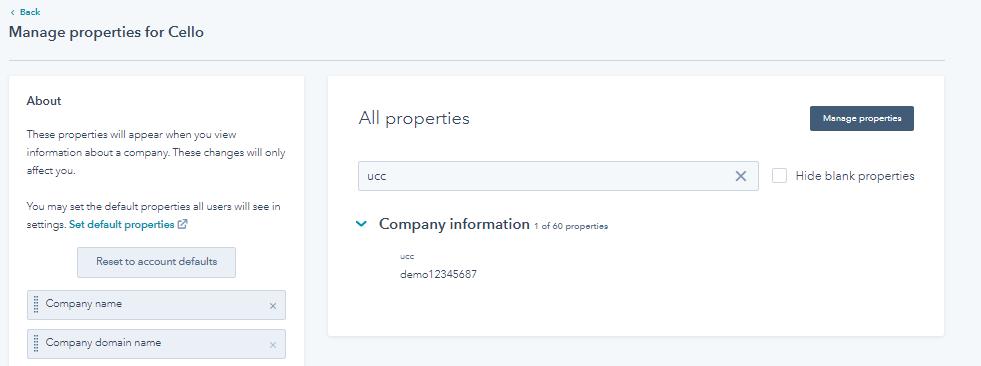
5. HubSpot should now have created a new contact and a new company. In the new company, you should find the `ucc` property filled with the entered value `demo12345687`
6. The test was successful. You can now move ahead to the section on providing the required data to Cello.
4. Submit your HubSpot form
5. HubSpot should now have created a new contact and a new company. In the new company, you should find the `ucc` property filled with the entered value `demo12345687`
6. The test was successful. You can now move ahead to the section on providing the required data to Cello.
 ## Troubleshooting
### Common Issues and Solutions
**1. "getReferral is not supported" error**
* Make sure you're using `getUcc()` instead of `getReferral()`
* This is the correct method for the latest attribution library
**2. Form fields not getting populated**
* Verify your form has a field with `name="ucc"`
* Check that the field selector in `querySelectorAll()` matches your form
* Ensure the `onFormReady` callback is executing
**3. Referral code is undefined**
* Test with a URL containing the `ucc` parameter: `?ucc=test123`
* Check browser cookies for `cello-referral`
* Verify the attribution script loaded properly
**4. Script loading order issues**
* Always include the command queue script before any attribution calls
* Use the `async` attribute on the attribution library script
## HubSpot Scheduling Pages Integration
You can also use the Cello attribution library with HubSpot scheduling pages to capture referral codes when prospects book meetings or demos. This is particularly useful for sales-led referral programs where referrals often lead to booked consultations or product demos.
### How it works
HubSpot scheduling pages include built-in forms that collect contact information before allowing visitors to book meetings. You can integrate Cello attribution with these forms using the same approach as regular HubSpot forms.
### Setup Steps
The integration process for scheduling pages is identical to regular forms:
1. Include the Cello Attribution Library (Steps 2-3 above remain the same)
2. Set up the `ucc` property in your HubSpot contacts/companies
3. Add a hidden `ucc` field to your scheduling page form
4. Configure the scheduling page to populate the referral code
### Adding `ucc` Field to Scheduling Pages
1. Create or edit a scheduling page ([HubSpot's scheduling page guide](https://knowledge.hubspot.com/meetings/create-scheduling-pages))
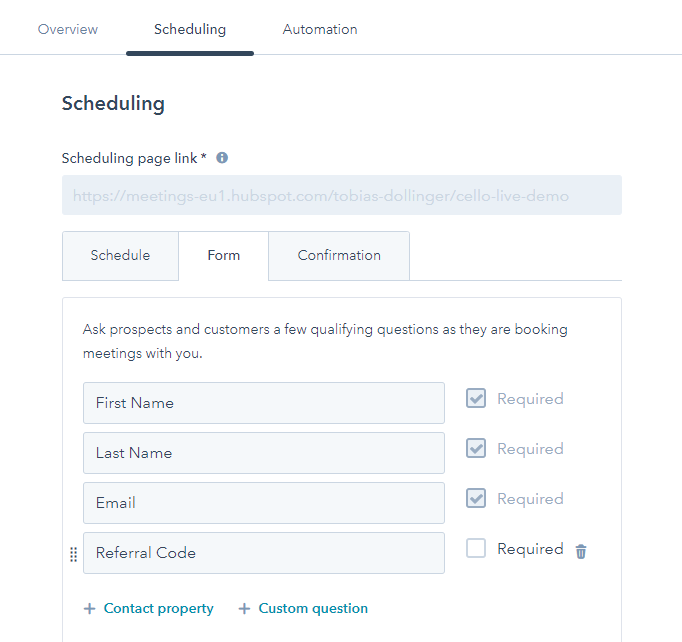
2. In the "Form" section, add the created `ucc` parameter to the form. You can't hide this field on a scheduling page. This field automatically picks up the `ucc` parameter from the link and feeds it into the created `ucc` property in HubSpot. The result should look like this:
## Troubleshooting
### Common Issues and Solutions
**1. "getReferral is not supported" error**
* Make sure you're using `getUcc()` instead of `getReferral()`
* This is the correct method for the latest attribution library
**2. Form fields not getting populated**
* Verify your form has a field with `name="ucc"`
* Check that the field selector in `querySelectorAll()` matches your form
* Ensure the `onFormReady` callback is executing
**3. Referral code is undefined**
* Test with a URL containing the `ucc` parameter: `?ucc=test123`
* Check browser cookies for `cello-referral`
* Verify the attribution script loaded properly
**4. Script loading order issues**
* Always include the command queue script before any attribution calls
* Use the `async` attribute on the attribution library script
## HubSpot Scheduling Pages Integration
You can also use the Cello attribution library with HubSpot scheduling pages to capture referral codes when prospects book meetings or demos. This is particularly useful for sales-led referral programs where referrals often lead to booked consultations or product demos.
### How it works
HubSpot scheduling pages include built-in forms that collect contact information before allowing visitors to book meetings. You can integrate Cello attribution with these forms using the same approach as regular HubSpot forms.
### Setup Steps
The integration process for scheduling pages is identical to regular forms:
1. Include the Cello Attribution Library (Steps 2-3 above remain the same)
2. Set up the `ucc` property in your HubSpot contacts/companies
3. Add a hidden `ucc` field to your scheduling page form
4. Configure the scheduling page to populate the referral code
### Adding `ucc` Field to Scheduling Pages
1. Create or edit a scheduling page ([HubSpot's scheduling page guide](https://knowledge.hubspot.com/meetings/create-scheduling-pages))
2. In the "Form" section, add the created `ucc` parameter to the form. You can't hide this field on a scheduling page. This field automatically picks up the `ucc` parameter from the link and feeds it into the created `ucc` property in HubSpot. The result should look like this:
 ### JavaScript Integration for Scheduling Pages
Since scheduling pages are embedded HubSpot components, you'll add the same integration code to the page where your scheduling page is embedded:
```html theme={null}
```
### Testing Your Scheduling Page Integration
1. Visit your scheduling page with a referral parameter:
```
https://yoursite.com/book-demo?ucc=demo12345687
```
2. Start the booking process and fill out the form
3. Complete the booking
4. Check the created contact in HubSpot - the `ucc` field should contain `demo12345687`
### Key Differences from Regular Forms
* **Timing**: Scheduling pages load asynchronously, so we use MutationObserver to detect when the form is ready
* **Form structure**: Scheduling page forms are embedded HubSpot components with specific styling
* **Optional field**: Make the `ucc` field optional since not all meeting bookings will come from referrals
* **Meeting context**: The referral code will be associated with the contact and any resulting deals from the meeting
**For sales-led businesses**: Integrating referral tracking with scheduling pages is crucial for tracking which referrals lead to qualified sales conversations and ultimately closed deals.
### JavaScript Integration for Scheduling Pages
Since scheduling pages are embedded HubSpot components, you'll add the same integration code to the page where your scheduling page is embedded:
```html theme={null}
```
### Testing Your Scheduling Page Integration
1. Visit your scheduling page with a referral parameter:
```
https://yoursite.com/book-demo?ucc=demo12345687
```
2. Start the booking process and fill out the form
3. Complete the booking
4. Check the created contact in HubSpot - the `ucc` field should contain `demo12345687`
### Key Differences from Regular Forms
* **Timing**: Scheduling pages load asynchronously, so we use MutationObserver to detect when the form is ready
* **Form structure**: Scheduling page forms are embedded HubSpot components with specific styling
* **Optional field**: Make the `ucc` field optional since not all meeting bookings will come from referrals
* **Meeting context**: The referral code will be associated with the contact and any resulting deals from the meeting
**For sales-led businesses**: Integrating referral tracking with scheduling pages is crucial for tracking which referrals lead to qualified sales conversations and ultimately closed deals.