> ## Documentation Index
> Fetch the complete documentation index at: https://docs.cello.so/llms.txt
> Use this file to discover all available pages before exploring further.
# Apply Discounts
> Learn how to apply discounts to referred users when the purchase a subscription
## Implementation steps
Implementing automated discounts for referred users follows a consistent pattern across all subscription platforms. Here's the complete workflow:
Create discount coupons in your subscription platform (Stripe, Chargebee, Paddle, Recurly, etc.):
**Platform Setup:**
* Configure discounts at the plan/price level
* Create multiple variations for different subscription plans:
* Monthly plans: e.g., 25% off for 3 months
* Annual plans: e.g., 50% off first year
* Store provider coupon IDs in application configuration. You will need them later to apply the correct coupon at subscription time based on plan/price and referral status.
Once you’ve set up discounts in your subscription platform, a potential next step would be to [display the discount information on your pricing or landing page](/guides/user-experience/new-user-discounts).
During subscription creation, check if the new user is a Cello referral and discount needs to be assigned:
* New ⭐: Use our [New User Reward API](/api-reference/new-users/get-reward) to validate the eligibility for a new user reward (discount)
or
* **Using Stripe or Chargebee only:** Check your Stripe/Chargebee Customer if a `cello_ucc` is present in the [**Customer Object**](https://apidocs.chargebee.com/docs/api/customers)**.**
* **Using CelloAPI to track signups and Stripe/Chargebee to track purchases:** Check your Stripe/Chargebee customer if a `cello_ucc` is present in the [**Customer Object**](https://apidocs.chargebee.com/docs/api/customers)
* **Cello API to track all conversion events:** Check if the new user with this id has a `cello_ucc` in your profile you stored during [signup tracking](/attribution/tracking-signups).
During subscription creation, pass the determined coupon code to your subscription platform:
**Required Data for Subscription:**
* Plan/Price information
* Coupon/discount code
**Platform-Specific Application:**
* **Stripe**: Use `discounts` array or `coupon` parameter on Checkout Session
* **Chargebee**: Apply `coupon_ids` on Subscription or via Hosted Pages (not at customer creation)
### Key Implementation Notes
* **Timing**: Discounts must be applied during initial subscription creation, not afterward
* **Validation**: Always verify the user is eligible for referral discounts
* **Fallback**: Handle cases where discount codes are invalid or expired
* **Configuration**: Maintain an application-level mapping of coupon IDs to plan type and referral status so the correct coupon can be applied at subscription time
## Stripe implementation
Stripe offers flexible discount mechanisms through **coupons**. For referral discounts, apply coupons during Subscription creation or Checkout. You cannot attach discounts at customer creation.
### Overview
There are two ways to apply coupons in Stripe, depending on your integration style:
* Server-side Subscription API (apply during `subscriptions.create`) - best for custom UIs. See [Stripe documentation](https://stripe.com/docs/billing/subscriptions/discounts).
* Prebuilt Checkout Session (apply during `checkout.sessions.create`) - best for hosted checkout. See [Stripe documentation](https://stripe.com/docs/payments/checkout/discounts).
Stripe's discount system works through:
* **Coupons**: Define the discount structure (percentage, duration, limits)
* **Application methods**: Apply coupons to Subscriptions or Checkout Sessions
Set up discount coupons for your referral program:
**Via Stripe Dashboard:**
1. Go to [Stripe Dashboard > Coupons](https://dashboard.stripe.com/coupons)
2. Click "Create coupon"
3. Configure discount parameters:
* **Name**: e.g., `Referral Discount - Monthly 25%`
* **Type**: Percentage
* **Percent off**: 25%
* **Duration**: Repeating (3 months)
* After creation, store the returned coupon ID in your config
**Via Stripe API:**
```javascript theme={null}
const stripe = require('stripe')('sk_live_...');
const coupon = await stripe.coupons.create({
name: 'Referral Discount - Monthly 25%',
percent_off: 25,
duration: 'repeating',
duration_in_months: 3,
metadata: {
campaign_type: 'user-referrals',
plan_type: 'monthly'
}
});
// Save coupon.id to your configuration
```
```javascript theme={null}
const subscription = await stripe.subscriptions.create({
customer: user.customerId,
items: [{
price: 'price_monthly_plan'
}],
discounts: [{
coupon: couponId
}]
});
```
### Handle checkout sessions with discounts
For Stripe Checkout, include discounts in session creation:
```javascript theme={null}
const session = await stripe.checkout.sessions.create({
mode: 'subscription',
line_items: [{
price: 'price_monthly_plan',
quantity: 1
}],
customer: user.customerId,
discounts: [{
coupon: couponId
}],
success_url: 'https://yoursite.com/success',
cancel_url: 'https://yoursite.com/cancel'
});
```
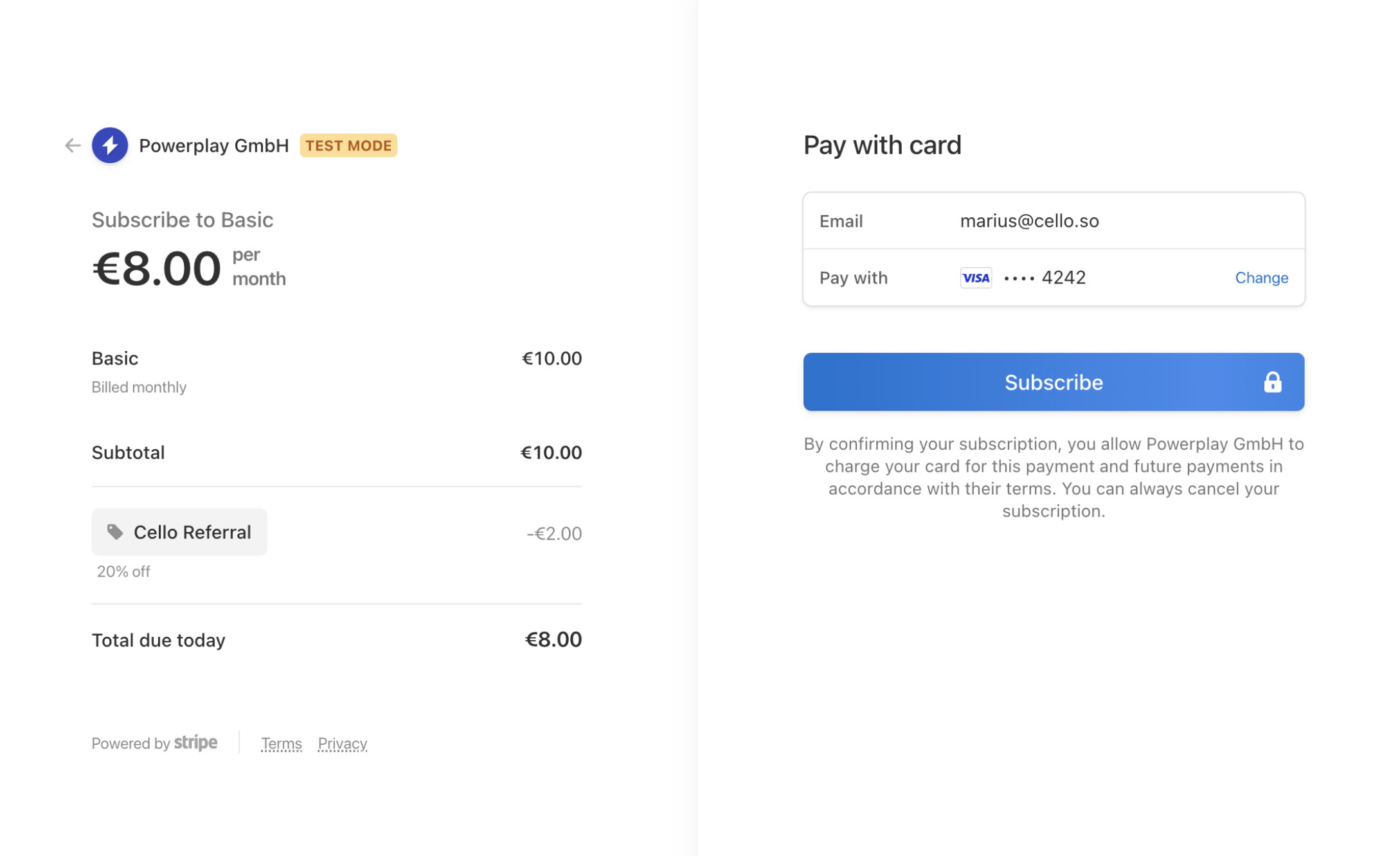
The Stripe UI automatically displays the discount during checkout:
 ### Manual discount application (not recommended)
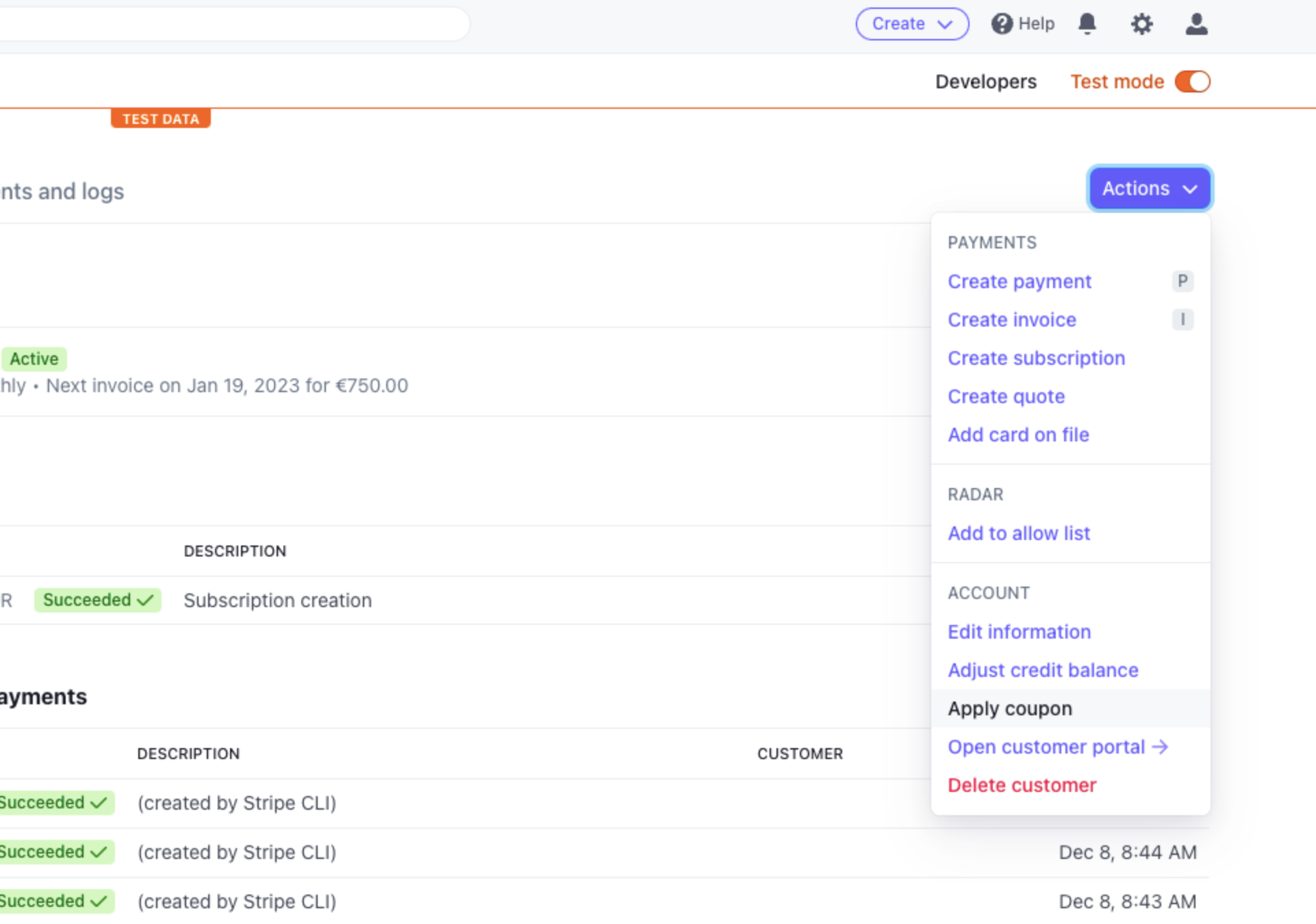
For testing or special cases, you can manually attach coupons on a Subscription in the Stripe Dashboard:
1. Navigate to the subscription in [Stripe Dashboard](https://dashboard.stripe.com/subscriptions)
2. Click **Update subscription** → **Add coupon**
3. Select the appropriate referral coupon
### Manual discount application (not recommended)
For testing or special cases, you can manually attach coupons on a Subscription in the Stripe Dashboard:
1. Navigate to the subscription in [Stripe Dashboard](https://dashboard.stripe.com/subscriptions)
2. Click **Update subscription** → **Add coupon**
3. Select the appropriate referral coupon
 Manual application is not scalable for automated referral programs. Use the API methods above for production implementations.
## Chargebee implementation
Chargebee uses **coupons** to apply discounts on subscriptions. For referral discounts, apply coupons during subscription creation or via Hosted Pages.
### Overview
There are two ways to apply coupons in Chargebee:
* Subscription API (apply during `subscription.create`) - for server-side subscription creation. See [Chargebee documentation](https://apidocs.chargebee.com/docs/api/subscriptions?prod_cat_ver=2#create_a_subscription).
* Hosted Pages (apply via `coupon_ids` during checkout) - for provider-hosted checkout. See [Chargebee documentation](https://apidocs.chargebee.com/docs/api/hosted_pages?prod_cat_ver=2#checkout_new_subscription).
Chargebee's discount system works through:
* **Coupons**: Define discount rules (percentage, amount, duration)
* **Application methods**: Apply to subscriptions or via Hosted Pages
Set up discount coupons for your referral program:
**Via Chargebee Dashboard:**
1. Go to [Chargebee Dashboard > Coupons](https://www.chargebee.com/docs/2.0/coupons.html#creating-coupons)
2. Click "Create Coupon"
3. Configure discount parameters:
* **Coupon Name**: e.g., `Referral Discount - Monthly 25%`
* **Discount Type**: Percentage
* **Discount**: 25%
* **Duration Type**: Limited Period (3 months)
* After creation, store the coupon ID in your config
**Via Chargebee API:**
```javascript theme={null}
const chargebee = require('chargebee');
chargebee.configure({
site: 'your-site',
api_key: 'your-api-key'
});
const coupon = await chargebee.coupon.create({
id: 'YOUR_COUPON_ID',
name: 'Referral Discount - Monthly 25%',
discount_type: 'percentage',
discount_percentage: 25,
duration_type: 'limited_period',
period: 3,
period_unit: 'month'
});
```
```javascript theme={null}
const subscription = await chargebee.subscription.create({
customer_id: user.id,
plan_id: 'monthly_plan',
coupon_ids: [couponId]
});
```
### Handle Hosted Pages with discounts
For Chargebee Hosted Pages, include coupons in checkout URLs:
```javascript theme={null}
const hostedPage = await chargebee.hosted_page.checkout_new({
subscription: {
plan_id: 'monthly_plan',
coupon_ids: [couponId]
},
customer: {
id: user.id,
email: user.email
}
});
// Redirect user to hostedPage.url
```
## Cello API integration (for other platforms)
If you use another billing platform (for example, Paddle, Recurly, Braintree) or a home-grown system, follow the same general approach described above:
1. Create and manage coupons/discounts in your billing system.
2. Keep an application-level mapping of coupon IDs by plan and referral status.
3. Apply the correct coupon at subscription/checkout creation time.
Manual application is not scalable for automated referral programs. Use the API methods above for production implementations.
## Chargebee implementation
Chargebee uses **coupons** to apply discounts on subscriptions. For referral discounts, apply coupons during subscription creation or via Hosted Pages.
### Overview
There are two ways to apply coupons in Chargebee:
* Subscription API (apply during `subscription.create`) - for server-side subscription creation. See [Chargebee documentation](https://apidocs.chargebee.com/docs/api/subscriptions?prod_cat_ver=2#create_a_subscription).
* Hosted Pages (apply via `coupon_ids` during checkout) - for provider-hosted checkout. See [Chargebee documentation](https://apidocs.chargebee.com/docs/api/hosted_pages?prod_cat_ver=2#checkout_new_subscription).
Chargebee's discount system works through:
* **Coupons**: Define discount rules (percentage, amount, duration)
* **Application methods**: Apply to subscriptions or via Hosted Pages
Set up discount coupons for your referral program:
**Via Chargebee Dashboard:**
1. Go to [Chargebee Dashboard > Coupons](https://www.chargebee.com/docs/2.0/coupons.html#creating-coupons)
2. Click "Create Coupon"
3. Configure discount parameters:
* **Coupon Name**: e.g., `Referral Discount - Monthly 25%`
* **Discount Type**: Percentage
* **Discount**: 25%
* **Duration Type**: Limited Period (3 months)
* After creation, store the coupon ID in your config
**Via Chargebee API:**
```javascript theme={null}
const chargebee = require('chargebee');
chargebee.configure({
site: 'your-site',
api_key: 'your-api-key'
});
const coupon = await chargebee.coupon.create({
id: 'YOUR_COUPON_ID',
name: 'Referral Discount - Monthly 25%',
discount_type: 'percentage',
discount_percentage: 25,
duration_type: 'limited_period',
period: 3,
period_unit: 'month'
});
```
```javascript theme={null}
const subscription = await chargebee.subscription.create({
customer_id: user.id,
plan_id: 'monthly_plan',
coupon_ids: [couponId]
});
```
### Handle Hosted Pages with discounts
For Chargebee Hosted Pages, include coupons in checkout URLs:
```javascript theme={null}
const hostedPage = await chargebee.hosted_page.checkout_new({
subscription: {
plan_id: 'monthly_plan',
coupon_ids: [couponId]
},
customer: {
id: user.id,
email: user.email
}
});
// Redirect user to hostedPage.url
```
## Cello API integration (for other platforms)
If you use another billing platform (for example, Paddle, Recurly, Braintree) or a home-grown system, follow the same general approach described above:
1. Create and manage coupons/discounts in your billing system.
2. Keep an application-level mapping of coupon IDs by plan and referral status.
3. Apply the correct coupon at subscription/checkout creation time.